Path2D
NOTE
This component is supported since API version 6. Updates will be marked with a superscript to indicate their earliest API version.
Path2D allows you to describe a path through an existing path. This path can be drawn through the stroke API of Canvas.
addPath
addPath(path: Object): void
Adds a path to this path.
Parameters
| Name | Type | Description |
|---|---|---|
| path | Object | Path to be added to this path. |
Example
<!-- xxx.hml -->
<div>
  <canvas ref="canvas" style="width: 500px; height: 500px; background-color: #ffff00;"></canvas>
</div>
// xxx.js
export default {
  onShow() {
      const el = this.$refs.canvas;
      const ctx = el.getContext('2d');
      var path1 = ctx.createPath2D("M250 150 L150 350 L350 350 Z");
      var path2 = ctx.createPath2D();
      path2.addPath(path1);
      ctx.stroke(path2);
  }
}

setTransform
setTransform(scaleX: number, skewX: number, skewY: number, scaleY: number, translateX: number, translateY: number): void
Sets the path transformation matrix.
Parameters
| Name | Type | Description |
|---|---|---|
| scaleX | number | Scale ratio of the x-axis. |
| skewX | number | Skew angle of the x-axis. |
| skewY | number | Skew angle of the y-axis. |
| scaleY | number | Scale ratio of the y-axis. |
| translateX | number | Translation distance along the x-axis. |
| translateY | number | Translation distance along the y-axis. |
Example
<!-- xxx.hml -->
<div>
  <canvas ref="canvas" style="width: 300px; height: 250px; background-color: #ffff00;"></canvas>
</div>
// xxx.js
export default {
  onShow() {
      const el = this.$refs.canvas;
      const ctx = el.getContext('2d');
      var path = ctx.createPath2D("M250 150 L150 350 L350 350 Z");
      path.setTransform(0.8, 0, 0, 0.4, 0, 0);
      ctx.stroke(path);
  }
}

closePath
closePath(): void
Moves the current point of the path back to the start point of the path, and draws a straight line between the current point and the start point. If the shape has already been closed or has only one point, this method does nothing.
Example
<!-- xxx.hml -->
<div>
  <canvas ref="canvas" style="width: 500px; height: 500px; background-color: #ffff00;"></canvas>
</div>
// xxx.js
export default {
  onShow() {
      const el = this.$refs.canvas;
      const ctx = el.getContext('2d');
      var path = ctx.createPath2D();
      path.moveTo(200, 100);
      path.lineTo(300, 100);
      path.lineTo(200, 200);
      path.closePath();
      ctx.stroke(path);
  }
}

moveTo
moveTo(x: number, y: number): void
Moves the current coordinate point of the path to the target point, without drawing a line during the movement.
Parameters
| Parameter | Type | Description |
|---|---|---|
| x | number | X-coordinate of the target point. |
| y | number | Y-coordinate of the target point. |
Example
<!-- xxx.hml -->
<div>
  <canvas ref="canvas" style="width: 300px; height: 250px; background-color: #ffff00;"></canvas>
</div>
// xxx.js
export default {
  onShow() {
      const el = this.$refs.canvas;
      const ctx = el.getContext('2d');
      var path = ctx.createPath2D();
      path.moveTo(50, 100);
      path.lineTo(250, 100);
      path.lineTo(150, 200);
      path.closePath();
      ctx.stroke(path);
  }
}

lineTo
lineTo(x: number, y: number): void
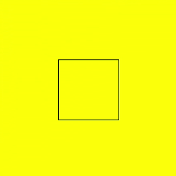
Draws a straight line from the current point to the target point.
Parameters
| Name | Type | Description |
|---|---|---|
| x | number | X-coordinate of the target point. |
| y | number | Y-coordinate of the target point. |
Example
<!-- xxx.hml -->
<div>
  <canvas ref="canvas" style="width: 400px; height: 450px; background-color: #ffff00;"></canvas>
</div>
// xxx.js
export default {
  onShow() {
      const el = this.$refs.canvas;
      const ctx = el.getContext('2d');
      var path = ctx.createPath2D();
      path.moveTo(100, 100);
      path.lineTo(100, 200);
      path.lineTo(200, 200);
      path.lineTo(200, 100);
      path.closePath();
      ctx.stroke(path);
  }
}
bezierCurveTo
bezierCurveTo(cp1x: number, cp1y: number, cp2x: number, cp2y: number, x: number, y: number): void
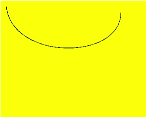
Draws a cubic bezier curve on the canvas.
Parameters
| Name | Type | Description |
|---|---|---|
| cp1x | number | X-coordinate of the first parameter of the bezier curve. |
| cp1y | number | Y-coordinate of the first parameter of the bezier curve. |
| cp2x | number | X-coordinate of the second parameter of the bezier curve. |
| cp2y | number | Y-coordinate of the second parameter of the bezier curve. |
| x | number | X-coordinate of the end point on the bezier curve. |
| y | number | Y-coordinate of the end point on the bezier curve. |
Example
<!-- xxx.hml -->
<div>
  <canvas ref="canvas" style="width: 300px; height: 250px; background-color: #ffff00;"></canvas>
</div>
// xxx.js
export default {
  onShow() {
      const el = this.$refs.canvas;
      const ctx = el.getContext('2d');
      var path = ctx.createPath2D();
      path.moveTo(10, 10);
      path.bezierCurveTo(20, 100, 200, 100, 200, 20);
      ctx.stroke(path);
  }
}
quadraticCurveTo
quadraticCurveTo(cpx: number, cpy: number, x: number, y: number): void
Draws a quadratic curve on the canvas.
Parameters
| Name | Type | Description |
|---|---|---|
| cpx | number | X-coordinate of the bezier curve parameter. |
| cpy | number | Y-coordinate of the bezier curve parameter. |
| x | number | X-coordinate of the end point on the bezier curve. |
| y | number | Y-coordinate of the end point on the bezier curve. |
Example
<!-- xxx.hml -->
<div>
  <canvas ref="canvas" style="width: 300px; height: 250px; background-color: #ffff00;"></canvas>
</div>
// xxx.js
export default {
  onShow() {
      const el = this.$refs.canvas;
      const ctx = el.getContext('2d');
      var path = ctx.createPath2D();
      path.moveTo(10, 10);
      path.quadraticCurveTo(100, 100, 200, 20);
      ctx.stroke(path);
  }
}

arc
arc(x: number, y: number, radius: number, startAngle: number, endAngle: number, anticlockwise: number): void
Draws an arc on the canvas.
Parameters
| Name | Type | Description |
|---|---|---|
| x | number | X-coordinate of the center point of the arc. |
| y | number | Y-coordinate of the center point of the arc. |
| radius | number | Radius of the arc. |
| startAngle | number | Start radian of the arc. |
| endAngle | number | End radian of the arc. |
| anticlockwise | boolean | Whether to draw the arc counterclockwise. |
Example
<!-- xxx.hml -->
<div>
  <canvas ref="canvas" style="width: 300px; height: 250px; background-color: #ffff00;"></canvas>
</div>
// xxx.js
export default {
  onShow() {
      const el = this.$refs.canvas;
      const ctx = el.getContext('2d');
      var path = ctx.createPath2D();
      path.arc(100, 75, 50, 0, 6.28);
      ctx.stroke(path);
  }
}

arcTo
arcTo(x1: number, y1: number, x2: number, y2: number, radius: number): void
Draws an arc based on the radius and points on the arc.
Parameters
| Parameter | Type | Description |
|---|---|---|
| x1 | number | X-coordinate of the first point on the arc. |
| y1 | number | Y-coordinate of the first point on the arc. |
| x2 | number | X-coordinate of the second point on the arc. |
| y2 | number | Y-coordinate of the second point on the arc. |
| radius | number | Radius of the arc. |
Example
<!-- xxx.hml -->
<div>
  <canvas ref="canvas" style="width: 300px; height: 250px; background-color: #ffff00;"></canvas>
</div>
// xxx.js
export default {
  onShow() {
      const el = this.$refs.canvas;
      const ctx = el.getContext('2d');
      var path = ctx.createPath2D();
      path.arcTo(150, 20, 150, 70, 50);
      ctx.stroke(path);
  }
}

ellipse
ellipse(x: number, y: number, radiusX: number, radiusY: number, rotation: number, startAngle: number, endAngle: number, anticlockwise: number): void
Draws an ellipse in the specified rectangular region on the canvas.
Parameters
| Name | Type | Description |
|---|---|---|
| x | number | X-coordinate of the ellipse center. |
| y | number | Y-coordinate of the ellipse center. |
| radiusX | number | Ellipse radius on the x-axis. |
| radiusY | number | Ellipse radius on the y-axis. |
| rotation | number | Rotation angle of the ellipse, in radians. |
| startAngle | number | Angle of the start point for drawing the ellipse, in radians. |
| endAngle | number | Angle of the end point for drawing the ellipse, in radians. |
| anticlockwise | number | Whether to draw the ellipse counterclockwise. The value 0 means clockwise, and 1 means counterclockwise. This parameter is optional. The default value is 0. |
Example
<!-- xxx.hml -->
<div>
  <canvas ref="canvas" style="width: 500px; height: 450px; background-color: #ffff00;"></canvas>
</div>
// xxx.js
export default {
  onShow() {
      const el = this.$refs.canvas;
      const ctx = el.getContext('2d');
      var path = ctx.createPath2D();
      path.ellipse(200, 200, 50, 100, Math.PI * 0.25, Math.PI * 0.5, Math.PI, 1);
      ctx.stroke(path);
  }
}

rect
rect(x: number, y: number, width: number, height: number): void
Creates a rectangle on the canvas.
Parameters
| Name | Type | Description |
|---|---|---|
| x | number | X-coordinate of the upper left corner of the rectangle. |
| y | number | Y-coordinate of the upper left corner of the rectangle. |
| width | number | Width of the rectangle. |
| height | number | Height of the rectangle. |
Example
<!-- xxx.hml -->
<div>
  <canvas ref="canvas" style="width: 500px; height: 450px; background-color: #ffff00;"></canvas>
</div>
// xxx.js
export default {
  onShow() {
      const el = this.$refs.canvas;
      const ctx = el.getContext('2d');
      var path = ctx.createPath2D();
      path.rect(20, 20, 100, 100);
      ctx.stroke(path);
  }
}

你可能感兴趣的鸿蒙文章
harmony 鸿蒙JavaScript-compatible Web-like Development Paradigm (ArkUI.Full)