Path2D
Path2D allows you to describe a path through an existing path. This path can be drawn through the stroke or fill API of Canvas.
NOTE
The APIs of this module are supported since API version 8. Updates will be marked with a superscript to indicate their earliest API version.
APIs
Path2D(unit?: LengthMetricsUnit)
Constructs an empty Path2D object.
Widget capability: This API can be used in ArkTS widgets since API version 9.
Atomic service API: This API can be used in atomic services since API version 11.
System capability: SystemCapability.ArkUI.ArkUI.Full
Parameters
| Name | Type | Mandatory | Description |
|---|---|---|---|
| unit12+ | LengthMetricsUnit | No | Unit mode of the Path2D object. The value cannot be dynamically changed once set. The configuration method is the same as that of CanvasRenderingContext2D. Default value: DEFAULT |
Path2D(description: string, unit?: LengthMetricsUnit)
Constructs a Path2D object using a path that complies with the SVG path specifications.
Widget capability: This API can be used in ArkTS widgets since API version 9.
Atomic service API: This API can be used in atomic services since API version 11.
System capability: SystemCapability.ArkUI.ArkUI.Full
Parameters
| Name | Type | Mandatory | Description |
|---|---|---|---|
| description | string | Yes | Path that complies with the SVG path syntax. |
| unit12+ | LengthMetricsUnit | No | Unit mode of the Path2D object. The value cannot be dynamically changed once set. The configuration method is the same as that of CanvasRenderingContext2D. Default value: DEFAULT |
addPath
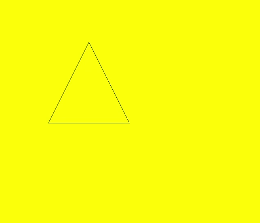
addPath(path: Path2D, transform?: Matrix2D): void
Adds a path to this path.
Widget capability: This API can be used in ArkTS widgets since API version 9.
Atomic service API: This API can be used in atomic services since API version 11.
System capability: SystemCapability.ArkUI.ArkUI.Full
Parameters
| Name | Type | Mandatory | Description |
|---|---|---|---|
| path | Path2D | Yes | Path to be added to this path. Unit: px. |
| transform | Matrix2D | No | Transformation matrix of the new path. Default value: null. |
Example
// xxx.ets
@Entry
@Component
struct AddPath {
  private settings: RenderingContextSettings = new RenderingContextSettings(true)
  private context: CanvasRenderingContext2D = new CanvasRenderingContext2D(this.settings)
  private path2Da: Path2D = new Path2D("M250 150 L150 350 L350 350 Z")
  private path2Db: Path2D = new Path2D()

  build() {
    Flex({ direction: FlexDirection.Column, alignItems: ItemAlign.Center, justifyContent: FlexAlign.Center }) {
      Canvas(this.context)
        .width('100%')
        .height('100%')
        .backgroundColor('#ffff00')
        .onReady(() => {
          this.path2Db.addPath(this.path2Da)
          this.context.stroke(this.path2Db)
        })
    }
    .width('100%')
    .height('100%')
  }
}
closePath
closePath(): void
Moves the current point of the path back to the start point of the path, and draws a straight line between the current point and the start point. If the shape has already been closed or has only one point, this method does nothing.
Widget capability: This API can be used in ArkTS widgets since API version 9.
Atomic service API: This API can be used in atomic services since API version 11.
System capability: SystemCapability.ArkUI.ArkUI.Full
Example
// xxx.ets
@Entry
@Component
struct ClosePath {
  private settings: RenderingContextSettings = new RenderingContextSettings(true)
  private context: CanvasRenderingContext2D = new CanvasRenderingContext2D(this.settings)
  private path2Db: Path2D = new Path2D()

  build() {
    Flex({ direction: FlexDirection.Column, alignItems: ItemAlign.Center, justifyContent: FlexAlign.Center }) {
      Canvas(this.context)
        .width('100%')
        .height('100%')
        .backgroundColor('#ffff00')
        .onReady(() => {
          this.path2Db.moveTo(200, 100)
          this.path2Db.lineTo(300, 100)
          this.path2Db.lineTo(200, 200)
          this.path2Db.closePath()
          this.context.stroke(this.path2Db)
        })
    }
    .width('100%')
    .height('100%')
  }
}

moveTo
moveTo(x: number, y: number): void
Moves the current coordinate point of the path to the target point, without drawing a line during the movement.
Widget capability: This API can be used in ArkTS widgets since API version 9.
Atomic service API: This API can be used in atomic services since API version 11.
System capability: SystemCapability.ArkUI.ArkUI.Full
Parameters
| Name | Type | Mandatory | Description |
|---|---|---|---|
| x | number | Yes | X coordinate of the target point. Default unit: vp. |
| y | number | Yes | Y coordinate of the target point. Default unit: vp. |
Example
// xxx.ets
@Entry
@Component
struct MoveTo {
  private settings: RenderingContextSettings = new RenderingContextSettings(true)
  private context: CanvasRenderingContext2D = new CanvasRenderingContext2D(this.settings)
  private path2Db: Path2D = new Path2D()

  build() {
    Flex({ direction: FlexDirection.Column, alignItems: ItemAlign.Center, justifyContent: FlexAlign.Center }) {
      Canvas(this.context)
        .width('100%')
        .height('100%')
        .backgroundColor('#ffff00')
        .onReady(() => {
          this.path2Db.moveTo(50, 100)
          this.path2Db.lineTo(250, 100)
          this.path2Db.lineTo(150, 200)
          this.path2Db.closePath()
          this.context.stroke(this.path2Db)
        })
    }
    .width('100%')
    .height('100%')
  }
}

lineTo
lineTo(x: number, y: number): void
Draws a straight line from the current point to the target point.
Widget capability: This API can be used in ArkTS widgets since API version 9.
Atomic service API: This API can be used in atomic services since API version 11.
System capability: SystemCapability.ArkUI.ArkUI.Full
Parameters
| Name | Type | Mandatory | Description |
|---|---|---|---|
| x | number | Yes | X coordinate of the target point. Default unit: vp. |
| y | number | Yes | Y coordinate of the target point. Default unit: vp. |
Example
// xxx.ets
@Entry
@Component
struct LineTo {
  private settings: RenderingContextSettings = new RenderingContextSettings(true)
  private context: CanvasRenderingContext2D = new CanvasRenderingContext2D(this.settings)
  private path2Db: Path2D = new Path2D()

  build() {
    Flex({ direction: FlexDirection.Column, alignItems: ItemAlign.Center, justifyContent: FlexAlign.Center }) {
      Canvas(this.context)
        .width('100%')
        .height('100%')
        .backgroundColor('#ffff00')
        .onReady(() => {
          this.path2Db.moveTo(100, 100)
          this.path2Db.lineTo(100, 200)
          this.path2Db.lineTo(200, 200)
          this.path2Db.lineTo(200, 100)
          this.path2Db.closePath()
          this.context.stroke(this.path2Db)
        })
    }
    .width('100%')
    .height('100%')
  }
}

bezierCurveTo
bezierCurveTo(cp1x: number, cp1y: number, cp2x: number, cp2y: number, x: number, y: number): void
Draws a cubic Bezier curve on the canvas.
Widget capability: This API can be used in ArkTS widgets since API version 9.
Atomic service API: This API can be used in atomic services since API version 11.
System capability: SystemCapability.ArkUI.ArkUI.Full
Parameters
| Name | Type | Mandatory | Description |
|---|---|---|---|
| cp1x | number | Yes | X coordinate of the first parameter of the bezier curve. Default unit: vp. |
| cp1y | number | Yes | Y coordinate of the first parameter of the bezier curve. Default unit: vp. |
| cp2x | number | Yes | X coordinate of the second parameter of the bezier curve. Default unit: vp. |
| cp2y | number | Yes | Y coordinate of the second parameter of the bezier curve. Default unit: vp. |
| x | number | Yes | X coordinate of the end point on the bezier curve. Default unit: vp. |
| y | number | Yes | Y coordinate of the end point on the bezier curve. Default unit: vp. |
Example
// xxx.ets
@Entry
@Component
struct BezierCurveTo {
  private settings: RenderingContextSettings = new RenderingContextSettings(true)
  private context: CanvasRenderingContext2D = new CanvasRenderingContext2D(this.settings)
  private path2Db: Path2D = new Path2D()

  build() {
    Flex({ direction: FlexDirection.Column, alignItems: ItemAlign.Center, justifyContent: FlexAlign.Center }) {
      Canvas(this.context)
        .width('100%')
        .height('100%')
        .backgroundColor('#ffff00')
        .onReady(() => {
          this.path2Db.moveTo(10, 10)
          this.path2Db.bezierCurveTo(20, 100, 200, 100, 200, 20)
          this.context.stroke(this.path2Db)
        })
    }
    .width('100%')
    .height('100%')
  }
}

quadraticCurveTo
quadraticCurveTo(cpx: number, cpy: number, x: number, y: number): void
Draws a quadratic curve on the canvas.
Widget capability: This API can be used in ArkTS widgets since API version 9.
Atomic service API: This API can be used in atomic services since API version 11.
System capability: SystemCapability.ArkUI.ArkUI.Full
Parameters
| Name | Type | Mandatory | Description |
|---|---|---|---|
| cpx | number | Yes | X coordinate of the bezier curve parameter. Default unit: vp. |
| cpy | number | Yes | Y coordinate of the bezier curve parameter. Default unit: vp. |
| x | number | Yes | X coordinate of the end point on the bezier curve. Default unit: vp. |
| y | number | Yes | Y coordinate of the end point on the bezier curve. Default unit: vp. |
Example
// xxx.ets
@Entry
@Component
struct QuadraticCurveTo {
  private settings: RenderingContextSettings = new RenderingContextSettings(true)
  private context: CanvasRenderingContext2D = new CanvasRenderingContext2D(this.settings)
  private path2Db: Path2D = new Path2D()

  build() {
    Flex({ direction: FlexDirection.Column, alignItems: ItemAlign.Center, justifyContent: FlexAlign.Center }) {
      Canvas(this.context)
        .width('100%')
        .height('100%')
        .backgroundColor('#ffff00')
        .onReady(() => {
          this.path2Db.moveTo(10, 10)
          this.path2Db.quadraticCurveTo(100, 100, 200, 20)
          this.context.stroke(this.path2Db)
      })
    }
    .width('100%')
    .height('100%')
  }
}

arc
arc(x: number, y: number, radius: number, startAngle: number, endAngle: number, counterclockwise?: boolean): void
Draws an arc on the canvas.
Widget capability: This API can be used in ArkTS widgets since API version 9.
Atomic service API: This API can be used in atomic services since API version 11.
System capability: SystemCapability.ArkUI.ArkUI.Full
Parameters
| Name | Type | Mandatory | Description |
|---|---|---|---|
| x | number | Yes | X coordinate of the center point of the arc. Default unit: vp. |
| y | number | Yes | Y coordinate of the center point of the arc. Default unit: vp. |
| radius | number | Yes | Radius of the arc. Default unit: vp. |
| startAngle | number | Yes | Start radian of the arc. Unit: radian. |
| endAngle | number | Yes | End radian of the arc. Unit: radian. |
| counterclockwise | boolean | No | Whether to draw the arc counterclockwise. true: Draw the ellipse counterclockwise. false: Draw the ellipse clockwise. Default value: false. |
Example
// xxx.ets
@Entry
@Component
struct Arc {
  private settings: RenderingContextSettings = new RenderingContextSettings(true)
  private context: CanvasRenderingContext2D = new CanvasRenderingContext2D(this.settings)
  private path2Db: Path2D = new Path2D()

  build() {
    Flex({ direction: FlexDirection.Column, alignItems: ItemAlign.Center, justifyContent: FlexAlign.Center }) {
      Canvas(this.context)
        .width('100%')
        .height('100%')
        .backgroundColor('#ffff00')
        .onReady(() => {
          this.path2Db.arc(100, 75, 50, 0, 6.28)
          this.context.stroke(this.path2Db)
        })
    }
    .width('100%')
    .height('100%')
  }
}

arcTo
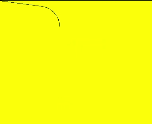
arcTo(x1: number, y1: number, x2: number, y2: number, radius: number): void
Draws an arc based on the radius and points on the arc.
Widget capability: This API can be used in ArkTS widgets since API version 9.
Atomic service API: This API can be used in atomic services since API version 11.
System capability: SystemCapability.ArkUI.ArkUI.Full
Parameters
| Name | Type | Mandatory | Description |
|---|---|---|---|
| x1 | number | Yes | X coordinate of the first point on the arc. Default unit: vp. |
| y1 | number | Yes | Y coordinate of the first point on the arc. Default unit: vp. |
| x2 | number | Yes | X coordinate of the second point on the arc. Default unit: vp. |
| y2 | number | Yes | Y coordinate of the second point on the arc. Default unit: vp. |
| radius | number | Yes | Radius of the arc. Default unit: vp. |
Example
// xxx.ets
@Entry
@Component
struct ArcTo {
  private settings: RenderingContextSettings = new RenderingContextSettings(true)
  private context: CanvasRenderingContext2D = new CanvasRenderingContext2D(this.settings)
  private path2Db: Path2D = new Path2D()

  build() {
    Flex({ direction: FlexDirection.Column, alignItems: ItemAlign.Center, justifyContent: FlexAlign.Center }) {
      Canvas(this.context)
        .width('100%')
        .height('100%')
        .backgroundColor('#ffff00')
        .onReady(() => {
          this.path2Db.arcTo(150, 20, 150, 70, 50)
          this.context.stroke(this.path2Db)
        })
    }
    .width('100%')
    .height('100%')
  }
}
ellipse
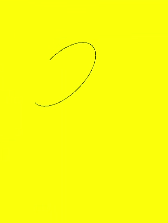
ellipse(x: number, y: number, radiusX: number, radiusY: number, rotation: number, startAngle: number, endAngle: number, counterclockwise?: boolean): void
Draws an ellipse in the specified rectangular region on the canvas.
Widget capability: This API can be used in ArkTS widgets since API version 9.
Atomic service API: This API can be used in atomic services since API version 11.
System capability: SystemCapability.ArkUI.ArkUI.Full
Parameters
| Name | Type | Mandatory | Description |
|---|---|---|---|
| x | number | Yes | X coordinate of the ellipse center. Default unit: vp. |
| y | number | Yes | Y coordinate of the ellipse center. Default unit: vp. |
| radiusX | number | Yes | Radius of the ellipse on the x-axis. Default unit: vp. |
| radiusY | number | Yes | Radius of the ellipse on the y-axis. Default unit: vp. |
| rotation | number | Yes | Rotation angle of the ellipse. Unit: radian. |
| startAngle | number | Yes | Angle of the start point for drawing the ellipse. Unit: radian. |
| endAngle | number | Yes | Angle of the end point for drawing the ellipse. Unit: radian. |
| counterclockwise | boolean | No | Whether to draw the ellipse counterclockwise. true: Draw the ellipse counterclockwise. false: Draw the ellipse clockwise. Default value: false. |
Example
// xxx.ets
@Entry
@Component
struct CanvasExample {
  private settings: RenderingContextSettings = new RenderingContextSettings(true)
  private context: CanvasRenderingContext2D = new CanvasRenderingContext2D(this.settings)
  private path2Db: Path2D = new Path2D()

  build() {
    Flex({ direction: FlexDirection.Column, alignItems: ItemAlign.Center, justifyContent: FlexAlign.Center }) {
      Canvas(this.context)
        .width('100%')
        .height('100%')
        .backgroundColor('#ffff00')
        .onReady(() => {
          this.path2Db.ellipse(200, 200, 50, 100, 0, Math.PI * 1, Math.PI * 2)
          this.context.stroke(this.path2Db)
        })
    }
    .width('100%')
    .height('100%')
  }
}
rect
rect(x: number, y: number, w: number, h: number): void
Creates a rectangle on the canvas.
Widget capability: This API can be used in ArkTS widgets since API version 9.
Atomic service API: This API can be used in atomic services since API version 11.
System capability: SystemCapability.ArkUI.ArkUI.Full
Parameters
| Name | Type | Mandatory | Description |
|---|---|---|---|
| x | number | Yes | X coordinate of the upper left corner of the rectangle. Default unit: vp. |
| y | number | Yes | Y coordinate of the upper left corner of the rectangle. Default unit: vp. |
| w | number | Yes | Width of the rectangle. Default unit: vp. |
| h | number | Yes | Height of the rectangle. Default unit: vp. |
Example
// xxx.ets
@Entry
@Component
struct CanvasExample {
  private settings: RenderingContextSettings = new RenderingContextSettings(true)
  private context: CanvasRenderingContext2D = new CanvasRenderingContext2D(this.settings)
  private path2Db: Path2D = new Path2D()

  build() {
    Flex({ direction: FlexDirection.Column, alignItems: ItemAlign.Center, justifyContent: FlexAlign.Center }) {
      Canvas(this.context)
        .width('100%')
        .height('100%')
        .backgroundColor('#ffff00')
        .onReady(() => {
          this.path2Db.rect(20, 20, 100, 100);
          this.context.stroke(this.path2Db)
        })
    }
    .width('100%')
    .height('100%')
  }
}
