Using LPP to Play Audio and Video (C/C++)
Starting from API version 20, the Low Power Player (LPP) offers an end-to-end media pipeline from the source to rendering, while keeping power consumption to a minimum. This guide walks you through playing a local video file using the LPP APIs.
The full playback process includes creating a demuxer, creating a player, setting callback functions, configuring playback parameters (speed and volume), controlling playback (play, pause, resume, stop, and reset), and releasing the player instance.
Figure 1 Playback state transition
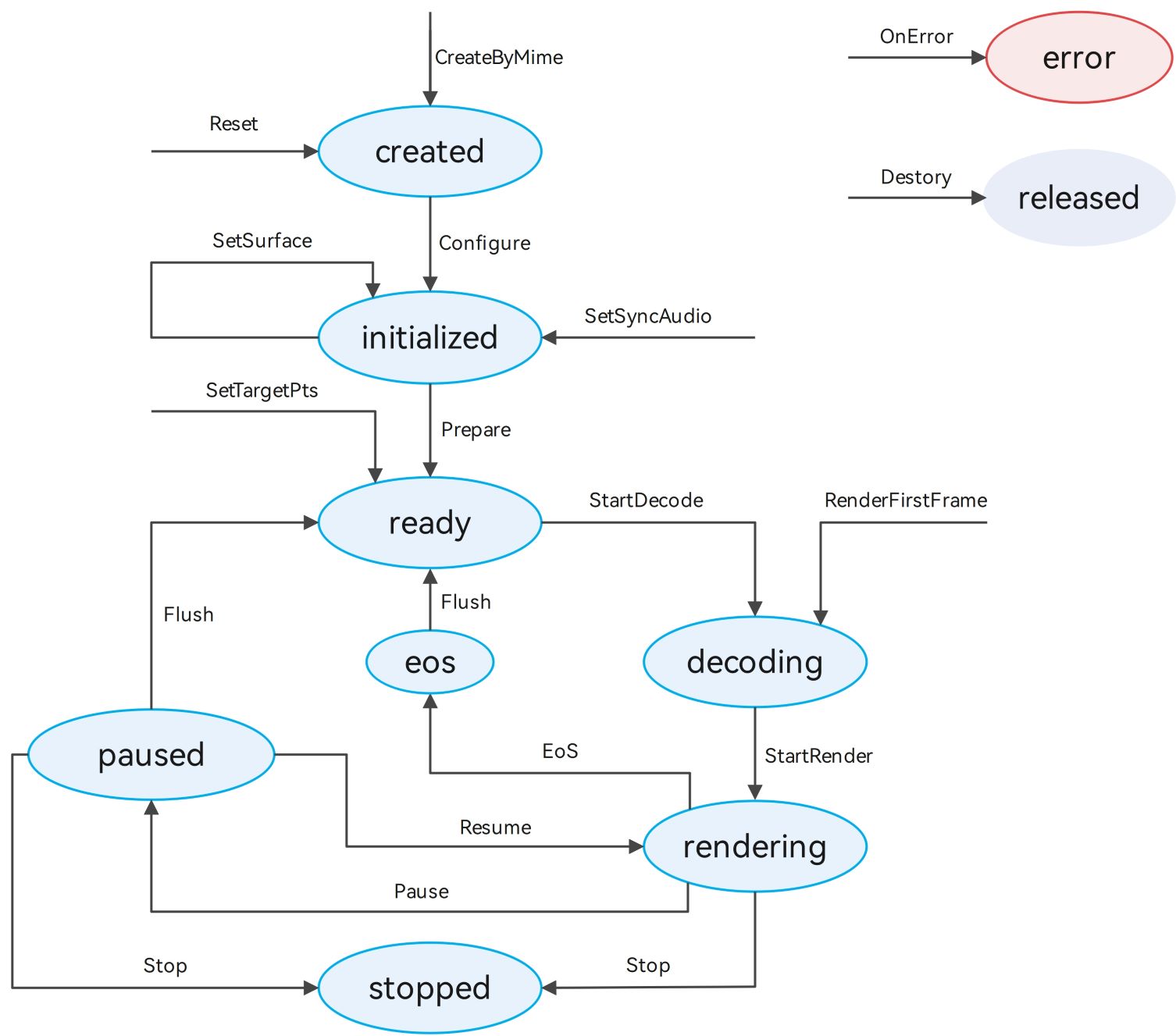
When the player is in the ready, decoding, rendering, paused, or stopped state, it occupies system resources. Call reset or destroy to reclaim the resources when it is no longer needed.
Development Tips
This topic describes only how to implement the playback of a media asset. In practice, background playback and playback conflicts may be involved. You can refer to the following description to handle the situation based on your service requirements.
-
Due to hardware differences, LPP capabilities are only available on certain smartphones. You are advised to use OH_LowPowerAVSink_GetCapability to check whether the LPP capabilities are supported. This API is available since API version 21. If they are not supported, use AVCodec for playback.
-
When an application is playing media data that involves audio, it may be interrupted by other applications according to the system audio management policy. (For details, see Processing Audio Interruption Events.) It is recommended that the application proactively listen for audio interruption events through OH_LowPowerAudioSinkCallback_SetInterruptListener and handle the events accordingly to avoid inconsistencies between the application status and the expected effect.
-
When the device is connected to multiple audio output devices, it is recommended that the application listen for audio output device change events through OH_LowPowerAudioSinkCallback_SetDeviceChangeListener and handle the events accordingly.
-
During application execution, system internal exceptions may occur, such as network exceptions, insufficient memory, or unavailable media services. It is recommended that the application listen for errors through OH_LowPowerAudioSinkCallback_SetErrorListener or OH_LowPowerVideoSinkCallback_SetErrorListener and handle the errors accordingly.
-
During playback, the player obtains the buffer of a specified track through OH_AVDemuxer_ReadSampleBuffer and encapsulates multiple buffers through OH_AVSamplesBuffer_AppendOneBuffer. Then the player starts consumption through notifications invoked by OH_LowPowerAudioSink_ReturnSamples or OH_LowPowerVideoSink_ReturnSamples. When the player needs data, it triggers the callback registered through OH_LowPowerAudioSinkCallback_SetDataNeededListener or OH_LowPowerVideoSinkCallback_SetDataNeededListener.
-
Pay attention to the timing of API calls. Make reasonable calls according to the state diagram and detailed API documentation. After the program execution, call the corresponding
OH_***_DestroyAPI to release resources. -
When registering a callback, you can configure custom data in the last parameter
void *userDatato perform certain settings (such as state changes) in the callback functions.
Other callback functions:
OH_LowPowerAudioSinkCallback_SetPositionUpdateListener: called when the playback progress updates.
OH_LowPowerAudioSinkCallback_SetEosListener or OH_LowPowerVideoSinkCallback_SetEosListener: called when the playback is completed.
OH_LowPowerVideoSinkCallback_SetRenderStartListener: called when video rendering starts.
OH_LowPowerVideoSink_SetTargetStartFrame: called when the target frame is reached.
OH_LowPowerVideoSinkCallback_SetStreamChangedListener: called when the video stream is switched.
OH_LowPowerVideoSinkCallback_SetFirstFrameDecodedListener: called when the first frame of video is decoded.
How to Develop
Link the dynamic libraries in the CMake script.
target_link_libraries(sample PUBLIC liblowpower_avsink.so)
Include the header files.
#include "multimedia/player_framework/lowpower_audio_sink_base.h"
#include "multimedia/player_framework/lowpower_audio_sink.h"
#include "multimedia/player_framework/lowpower_video_sink.h"
#include "multimedia/player_framework/lowpower_video_sink_base.h"
To use system logging, include the following header file:
#include <hilog/log.h>
In addition, link the following dynamic libraries in the CMake script:
target_link_libraries(sample PUBLIC libhilog_ndk.z.so)
Include the following libraries: demuxer, basic decoding, and display rendering.
set(BASE_LIBRARY
    libnative_media_codecbase.so libnative_media_core.so libnative_media_vdec.so libnative_window.so
    libnative_media_venc.so libnative_media_acodec.so libnative_media_avdemuxer.so libnative_media_avsource.so
    libohaudio.so
)
target_link_libraries(sample PUBLIC ${BASE_LIBRARY})
Include the lowpower_audio_sink_base.h, lowpower_audio_sink.h, lowpower_video_sink.h and lowpower_video_sink_base.h header files to use audio and video playback APIs.
-
Creates a player.
Based on actual service requirements, you can use a self-developed demuxer or create an OH_AVSource instance by calling OH_AVSource_CreateWithDataSource(), OH_AVSource_CreateWithFD(), or OH_AVSource_CreateWithURI(). Then call OH_AVDemuxer_CreateWithSource() through the OH_AVSource instance to create a demuxer and obtain video metadata.
source_ = OH_AVSource_CreateWithFD(info.inputFd, info.inputFileOffset, info.inputFileSize); demuxer_ = OH_AVDemuxer_CreateWithSource(source_); int32_t ret = GetTrackInfo(sourceFormat, info); -
Based on the video metadata, call OH_LowPowerAudioSink_CreateByMime or OH_LowPowerVideoSink_CreateByMime to create a player.
lppVideoStreamer_ = OH_LowPowerVideoSink_CreateByMime(codecMime.c_str()); lppAudioStreamer_ = OH_LowPowerAudioSink_CreateByMime(codecMime.c_str()); -
Set callbacks.
Call OH_LowPowerAudioSinkCallback_Create or OH_LowPowerVideoSinkCallback_Create to create a callback for OH_LowPowerAudioSinkCallback or OH_LowPowerVideoSinkCallback. Add the callbacks to the structure via the setListener API, and register them with registerCallback.
lppAudioStreamerCallback_ = OH_LowPowerAudioSinkCallback_Create(); OH_LowPowerAudioSinkCallback_SetDataNeededListener(lppAudioStreamerCallback_, LppCallback::OnDataNeeded, lppUserData); OH_LowPowerAudioSinkCallback_SetPositionUpdateListener(lppAudioStreamerCallback_, LppCallback::OnPositionUpdated, lppUserData); ret = OH_LowPowerAudioSink_RegisterCallback(lppAudioStreamer_, lppAudioStreamerCallback_); -
Configure the player.
Based on the metadata obtained through demultiplexing, create and configure OH_AVFormat. Configure the player by calling OH_LowPowerAudioSink_Configure or OH_LowPowerVideoSink_Configure. For details about the parameters, see the sample code. For video streams, call OH_LowPowerVideoSink_SetVideoSurface to set the display window.
OH_AVFormat *format = OH_AVFormat_Create(); OH_AVFormat_SetIntValue(format, OH_MD_KEY_WIDTH, sampleInfo.videoWidth); OH_AVFormat_SetIntValue(format, OH_MD_KEY_HEIGHT, sampleInfo.videoHeight); OH_AVFormat_SetDoubleValue(format, OH_MD_KEY_FRAME_RATE, sampleInfo.frameRate); OH_AVFormat_SetIntValue(format, OH_MD_KEY_PIXEL_FORMAT, sampleInfo.pixelFormat); OH_AVFormat_SetIntValue(format, OH_MD_KEY_ROTATION, sampleInfo.rotation); int ret = OH_LowPowerVideoSink_Configure(lppVideoStreamer_, format); -
Prepare for playback.
Call OH_LowPowerVideoSink_SetSyncAudioSink to set audio-video synchronization binding. Then, call OH_LowPowerAudioSink_Prepare or OH_LowPowerVideoSink_Prepare. After a successful call, the player enters the preparing state.
OH_LowPowerVideoSink_Prepare(lppVideoStreamer_); -
Start playback.
Call OH_LowPowerAudioSink_Start or OH_LowPowerVideoSink_StartRenderer to start rendering. For video streams, before rendering, call OH_LowPowerVideoSink_StartDecoder to start decoding, or call OH_LowPowerVideoSink_RenderFirstFrame to start decoding and display the first frame.
OH_LowPowerVideoSink_StartDecoder(lppVideoStreamer_); OH_LowPowerVideoSink_StartRenderer(lppVideoStreamer_); -
(Optional) Control the playback.
To pause the playback, call OH_LowPowerAudioSink_Pause or OH_LowPowerVideoSink_Pause.
To resume the playback, call OH_LowPowerAudioSink_Resume or OH_LowPowerVideoSink_Resume.
To stop the playback, call OH_LowPowerAudioSink_Stop or OH_LowPowerVideoSink_Stop.
To set the playback volume, call OH_LowPowerAudioSink_SetVolume.
To set the playback speed, call OH_LowPowerAudioSink_SetPlaybackSpeed or OH_LowPowerVideoSink_SetPlaybackSpeed.
To clear cache data (which can be used for seeking), call OH_LowPowerAudioSink_Flush or OH_LowPowerVideoSink_Flush. -
(Optional) Replace resources.
Call OH_LowPowerAudioSink_Reset or OH_LowPowerVideoSink_Reset to reset the resource. You can replace resources and reconfigure the player.
-
Exit the playback.
Call OH_LowPowerAudioSink_Destroy or OH_LowPowerVideoSink_Destroy to destroy the instance. The player enters the RELEASED state and exits the playback.
Running the Sample Project
-
Create a project. Download the sample project, and copy its resources to the corresponding directories.
lpp_demo-sample/entry/src/main/ ├── cpp # Native layer │ ├── capbilities # Capability interfaces and implementation │ │ ├── include # Capability interfaces │ │ ├── demuxer.cpp # Demuxer implementation │ │ ├── lpp_audio_streamer.cpp # LPP audio stream implementation │ │ └── lpp_video_streamer.cpp # LPP video stream implementation │ ├── common # Common modules │ │ ├── dfx # Logs │ │ ├── lpp_callback.cpp # LPP audio and video callback implementation │ │ ├── lpp_callback.h # LPP audio and video callback interfaces │ │ └── sample_info.h # Common classes for function implementation │ ├── render # Render module interfaces and implementation* Window player settings │ │ ├── include # Display module interfaces │ │ ├── egl_core.cpp # Display parameter settings │ │ ├── plugin_manager.cpp # Display module management implementation │ │ └── plugin_render.cpp # Display logic implementation │ ├── sample # Native layer │ │ ├── player # Player interfaces and implementation at the native layer │ │ │ ├── Player.cpp # Player implementation at the native layer │ │ │ ├── Player.h # Player interfaces at the native layer │ │ │ ├── PlayerNative.cpp # Player entry at the native layer │ │ │ └── PlayerNative.h # Interface exposed by the native layer │ ├── types # │ │ └── libplayer # Interfaces exposed by the player to the UI layer │ └── CMakeLists.txt # Compilation entry ├── ets # UI layer │ ├── common # Common modules │ │ ├── utils # Common utility class │ │ │ ├── DateTimeUtils.ets # Used to obtain the current time │ │ │ └── Logger.ts # Log utility │ | └───CommonConstants.ets # Common constants │ ├── entryability # Application entry │ │ └── EntryAbility.ts # Implementation of the permission request dialog box │ ├── pages # Pages contained in the EntryAbility │ │ └── Index.ets # Home page/Playback page ├── resources # Static resources │ ├── base # Resource files in this directory are assigned unique IDs. │ │ ├── element # Fonts and colors │ │ ├── media # Images │ │ └── profile # Home page of the app entry │ ├── en_US # Resources in this directory are preferentially matched when the device language is English (US). │ └── zh_CN # Resources in this directory are preferentially matched when the device language is simplified Chinese. └── module.json5 # Module configuration information -
Compile and run the project.
你可能感兴趣的鸿蒙文章
openharmony 鸿蒙 using-ndk-avplayer-for-playback
openharmony 鸿蒙 media-kit-intro
openharmony 鸿蒙 avtranscoder-faq
openharmony 鸿蒙 video-recording
openharmony 鸿蒙 avscreencapture-c-custom-scenarios
openharmony 鸿蒙 streaming-media-playback-development-guide
openharmony 鸿蒙 using-ndk-avrecorder-for-audio-recording