SwipeGesture
用于触发滑动事件,滑动速度大于100vp/s时可识别成功。
说明:
从API version 8开始支持。后续版本如有新增内容,则采用上角标单独标记该内容的起始版本。
接口
SwipeGesture(value?: { fingers?: number, direction?: SwipeDirection, speed?: number, isFingerCountLimited?: boolean })
原子化服务API: 从API version 11开始,该接口支持在原子化服务中使用。
系统能力: SystemCapability.ArkUI.ArkUI.Full
参数:
| 参数名称 | 参数类型 | 必填 | 参数描述 |
|---|---|---|---|
| fingers | number | 否 | 触发滑动的最少手指数,默认为1,最小为1指,最大为10指。 默认值:1 |
| direction | SwipeDirection | 否 | 触发滑动手势的滑动方向。 默认值:SwipeDirection.All |
| speed | number | 否 | 识别滑动的最小速度。 默认值:100VP/s 说明: 当滑动速度的值小于等于0时,会被转化为默认值。 |
| isFingerCountLimited15+ | boolean | 否 | 是否检查触摸屏幕的手指数量。如果触摸手指的数量不等于设置的触发滑动的最少手指数(即上述fingers参数),手势识别将失败。 true:检查触摸屏幕的手指数量。 false:不检查触摸屏幕的手指数量。 默认值:false |
SwipeDirection枚举说明
原子化服务API: 从API version 11开始,该接口支持在原子化服务中使用。
系统能力: SystemCapability.ArkUI.ArkUI.Full
| 名称 | 描述 |
|---|---|
| All | 所有方向。 |
| Horizontal | 水平方向,手指滑动方向与x轴夹角小于45度时触发。 |
| Vertical | 竖直方向,手指滑动方向与y轴夹角小于45度时触发。 |
| None | 任何方向均不可触发。 |
事件
系统能力: SystemCapability.ArkUI.ArkUI.Full
| 名称 | 功能描述 |
|---|---|
| onAction(event:(event: GestureEvent) => void) | Swipe手势识别成功回调。 原子化服务API: 从API version 11开始,该接口支持在原子化服务中使用。 |
属性
系统能力: SystemCapability.ArkUI.ArkUI.Full
| 名称 | 类型 | 描述 |
|---|---|---|
| tag11+ | string | 设置Swipe手势标志,用于自定义手势判定时区分绑定的手势。 原子化服务API: 从API version 11开始,该接口支持在原子化服务中使用。 |
| allowedTypes14+ | Array<SourceTool> | 设置Swipe手势支持的事件输入源。 原子化服务API: 从API version 14开始,该接口支持在原子化服务中使用。 |
示例
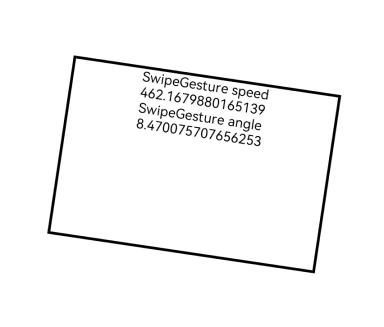
该示例通过配置SwipeGesture实现了滑动手势的识别。
// xxx.ets
@Entry
@Component
struct SwipeGestureExample {
  @State rotateAngle: number = 0;
  @State speed: number = 1;

  build() {
    Column() {
      Column() {
        Text("SwipeGesture speed\n" + this.speed)
        Text("SwipeGesture angle\n" + this.rotateAngle)
      }
      .border({ width: 3 })
      .width(300)
      .height(200)
      .margin(100)
      .rotate({ angle: this.rotateAngle })
      // 单指竖直方向滑动时触发该事件
      .gesture(
      SwipeGesture({ direction: SwipeDirection.Vertical })
        .onAction((event: GestureEvent) => {
          if (event) {
            this.speed = event.speed
            this.rotateAngle = event.angle
          }
        })
      )
    }.width('100%')
  }
}