@ohos.effectKit (图像效果)(系统接口)
图像效果模块提供了处理图像的基础能力,包括亮度调节、模糊化、灰度调节和智能取色等。effectKit用于离线处理图像(如pixelmap、png、jpeg)以获得视觉效果,而uiEffect则实时接入渲染服务,针对屏幕帧缓存进行处理以获得动态视觉效果。
该模块提供以下图像效果相关的常用功能:
- ColorPicker:智能取色器。
- Filter:效果类,用于添加指定效果到图像源。
说明:
- 本模块首批接口从API version 9开始支持。后续版本的新增接口,采用上角标单独标记接口的起始版本。
- 页面仅包含本模块的系统接口,其他公开接口参见ohos.effectKit (图像效果)。
导入模块
import { effectKit } from "@kit.ArkGraphics2D";
PictureComplexityDegree22+
图片内容复杂度的枚举。
系统能力: SystemCapability.Multimedia.Image.Core
系统接口: 此接口为系统接口。
| 名称 | 值 | 说明 |
|---|---|---|
| UNKNOWN_COMPLEXITY_DEGREE_PICTURE | 0 | 默认值,图片内容复杂度未知。 |
| PURE_PICTURE | 1 | 图片内容复杂度为纯净。 |
| MODERATE_COMPLEXITY_PICTURE | 2 | 图片内容复杂度为一般。 |
| VERY_FLOWERY_PICTURE | 3 | 图片内容复杂度为复杂。 |
PictureShadeDegree22+
图片颜色深浅度的枚举。
系统能力: SystemCapability.Multimedia.Image.Core
系统接口: 此接口为系统接口。
| 名称 | 值 | 说明 |
|---|---|---|
| UNKNOWN_SHADE_DEGREE_PICTURE | 0 | 默认值,图片颜色深浅度未知。 |
| EXTREMELY_LIGHT_PICTURE | 1 | 图片颜色深浅度为极浅。 |
| VERY_LIGHT_PICTURE | 2 | 图片颜色深浅度为较浅。 |
| LIGHT_PICTURE | 3 | 图片颜色深浅度为略浅。 |
| MODERATE_SHADE_PICTURE | 4 | 图片颜色深浅度为一般。 |
| DARK_PICTURE | 5 | 图片颜色深浅度为较深。 |
| EXTREMELY_DARK_PICTURE | 6 | 图片颜色深浅度为极深。 |
PictureLightDegree
图片颜色明亮度的枚举。
起始版本: 26.0.0
模型约束: 此接口仅可在Stage模型下使用。
系统接口: 此接口为系统接口。
系统能力: SystemCapability.Multimedia.Image.Core
卡片能力: 从API版本26.0.0开始,该接口支持在ArkTS卡片中使用。
| 名称 | 值 | 说明 |
|---|---|---|
| UNKNOWN_LIGHT_COLOR_DEGREE_PICTURE | 0 | 未知明亮度的图片。 |
| EXTREMELY_LIGHT_COLOR_PICTURE | 1 | 极亮色图片。 |
| LIGHT_COLOR_PICTURE | 2 | 亮色图片。 |
| DARK_COLOR_PICTURE | 3 | 暗色图片。 |
| EXTREMELY_DARK_COLOR_PICTURE | 4 | 极暗色图片。 |
| FLOWERY_PICTURE | 5 | 花色图片。 |
| EXTREMELY_FLOWERY_PICTURE | 6 | 极花色图片。 |
ColorPicker
取色类,用于从一张图像数据中获取它的主要颜色。在调用ColorPicker的方法前,需要先通过createColorPicker创建一个ColorPicker实例。
getTopProportionColorsAndPercentage22+
getTopProportionColorsAndPercentage(colorCount: number): Map<Color|null, number|null>
读取图像占比靠前的颜色值以及对应比例,个数由colorCount指定,结果写入Color与其对应比例的字典中,使用同步方式返回。
卡片能力: 从API version 22开始,该接口支持在ArkTS卡片中使用。
系统能力: SystemCapability.Multimedia.Image.Core
系统接口: 此接口为系统接口。
参数:
| 参数名 | 类型 | 必填 | 说明 |
|---|---|---|---|
| colorCount | number | 是 | 需要取主色及对应比例的个数,向下取整。 说明: 在OpenHarmony 6.1之前,取值范围为[1, 10],取色个数大于10视为取前10个;从OpenHarmony 6.1开始,取值范围为[1, 20],取色个数大于20视为取前20个。 |
返回值:
| 类型 | 说明 |
|---|---|
| Map<Color |null, number |null> | 图像占比前colorCount的颜色值与对应比例的字典,比例的取值范围为[0,1]。- 当实际读取的特征色个数小于 colorCount时,字典大小为实际特征色个数。- 取色失败或取色个数小于1返回 Map()。 |
错误码:
以下错误码详细介绍请参考通用错误码。
| 错误码ID | 错误信息 |
|---|---|
| 202 | Permission verification failed. A non-system application calls a system API. |
示例:
import { image } from "@kit.ImageKit";
import { effectKit } from "@kit.ArkGraphics2D";

const color = new ArrayBuffer(96);
let opts: image.InitializationOptions = {
  editable: true,
  pixelFormat: 3,
  size: {
    height: 4,
    width: 6
  }
}
image.createPixelMap(color, opts).then((pixelMap) => {
  effectKit.createColorPicker(pixelMap, (error, colorPicker) => {
    if (error) {
      console.error('Failed to create color picker.');
    } else {
      console.info('Succeeded in creating color picker.');
      let colors: Map<effectKit.Color|null, number|null> = colorPicker.getTopProportionColorsAndPercentage(2);
      colors.forEach((value: number|null, key: effectKit.Color|null) => {
        console.info('get top proportion colors and percentages: color ' + key + ', percentage ' + value);
      })
    }
  })
})
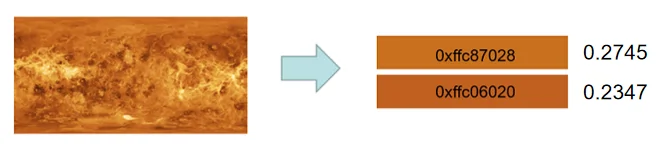
getShadeDegree22+
getShadeDegree(): PictureShadeDegree
获取图像颜色深浅度。
卡片能力: 从API version 22开始,该接口支持在ArkTS卡片中使用。
系统能力: SystemCapability.Multimedia.Image.Core
系统接口: 此接口为系统接口。
返回值:
| 类型 | 说明 |
|---|---|
| PictureShadeDegree | 图像颜色深浅度。 |
错误码:
以下错误码详细介绍请参考通用错误码。
| 错误码ID | 错误信息 |
|---|---|
| 202 | Permission verification failed. A non-system application calls a system API. |
示例:
import { image } from "@kit.ImageKit";
import { effectKit } from "@kit.ArkGraphics2D";

const color = new ArrayBuffer(96);
let opts: image.InitializationOptions = {
  editable: true,
  pixelFormat: 3,
  size: {
    height: 4,
    width: 6
  }
}
image.createPixelMap(color, opts).then((pixelMap) => {
  effectKit.createColorPicker(pixelMap, (error, colorPicker) => {
    if (error) {
      console.error('Failed to create color picker.');
    } else {
      console.info('Succeeded in creating color picker.');
      let shadeDegree: effectKit.PictureShadeDegree = colorPicker.getShadeDegree();
      console.info('The shade degree of the image is ' + shadeDegree);
    }
  })
})
getComplexityDegree22+
getComplexityDegree(): PictureComplexityDegree
获取图像内容复杂度。
卡片能力: 从API version 22开始,该接口支持在ArkTS卡片中使用。
系统能力: SystemCapability.Multimedia.Image.Core
系统接口: 此接口为系统接口。
返回值:
| 类型 | 说明 |
|---|---|
| PictureComplexityDegree | 图像内容复杂度。 |
错误码:
以下错误码详细介绍请参考通用错误码。
| 错误码ID | 错误信息 |
|---|---|
| 202 | Permission verification failed. A non-system application calls a system API. |
示例:
import { image } from "@kit.ImageKit";
import { effectKit } from "@kit.ArkGraphics2D";

const color = new ArrayBuffer(96);
let opts: image.InitializationOptions = {
  editable: true,
  pixelFormat: 3,
  size: {
    height: 4,
    width: 6
  }
}
image.createPixelMap(color, opts).then((pixelMap) => {
  effectKit.createColorPicker(pixelMap, (error, colorPicker) => {
    if (error) {
      console.error('Failed to create color picker.');
    } else {
      console.info('Succeeded in creating color picker.');
      let complexityDegree: effectKit.PictureComplexityDegree = colorPicker.getComplexityDegree();
      console.info('The complexity degree of the image is ' + complexityDegree);
    }
  })
})
getAlphaZeroTransparentProportion23+
getAlphaZeroTransparentProportion(): number
获取图像中完全透明的像素占比。
卡片能力: 从API version 23开始,该接口支持在ArkTS卡片中使用。
系统能力: SystemCapability.Multimedia.Image.Core
系统接口: 此接口为系统接口。
返回值:
| 类型 | 说明 |
|---|---|
| number | 完全透明的像素占比,比例的取值范围为[0,1]。 |
错误码:
以下错误码详细介绍请参考通用错误码。
| 错误码ID | 错误信息 |
|---|---|
| 202 | Permission verification failed. A non-system application calls a system API. |
示例:
import { image } from "@kit.ImageKit";
import { effectKit } from "@kit.ArkGraphics2D";

const color = new ArrayBuffer(96);
let opts: image.InitializationOptions = {
  editable: true,
  pixelFormat: 3,
  size: {
    height: 4,
    width: 6
  }
}
image.createPixelMap(color, opts).then((pixelMap) => {
  effectKit.createColorPicker(pixelMap, (error, colorPicker) => {
    if (error) {
      console.error('Failed to create color picker.');
    } else {
      console.info('Succeeded in creating color picker.');
        let percentage: number = colorPicker.getAlphaZeroTransparentProportion();
      console.info('Get proportion of fully transparent pixels: ' + percentage);
    }
  })
})
getMorandiShadowColor
getMorandiShadowColor(): Color
从图像的主色中获取莫兰迪阴影色,并将结果写入Color。该接口通过特定的颜色转换算法,将主色调转换为具有莫兰迪风格的阴影色调。
起始版本: 26.0.0
模型约束: 此接口仅可在Stage模型下使用。
系统接口: 此接口为系统接口。
系统能力: SystemCapability.Multimedia.Image.Core
卡片能力: 从API版本26.0.0开始,该接口支持在ArkTS卡片中使用。
返回值:
| 类型 | 说明 |
|---|---|
| Color | Color实例,即图像莫兰迪阴影色对应的颜色值,失败时返回null。 |
示例:
import { image } from "@kit.ImageKit";
import { effectKit } from "@kit.ArkGraphics2D";

const color = new ArrayBuffer(96);
let opts : image.InitializationOptions = {
  editable: true,
  pixelFormat: 3,
  size: {
    height: 4,
    width: 6
  }
}
image.createPixelMap(color, opts).then((pixelMap) => {
  effectKit.createColorPicker(pixelMap, (error, colorPicker) => {
    if (error) {
      console.error('Failed to create color picker.');
    } else {
      console.info('Succeeded in creating color picker.');
      let color = colorPicker.getMorandiShadowColor();
      console.info('get Morandi shadow color =' + color);
    }
  })
})
getDeepenImmersionColor
getDeepenImmersionColor(): Color
生成与背景色融合且比背景色更深的强沉浸感颜色,并将结果写入Color里。该接口通过颜色混合算法,创建一种既与背景色协调又具有更强沉浸感的颜色效果。
起始版本: 26.0.0
模型约束: 此接口仅可在Stage模型下使用。
系统接口: 此接口为系统接口。
系统能力: SystemCapability.Multimedia.Image.Core
卡片能力: 从API版本26.0.0开始,该接口支持在ArkTS卡片中使用。
返回值:
| 类型 | 说明 |
|---|---|
| Color | Color实例,即图像强沉浸色对应的颜色值,失败时返回null。 |
示例:
import { image } from "@kit.ImageKit";
import { effectKit } from "@kit.ArkGraphics2D";

const color = new ArrayBuffer(96);
let opts : image.InitializationOptions = {
  editable: true,
  pixelFormat: 3,
  size: {
    height: 4,
    width: 6
  }
}
image.createPixelMap(color, opts).then((pixelMap) => {
  effectKit.createColorPicker(pixelMap, (error, colorPicker) => {
    if (error) {
      console.error('Failed to create color picker.');
    } else {
      console.info('Succeeded in creating color picker.');
      let color = colorPicker.getDeepenImmersionColor();
      console.info('get deepen immersion color =' + color);
    }
  })
})
getImmersiveBackgroundColor
getImmersiveBackgroundColor(): Color
生成能够创造沉浸式视觉效果的沉浸式背景色,并将结果写入Color里。该接口基于主色生成适合作为沉浸式背景的颜色值。
起始版本: 26.0.0
模型约束: 此接口仅可在Stage模型下使用。
系统接口: 此接口为系统接口。
系统能力: SystemCapability.Multimedia.Image.Core
卡片能力: 从API版本26.0.0开始,该接口支持在ArkTS卡片中使用。
返回值:
| 类型 | 说明 |
|---|---|
| Color | Color实例,即图像沉浸式背景色对应的颜色值,失败时返回null。 |
示例:
import { image } from "@kit.ImageKit";
import { effectKit } from "@kit.ArkGraphics2D";

const color = new ArrayBuffer(96);
let opts : image.InitializationOptions = {
  editable: true,
  pixelFormat: 3,
  size: {
    height: 4,
    width: 6
  }
}
image.createPixelMap(color, opts).then((pixelMap) => {
  effectKit.createColorPicker(pixelMap, (error, colorPicker) => {
    if (error) {
      console.error('Failed to create color picker.');
    } else {
      console.info('Succeeded in creating color picker.');
      let color = colorPicker.getImmersiveBackgroundColor();
      console.info('get immersive background color =' + color);
    }
  })
})
getImmersiveForegroundColor
getImmersiveForegroundColor(): Color
生成能够创造沉浸式视觉效果的沉浸式前景色,并将结果写入Color里。该接口基于主色生成适合作为沉浸式前景的颜色值。
起始版本: 26.0.0
模型约束: 此接口仅可在Stage模型下使用。
系统接口: 此接口为系统接口。
系统能力: SystemCapability.Multimedia.Image.Core
卡片能力: 从API版本26.0.0开始,该接口支持在ArkTS卡片中使用。
返回值:
| 类型 | 说明 |
|---|---|
| Color | Color实例,即图像沉浸式前景色对应的颜色值,失败时返回null。 |
示例:
import { image } from "@kit.ImageKit";
import { effectKit } from "@kit.ArkGraphics2D";

const color = new ArrayBuffer(96);
let opts : image.InitializationOptions = {
  editable: true,
  pixelFormat: 3,
  size: {
    height: 4,
    width: 6
  }
}
image.createPixelMap(color, opts).then((pixelMap) => {
  effectKit.createColorPicker(pixelMap, (error, colorPicker) => {
    if (error) {
      console.error('Failed to create color picker.');
    } else {
      console.info('Succeeded in creating color picker.');
      let color = colorPicker.getImmersiveForegroundColor();
      console.info('get immersive foreground color =' + color);
    }
  })
})
discriminatePictureLightDegree()
discriminatePictureLightDegree(): PictureLightDegree
获取图片的明亮程度。
起始版本: 26.0.0
模型约束: 此接口仅可在Stage模型下使用。
系统接口: 此接口为系统接口。
系统能力: SystemCapability.Multimedia.Image.Core
卡片能力: 从API版本26.0.0开始,该接口支持在ArkTS卡片中使用。
返回值:
| 类型 | 说明 |
|---|---|
| PictureLightDegree | 图像颜色明亮程度。 |
错误码:
以下错误码详细介绍请参考通用错误码。
| 错误码ID | 错误信息 |
|---|---|
| 202 | Permission verification failed. A non-system application calls a system API. |
示例:
import { image } from "@kit.ImageKit";
import { effectKit } from "@kit.ArkGraphics2D";

const color = new ArrayBuffer(96);
let opts: image.InitializationOptions = {
  editable: true,
  pixelFormat: 3,
  size: {
    height: 4,
    width: 6
  }
}
image.createPixelMap(color, opts).then((pixelMap) => {
  effectKit.createColorPicker(pixelMap, (error, colorPicker) => {
    if (error) {
      console.error('Failed to create color picker.');
    } else {
      console.info('Succeeded in creating color picker.');
      let pictureLightDegree: effectKit.PictureLightDegree = colorPicker.discriminatePictureLightDegree();
      console.info('The color light degree of the image is ' + pictureLightDegree);
    }
  })
})
getReverseColor
getReverseColor(): Color
基于图像亮度判别结果生成反向颜色,并将结果写入Color里。根据discriminatePictureLightDegree接口获取的图片明亮类型得到一个反色,仅极亮色图片(EXTREMELY_LIGHT_COLOR_PICTURE)类型返回黑色,其他类型返回白色。用于界面主题或对比度计算。
起始版本: 26.0.0
模型约束: 此接口仅可在Stage模型下使用。
系统接口: 此接口为系统接口。
系统能力: SystemCapability.Multimedia.Image.Core
卡片能力: 从API版本26.0.0开始,该接口支持在ArkTS卡片中使用。
返回值:
| 类型 | 说明 |
|---|---|
| Color | Color实例,即图像反向颜色对应的颜色值,失败时返回null。 |
示例:
import { image } from "@kit.ImageKit";
import { effectKit } from "@kit.ArkGraphics2D";

const color = new ArrayBuffer(96);
let opts : image.InitializationOptions = {
  editable: true,
  pixelFormat: 3,
  size: {
    height: 4,
    width: 6
  }
}
image.createPixelMap(color, opts).then((pixelMap) => {
  effectKit.createColorPicker(pixelMap, (error, colorPicker) => {
    if (error) {
      console.error('Failed to create color picker.');
    } else {
      console.info('Succeeded in creating color picker.');
      let color = colorPicker.getReverseColor();
      console.info('get reverse color =' + color);
    }
  })
})
Filter
图像效果类用于将指定效果添加到输入图像。调用Filter方法前,需先通过createEffect创建Filter实例。
ellipticalGradientBlur23+
ellipticalGradientBlur(blurRadius: number, center: EllipticalMaskCenter, maskRadius: EllipticalMaskRadius, fractionStops: FractionStop[]): Filter
将带有椭圆形遮罩的渐变模糊效果添加到效果链表中,返回链表的头节点。
说明:
该接口为静态图像处理接口,为静态图像提供含有椭圆形遮罩的渐变模糊化效果。
系统能力: SystemCapability.Multimedia.Image.Core
系统接口: 此接口为系统接口。
模型约束: 此接口仅可在Stage模型下使用。
参数:
| 参数名 | 类型 | 必填 | 说明 |
|---|---|---|---|
| blurRadius | number | 是 | 模糊半径,取正整数,单位为px,模糊半径大于60px时自动截断。模糊效果与所设置的模糊半径值成正比,值越大效果越明显。 |
| center | EllipticalMaskCenter | 是 | 椭圆形遮罩的中心点坐标。 |
| maskRadius | EllipticalMaskRadius | 是 | 椭圆形遮罩在X轴和Y轴方向的半径。 |
| fractionStops | FractionStop[] | 是 | 渐变模糊位置与程度数组。位置与程度取值都在0-1之间,椭圆中心对应位置0,椭圆边界对应位置1。 模糊程度0表示无模糊,模糊程度1表示输入的模糊半径的模糊程度,大于1的转为1。位置参数值须严格递增,二元数组个数不能小于2,最大为12。 |
返回值:
| 类型 | 说明 |
|---|---|
| Filter | 返回已添加的图像效果。 |
示例:
import { image } from '@kit.ImageKit';
import { effectKit } from '@kit.ArkGraphics2D';
import { common } from '@kit.AbilityKit';
// 传入读取的图片数据
function ImageEllipticalGradientBlur(Image: ArrayBuffer): Promise<image.PixelMap> {
  return new Promise((resolve, reject) => {
    let imageSource = image.createImageSource(Image);
    let blurRadius:number = 25;
    let fractionStops:FractionStop[] = [[0, 0.2], [0.5, 0.7]];
    let maskRadius:effectKit.EllipticalMaskRadius = [1, 1];
    let center:effectKit.EllipticalMaskCenter = [0.5, 0.5];
    imageSource.createPixelMap().then(async (pixelMap: image.PixelMap) => {
      let headFilter = effectKit.createEffect(pixelMap);
      if (headFilter != null) {
        // 对图片添加效果标识
        headFilter.ellipticalGradientBlur(blurRadius, center, maskRadius, fractionStops);
      }
      // 按照添加的效果标识对图片进行处理并且返回处理好的图片数据
      headFilter.getEffectPixelMap(false).then(imageData => {
        resolve(imageData);
      })
    })
  })
}

@Entry
@Component
struct Index {
  @State imagePixelMap: image.PixelMap|null = null;
  private imageBuffer: ArrayBuffer|undefined = undefined;
  // 读取rawfile文件夹下的图片文件,也可根据需求更换读取方式,保证最终得到的是ArrayBuffer格式的图片数据即可
  async getFileBuffer(): Promise<ArrayBuffer|undefined> {
    try{
      const context: Context = this.getUIContext().getHostContext() as common.UIAbilityContext;
      const fileData: Uint8Array = await context.resourceManager.getRawFileContent('image.png');
      const buffer: ArrayBuffer = fileData.buffer.slice(0);
      return buffer;
    }catch (err){
      return undefined
    }
  }

  async aboutToAppear(): Promise<void>{
    this.imageBuffer = await this.getFileBuffer();
    if(this.imageBuffer == undefined){
      return;
    }
    // 图片处理为异步操作,可以依据是否需要拿到处理好的图片数据再进行下一步逻辑,按需添加await进行同步
    this.imagePixelMap = await ImageEllipticalGradientBlur(this.imageBuffer);
  }

  build() {
    Column() {
      Image(this.imagePixelMap)
        .width(304)
        .height(305)
    }
    .height('100%')
    .width('100%')
  }
}
EllipticalMaskRadius23+
type EllipticalMaskRadius = [ number, number ]
定义椭圆形遮罩的半径,取值为相对于组件宽和高的比例值。
系统能力: SystemCapability.Multimedia.Image.Core
系统接口: 此接口为系统接口。
模型约束: 此接口仅可在Stage模型下使用。
| 类型 | 说明 |
|---|---|
| [ number, number ] | 椭圆形遮罩在X轴和Y轴方向上的半径,单位分别为相对于组件宽和高的比例,取值均需大于0。 例如:[0.5, 1]表示遮罩的X轴半径等于组件宽的一半,Y轴半径等于组件高。 |
EllipticalMaskCenter23+
type EllipticalMaskCenter = [ number, number ]
定义椭圆形遮罩的中心点。
系统能力: SystemCapability.Multimedia.Image.Core
系统接口: 此接口为系统接口。
模型约束: 此接口仅可在Stage模型下使用。
| 类型 | 说明 |
|---|---|
| [ number, number ] | 椭圆形遮罩的中心点坐标。 第一个值表示X轴坐标,取值为正表示在原点右方,取值为负表示在原点左方。 第二个值表示Y轴坐标,取值为正表示在原点下方,取值为负表示在原点上方。 原点坐标为[0,0],对应为组件的左上角,[1, 1]对应为组件的右下角。 |
你可能感兴趣的鸿蒙文章
openharmony 鸿蒙 capi-drawing-gpu-context-h
openharmony 鸿蒙 capi-drawing-nativepixelmap-
openharmony 鸿蒙 capi-nativevsync-oh-nativevsync-expectedraterange
openharmony 鸿蒙 capi-drawing-oh-drawing-brush
openharmony 鸿蒙 capi-drawing-oh-drawing-image-info
openharmony 鸿蒙 capi-drawing-text-linetypography-h
openharmony 鸿蒙 capi-oh-nativeimage-oh-nativeimage
openharmony 鸿蒙 capi-drawing-typeface-h