Using startAbilityByType to Start a Navigation Application
This topic describes how to open the vertical domain panel of navigation applications.
Parameters on the Navigation Application Panel
If the type field in startAbilityByType is set to navigation, three intent scenarios are supported: route planning, navigation, and place search. The corresponding wantParam parameter contains the following properties.
NOTE
The GCJ-02 coordinate system is used for the longitude and latitude in this document.
-
Route planning scenarios
Name Type Mandatory Description sceneType number No Intent scene, which indicates the purpose of the current request. The default value is 1. In route planning scenarios, set it to 1 or leave it empty. originName string No Name of the source. originLatitude number No Latitude of the source. originLongitude number No Longitude of the source. originPoiIds Record<number, string> No List of POI IDs of the source. Currently, only POI IDs of Petal Maps and AutoNavi Map can be passed. destinationName string No Name of the destination. destinationLatitude number Yes Latitude of the destination. destinationLongitude number Yes Longitude of the destination. destinationPoiIds Record<number, string> No List of POI IDs of the destination. Currently, only POI IDs of Petal Maps and AutoNavi Map can be passed. vehicleType number No Transportation mode. The options are as follows: 0: driving; 1: walking; 2: cycling; 3: public transportation. -
Navigation scenarios
Name Type Mandatory Description sceneType number Yes Intent scene, which indicates the purpose of the current request. Set it to 2 for navigation scenarios. destinationName string No Name of the destination. destinationLatitude number Yes Latitude of the destination. destinationLongitude number Yes Longitude of the destination. destinationPoiIds Record<number, string> No List of POI IDs of the destination. Currently, only POI IDs of Petal Maps and AutoNavi Map can be passed. -
Place search scenarios
Name Type Mandatory Description sceneType number Yes Intent scene, which indicates the purpose of the current request. Set it to 3 for place search scenarios. destinationName string Yes Name of the destination.
Developing a Caller Application
-
Import the module.
import { common } from '@kit.AbilityKit'; -
Construct parameters and call the startAbilityByType API.
You need to obtain the POI IDs of the destination and origin from each map system and pass the parameters destinationPoiIds and originPoiIds based on the mappings.
@Entry
@Component
struct Index {
@State hideAbility: string = 'hideAbility'

	build() {
		Row() {
			Column() {
				Text(this.hideAbility)
					.fontSize(30)
					.fontWeight(FontWeight.Bold)
					.onClick(() => {
						let context = this.getUIContext().getHostContext() as common.UIAbilityContext;
						let wantParam: Record<string, Object> = {
							'sceneType': 1,
							'destinationLatitude': 32.060844,
							'destinationLongitude': 118.78315,
							'destinationName': 'No.xx, xx Road, xx City',
							'destinationPoiIds': {
								1:'1111', // Key 1 indicates Petal Maps, and the value must be a POI in Petal Maps.
								2:'2222' // Key 2 indicates AutoNavi Map, and the value must be a POI in AutoNavi Map.
							} as Record<number, string>,
							'originName': 'xx Park in xx City',
							'originLatitude': 31.060844,
							'originLongitude': 120.78315,
							'originPoiIds': {
								1: '3333',  // Key 1 indicates Petal Maps, and the value must be a POI in Petal Maps.
								2: '4444'   // Key 2 indicates AutoNavi Map, and the value must be a POI in AutoNavi Map.
							} as Record<number, string>,
							'vehicleType': 0
						};
						let abilityStartCallback: common.AbilityStartCallback = {
							onError: (code: number, name: string, message: string) => {
								console.log(`onError code ${code} name: ${name} message: ${message}`);
							},
							onResult: (result) => {
								console.log(`onResult result: ${JSON.stringify(result)}`);
							}
						}

						context.startAbilityByType("navigation", wantParam, abilityStartCallback,
							(err) => {
								if (err) {
									console.error(`startAbilityByType fail, err: ${JSON.stringify(err)}`);
								} else {
									console.log(`success`);
								}
							});
					});
			}
			.width('100%')
		}
		.height('100%')
	}
}
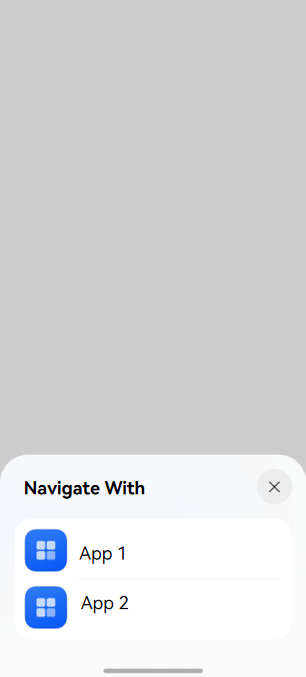
Effect
Developing a Target Application
-
Configure uris in the module.json5 file.
- Set the linkFeature field to declare the features supported by the application so that the system can match the application against all the installed applications on the device. The options are as follows: |Value |Description | |--------------|----------------------------| |Navigation |The application supports navigation. | |RoutePlan |The application supports route planning. | |PlaceSearch |The application supports place search. |
- Set scheme, host, port, and path or pathStartWith to match the URIs in Want to distinguish different features.
{ "abilities": [ { "skills": [ { "uris": [ { "scheme": "maps", // It is for reference only. Ensure that the declared URI can be started by external systems. "host": "navigation", "path": "", "linkFeature": "Navigation" // Declare that the application supports navigation. }, { "scheme": "maps", // It is for reference only. Ensure that the declared URI can be started by external systems. "host": "routePlan", "path": "", "linkFeature": "RoutePlan" // Declare that the application supports route planning. }, { "scheme": "maps", // It is for reference only. Ensure that the declared URI can be started by external systems. "host": "search", "path": "", "linkFeature": "PlaceSearch" // Declare that the application supports place search. } ] } ] } ] } -
Parse parameters and perform corresponding processing.
UIAbility.onCreate(want: Want, launchParam: AbilityConstant.LaunchParam): voidThe want.uri parameter carries the URI corresponding to linkFeature configured by the target application.
want.parameters carries the parameters passed by the caller, which vary in different scenarios.
-
Route planning scenarios
Name Type Mandatory Description originName string No Name of the source. originLatitude number No Latitude of the source. originLongitude number No Longitude of the source. originPoiId string No POI ID of the source. Currently, this parameter can be obtained only from Petal Maps and AutoNavi Map. destinationName string No Name of the destination. destinationLatitude number Yes Latitude of the destination. destinationLongitude number Yes Longitude of the destination. destinationPoiId string No POI ID of the destination. Currently, this parameter can be obtained only from Petal Maps and AutoNavi Map. vehicleType number No Transportation mode. The options are as follows: 0: driving; 1: walking; 2: cycling; 3: public transportation. -
Navigation scenarios
Name Type Mandatory Description destinationName string No Name of the destination. destinationLatitude number Yes Latitude of the destination. destinationLongitude number Yes Longitude of the destination. destinationPoiId string No POI ID of the destination. Currently, this parameter can be obtained only from Petal Maps and AutoNavi Map. -
Place search scenarios
Name Type Mandatory Description destinationName string Yes Name of the destination.
-
The application can develop different style pages based on the features defined in linkFeature, such as route planning, navigation, and place search, as well as the received URI and parameters.
Sample Code
import { AbilityConstant, UIAbility, Want } from '@kit.AbilityKit';
import { hilog } from '@kit.PerformanceAnalysisKit';
import { window } from '@kit.ArkUI';

const TAG = 'EntryAbility'

export default class EntryAbility extends UIAbility {
    windowStage: window.WindowStage|null = null;

    uri?: string;
    destinationLatitude?: number;
    destinationLongitude?: number;
    destinationName?: string;
    originName?: string;
    originLatitude?: number;
    originLongitude?: number;
    vehicleType?: number;
    destinationPoiId?: string;
    originPoiId?: string;

    onCreate(want: Want, launchParam: AbilityConstant.LaunchParam): void {
        hilog.info(0x0000, TAG, `onCreate, want=${JSON.stringify(want)}`);
        super.onCreate(want, launchParam);
        this.parseWant(want);
    }

    onNewWant(want: Want, launchParam: AbilityConstant.LaunchParam): void {
        hilog.info(0x0000, TAG, `onNewWant, want=${JSON.stringify(want)}`);
        super.onNewWant(want, launchParam);
        this.parseWant(want);
        if (!this.windowStage) {
            hilog.error(0x0000, TAG, 'windowStage is null');
            this.context.terminateSelf();
            return;
        }
        this.loadPage(this.windowStage);
    }

    private parseWant(want: Want): void {
        this.uri = want.uri as string|undefined;
        this.destinationLatitude = want.parameters?.destinationLatitude as number|undefined;
        this.destinationLongitude = want.parameters?.destinationLongitude as number|undefined;
        this.destinationName = want.parameters?.destinationName as string|undefined;
        this.originName = want.parameters?.originName as string|undefined;
        this.originLatitude = want.parameters?.originLatitude as number|undefined;
        this.originLongitude = want.parameters?.originLongitude as number|undefined;
        this.vehicleType = want.parameters?.vehicleType as number|undefined;
        this.destinationPoiId = want.parameters?.destinationPoiId as string|undefined;
        this.originPoiId = want.parameters?.originPoiId as string|undefined;
    }

    private loadPage(windowStage: window.WindowStage): void {
        hilog.info(0x0000, TAG, `loadPage, uri=${this.uri}`);
        if (this.uri === 'maps://navigation') {
            // Construct parameters for the navigation scenario.
            const storage: LocalStorage = new LocalStorage({
                "destinationLatitude": this.destinationLatitude,
                "destinationLongitude": this.destinationLongitude,
                "destinationPoiId": this.destinationPoiId
            } as Record<string, Object>);
            // Open the navigation page.
            windowStage.loadContent('pages/NavigationPage', storage)
        } else if (this.uri === 'maps://routePlan') {
            // Construct parameters for the path planning scenario.
            const storage: LocalStorage = new LocalStorage({
                "destinationLatitude": this.destinationLatitude,
                "destinationLongitude": this.destinationLongitude,
                "destinationName": this.destinationName,
                "originName": this.originName,
                "originLatitude": this.originLatitude,
                "originLongitude": this.originLongitude,
                "vehicleType": this.vehicleType,
                "destinationPoiId": this.destinationPoiId,
                "originPoiId": this.originPoiId
            } as Record<string, Object>);
            // Open the route planning page.
            windowStage.loadContent('pages/RoutePlanPage', storage)
        }  else if (this.uri === 'maps://search') {
            // Construct parameters for the place search scenario.
            const storage: LocalStorage = new LocalStorage({
                "destinationName": this.destinationName
            } as Record<string, Object>);
            // Open the place search page.
            windowStage.loadContent('pages/PlaceSearchPage', storage)
        } else {
            // Display the home page by default.
            windowStage.loadContent('pages/Index', (err) => {
                if (err.code) {
                    hilog.error(0x0000, TAG, 'Failed to load the content. Cause: %{public}s',
                        JSON.stringify(err) ?? '');
                    return;
                }
                hilog.info(0x0000, TAG, 'Succeeded in loading the content.');
            });
        }
    }

    onDestroy(): void {
        hilog.info(0x0000, TAG, `onDestroy`);
    }

    onWindowStageCreate(windowStage: window.WindowStage): void {
        hilog.info(0x0000, TAG, `onWindowStageCreate`);
        this.windowStage = windowStage;
        this.loadPage(this.windowStage);
    }

    onWindowStageDestroy(): void {
        hilog.info(0x0000, TAG, '%{public}s', 'Ability onWindowStageDestroy');
    }

    onForeground(): void {
        hilog.info(0x0000, TAG, '%{public}s', 'Ability onForeground');
    }

    onBackground(): void {
        hilog.info(0x0000, TAG, '%{public}s', 'Ability onBackground');
    }
}
你可能感兴趣的鸿蒙文章
harmony 鸿蒙Obtaining Reasons for Abnormal Application Exits
harmony 鸿蒙UIAbility Backup and Restore
harmony 鸿蒙Using Explicit Want to Start an Application Component
harmony 鸿蒙Introduction to Ability Kit
harmony 鸿蒙AbilityStage Component Container
harmony 鸿蒙Accessing a DataAbility
harmony 鸿蒙Accessing a DataShareExtensionAbility from the FA Model
harmony 鸿蒙Common action and entities Values (Not Recommended)