AtomicServiceMenuBar (System API)
Creates an AtomicServiceMenuBar object based on the context of the current atomic service. The object is used to control the display of the menu function capsule in the upper right corner.
NOTE
This component is supported since API version 23. Updates will be marked with a superscript to indicate their earliest API version.
Modules to Import
import { AtomicServiceMenuBar } from '@kit.ArkUI';
Child Components
None
Attributes
The universal attributes are not supported.
AtomicServiceMenuBar
Describes the object created using the UI context of the current atomic service. You can use the defined APIs to control the status of the menu function capsule of the current atomic service. For details, see Example.
constructor
constructor(uiContext: UIContext)
A constructor used to create an AtomicServiceMenuBar object.
Atomic service API: This API can be used in atomic services since API version 23.
Model restriction: This API can be used only in the stage model.
System API: This is a system API.
System capability: SystemCapability.ArkUI.ArkUI.Full
Parameters:
| Parameter | Type | Mandatory | Description |
|---|---|---|---|
| uiContext | UIContext | Yes | Context information of the current atomic service. |
setVisible
setVisible(visible: boolean): void
Sets whether to display or hide the menu function capsule of the current atomic service.
Atomic service API: This API can be used in atomic services since API version 23.
Model restriction: This API can be used only in the stage model.
System API: This is a system API.
System capability: SystemCapability.ArkUI.ArkUI.Full
Parameters:
| Parameter | Type | Mandatory | Description |
|---|---|---|---|
| visible | boolean | Yes | Expected status of the menu function capsule. true: The menu function capsule is displayed. false: The menu function capsule is hidden. |
Example
import { AtomicServiceMenuBar } from '@kit.ArkUI';

@Entry
@Component
struct Index {
  private menuBar: AtomicServiceMenuBar = new AtomicServiceMenuBar(this.getUIContext());

  @Builder
  private EmbedCompLauncherShow(title: string, text: string, event?: () => void) {
    Column() {
      if (typeof event === 'function') {
        Button(title)
          .width(300)
          .height(50)
          .fontSize(16)
          .borderRadius(25)
          .onClick(() => {
            event();
          })
      }
      Text(`Expected result: ${text}`)
        .width(300)
        .textAlign(TextAlign.Start)
        .fontSize(12)
        .margin({ top: 5, bottom: 15})
    }
  }

  build() {
    Column() {
      this.EmbedCompLauncherShow('Display menu function capsule', 'Clicking this button will display the menu function capsule.', () => {
        this.menuBar.setVisible(true);
      });
      this.EmbedCompLauncherShow('Hide menu function capsule', 'Clicking this button will hide the menu function capsule.', () => {
        this.menuBar.setVisible(false);
      });
    }
    .width('100%')
    .height('100%')
    .padding({ top: 100 })
  }
}
After the Hide menu function capsule button is clicked, the menu function capsule is hidden.
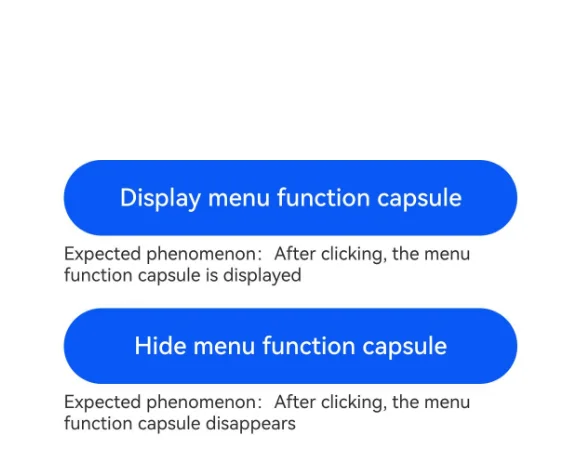
After the Show menu function capsule button is clicked, the menu function capsule is displayed.
你可能感兴趣的鸿蒙文章
openharmony 鸿蒙 ts-drawing-components-shape
openharmony 鸿蒙 ts-universal-attributes-sharp-clipping
openharmony 鸿蒙 ts-universal-attributes-toolbar
openharmony 鸿蒙 ts-container-lazyvgridlayout
openharmony 鸿蒙 ohos-arkui-advanced-FoldSplitContainer
openharmony 鸿蒙 ts-methods-calendarpicker-dialog
openharmony 鸿蒙 ts-uicommonevent
openharmony 鸿蒙 ts-basic-gestures-tapgesture