Menu Control (System API)
A context menu – a vertical list of items – can be bound to a component and displayed by long-pressing, clicking, or right-clicking the component.
NOTE
This component is supported since API version 7. Updates will be marked with a superscript to indicate their earliest API version.
This topic describes only system APIs provided by the module. For details about its public APIs, see Menu Control.
ContextMenuOptions10+
Configures menu item information.
System capability: SystemCapability.ArkUI.ArkUI.Full
| Name | Type | Read-Only | Optional | Description |
|---|---|---|---|---|
| systemMaterial23+ | SystemUiMaterial | No | Yes | System material of the menu. Different system materials have different attribute effects. This API affects the background color (backgroundColor), border color (borderColor), border width (borderWidth), and shadow (shadow). You are advised not to use this API together with the aforementioned APIs. If the material is set to an invalid value or undefined, no system material is set. Default value: undefined System API: This is a system API. Atomic service API: This API can be used in atomic services since API version 23. Model restriction: This API can be used only in the stage model. |
Example
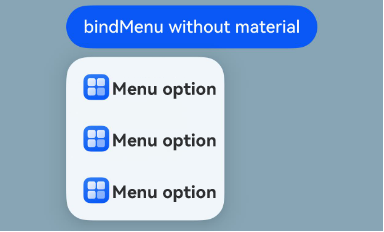
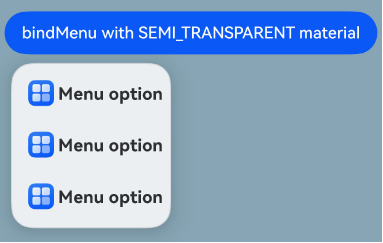
Example 1: Setting the System Material of a Menu
This example sets the system material of a menu by setting the systemMaterial attribute in ContextMenuOptions.
The systemMaterial attribute is added to ContextMenuOptions since API version 23.
import { uiMaterial } from '@kit.ArkUI';

@Entry
@Component
struct Index {
  @Builder
  MyMenu() {
    Menu() {
      MenuItem({ startIcon: this.iconStr, content: 'Menu option' })
      MenuItem({ startIcon: this.iconStr, content: 'Menu option' })
      MenuItem({ startIcon: this.iconStr, content: 'Menu option' })
    }
  }

  build() {
    Column() {
      Button('bindMenu with THICK material')
        .bindMenu(this.MyMenu, {
          systemMaterial: new uiMaterial.Material({ type: uiMaterial.MaterialType.SEMI_TRANSPARENT })
        })
    }
    // Replace $r('app.media.img') with the image resource file you use.
    .backgroundImage($r('app.media.img'))
  }
}
Menu without the system material
Menu with the system material
你可能感兴趣的鸿蒙文章
openharmony 鸿蒙 ts-drawing-components-shape
openharmony 鸿蒙 ts-universal-attributes-sharp-clipping
openharmony 鸿蒙 ts-universal-attributes-toolbar
openharmony 鸿蒙 ts-container-lazyvgridlayout
openharmony 鸿蒙 ohos-arkui-advanced-FoldSplitContainer
openharmony 鸿蒙 ts-methods-calendarpicker-dialog
openharmony 鸿蒙 ts-uicommonevent
openharmony 鸿蒙 ts-basic-gestures-tapgesture