@ohos.app.ability.verticalPanelManager (Vertical Panel Management) (System API)
The module provides capabilities for vertical panel management. Currently, it only supports launching the vertical panel for application selection.
NOTE
The initial APIs of this module are supported since API version 20. Newly added APIs will be marked with a superscript to indicate their earliest API version.
The APIs of this module can be used only in the stage model.
The APIs provided by this module are system APIs.
Modules to Import
import { verticalPanelManager } from '@kit.AbilityKit';
verticalPanelManager.startVerticalPanel
startVerticalPanel(context: common.UIAbilityContext, wantParam: Record<string, Object>, panelConfig: PanelConfig, panelStartCallback: PanelStartCallback): Promise<void>
Launches a vertical panel for selecting a target application to start. This API must be called when the caller (source application) is running in the foreground. This API uses a promise to return the result.
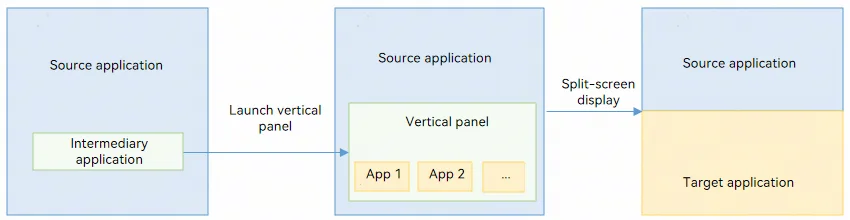
As shown in the figure below, the source application (sourceAppInfo), which is currently displayed on the screen, calls startVerticalPanel via an intermediary application (the launcher application) to launch the vertical panel. After the user manually selects the target application, the source and target applications automatically enter a split-screen layout.
System capability: SystemCapability.Ability.AppExtension.VerticalPanel
System API: This is a system API.
Parameters
| Name | Type | Mandatory | Description |
|---|---|---|---|
| context | common.UIAbilityContext | Yes | Context of the caller. |
| wantParam | Record<string, Object> | Yes | Parameters passed for starting the UIExtensionAbility. |
| panelConfig | PanelConfig | Yes | Configuration parameters of the vertical panel. |
| panelStartCallback | PanelStartCallback | Yes | Callback for launching the vertical panel. |
Return value
| Name | Description |
|---|---|
| Promise<void> | Promise that returns no value. |
Error codes
For details about the error codes, see Universal Error Codes and Ability Error Codes.
| ID | Error Message |
|---|---|
| 202 | The application is not a system application. |
| 16000050 | Failed to connect to the system service or system server handle failed. |
| 16000135 | The main window of this ability of this context does not exits. |
Example
import { common, verticalPanelManager } from '@kit.AbilityKit';
import { BusinessError } from '@kit.BasicServicesKit';

@Entry
@Component
struct Index {
  @State message: string = 'StartVerticalPanel';

  build() {
    RelativeContainer() {
      Text(this.message)
        .id('StartVerticalPanel')
        .fontSize($r('app.float.page_text_font_size'))
        .fontWeight(FontWeight.Bold)
        .alignRules({
          center: { anchor: '__container__', align: VerticalAlign.Center },
          middle: { anchor: '__container__', align: HorizontalAlign.Center }
        })
        .onClick(() => {
          this.callStartVerticalPanelNapi();
        })
    }
    .height('100%')
    .width('100%');
  }

  // Construct parameters and call startVerticalPanel to launch the vertical panel.
  callStartVerticalPanelNapi() {
    // Param[0] UIAbilityContext
    const context = this.getUIContext().getHostContext() as common.UIAbilityContext;

    // Param[1] wantParam: Record<string, Object>
    let wantParam: Record<string, Object> = {
      'sceneType': 3,
      'destinationName': 'Lianqiu Lake R&D Center'
    };

    // Param[2] PanelConfig
    let sourceAppInfo: Record<string, string> = {};
    sourceAppInfo[verticalPanelManager.SOURCE_APP_BUNDLE_NAME] = 'com.huawei.hmos.browser';
    sourceAppInfo[verticalPanelManager.SOURCE_APP_MODULE_NAME] = 'entry';
    sourceAppInfo[verticalPanelManager.SOURCE_APP_ABILITY_NAME] = 'MainAbility';
    sourceAppInfo[verticalPanelManager.SOURCE_APP_WINDOW_ID] = '0';
    sourceAppInfo[verticalPanelManager.SOURCE_APP_SCREEN_MODE] = '1';

    let panelConfig: verticalPanelManager.PanelConfig = {
      type: verticalPanelManager.VerticalType.NAVIGATION,
      sourceAppInfo: sourceAppInfo
    };

    // Param[3] PanelStartCallback
    let callback: verticalPanelManager.PanelStartCallback = {
      onError: (code: number, name: string, message: string): void => {
        console.info(`startVerticalPanel onError code ${code} name: ${name} message: ${message}`);
      },
      onResult: (result: common.AbilityResult): void => {
        console.info(`startVerticalPanel onResult result ${JSON.stringify(result)}`);
      },
    };

    try {
      console.info(`call startVerticalPanel`);
      verticalPanelManager.startVerticalPanel(context, wantParam, panelConfig, callback)
        .then(() => {
          console.info(`call startVerticalPanel end`);
        })
        .catch((error: BusinessError) => {
          console.error(`call startVerticalPanel promise catch error : ${error}`);
        });
    } catch (error) {
      console.error(`call startVerticalPanel catch error : ${error}`);
    }
  }
}
PanelConfig
Describes the configuration parameters of the vertical panel.
System capability: SystemCapability.Ability.AppExtension.VerticalPanel
| Name | Type | Read-Only | Optional | Description |
|---|---|---|---|---|
| type | VerticalType | No | No | Type of the vertical panel. |
| sourceAppInfo | Record<string, string> | No | No | Information about the source application, including its bundle name, module name, ability name, window ID, and screen mode. When a target application is selected and started from the vertical panel, it automatically forms a split-screen layout with the source application. |
VerticalType
Enumerates the types of vertical panels that can be launched.
System capability: SystemCapability.Ability.AppExtension.VerticalPanel
System API: This is a system API.
| Name | Value | Description |
|---|---|---|
| NAVIGATION | 'navigation' | Navigation application. For details about wantParam, see the extended panel parameter description in Using startAbilityByType to Start a Navigation Application. |
PanelStartCallback
Describes the callback for launching the vertical panel.
System capability: SystemCapability.Ability.AppExtension.VerticalPanel
System API: This is a system API.
| Name | Type | Read-Only | Optional | Description |
|---|---|---|---|---|
| onError | OnErrorFn | No | No | Callback invoked when launching the vertical panel fails. |
| onResult | OnResultFn | No | Yes | Callback invoked when the launched vertical panel is terminated. |
OnErrorFn
type OnErrorFn = (code: number, name: string, message: string) => void
System capability: SystemCapability.Ability.AppExtension.VerticalPanel
System API: This is a system API.
Parameters
| Name | Type | Mandatory | Description |
|---|---|---|---|
| code | number | Yes | Result code returned when the UIExtensionAbility fails to start. |
| name | string | Yes | Name returned when the UIExtensionAbility fails to start. |
| message | string | Yes | Error information returned when the UIExtensionAbility fails to start. |
Example
let callback: verticalPanelManager.PanelStartCallback = {
  onError: (code: number, name: string, message: string): void => {
    console.info(`startVerticalPanel onError code ${code} name: ${name} message: ${message}`);
  },
  onResult: (result: common.AbilityResult):void => {
    console.info(`startVerticalPanel onResult result ${JSON.stringify(result)}`);
  },
}
OnResultFn
type OnResultFn = (parameter: AbilityResult) => void
System capability: SystemCapability.Ability.AppExtension.VerticalPanel
System API: This is a system API.
Parameters
| Name | Type | Mandatory | Description |
|---|---|---|---|
| parameter | AbilityResult | Yes | Parameters returned when the UIExtensionAbility calls terminateSelfWithResult. |
Example
let callback: verticalPanelManager.PanelStartCallback = {
  onError: (code: number, name: string, message: string): void => {
    console.info(`startVerticalPanel onError code ${code} name: ${name} message: ${message}`);
  },
  onResult: (result: common.AbilityResult):void => {
    console.info(`startVerticalPanel onResult result ${JSON.stringify(result)}`);
  },
}
Constants
System capability: SystemCapability.Ability.AppExtension.VerticalPanel
System API: This is a system API.
| Name | Type | Value | Description |
|---|---|---|---|
| SOURCE_APP_BUNDLE_NAME | string | 'bundleName' | Constant string bundleName, which indicates the bundle name of the source application. It can be used as a key in sourceAppInfo. |
| SOURCE_APP_MODULE_NAME | string | 'moduleName' | Constant string moduleName, which indicates the module name of the source application. It can be used as a key in sourceAppInfo. |
| SOURCE_APP_ABILITY_NAME | string | 'abilityName' | Constant string abilityName, which indicates the ability name of the source application. It can be used as a key in sourceAppInfo. |
| SOURCE_APP_WINDOW_ID | string | 'windowId' | Constant string windowId, which indicates the window ID of the source application. It can be used as a key in sourceAppInfo. |
| SOURCE_APP_SCREEN_MODE | string | 'screenMode' | Constant string screenMode, which indicates the screen mode of the source application. Currently, the vertical panel can be launched successfully only when the value is 1. It can be used as a key in sourceAppInfo. |
你可能感兴趣的鸿蒙文章
openharmony 鸿蒙 js-apis-app-ability-appServiceExtensionAbility
openharmony 鸿蒙 js-apis-inner-wantAgent-triggerInfo-sys
openharmony 鸿蒙 js-apis-inner-wantAgent-wantAgentInfo-sys
openharmony 鸿蒙 js-apis-appControl-sys
openharmony 鸿蒙 js-apis-app-ability-environmentCallback
openharmony 鸿蒙 js-apis-inner-application-missionInfo-sys
openharmony 鸿蒙 js-apis-bundleManager-sharedBundleInfo-sys
openharmony 鸿蒙 js-apis-inner-application-continueMissionInfo-sys
openharmony 鸿蒙 js-apis-inner-application-appServiceExtensionContext
openharmony 鸿蒙 js-apis-bundleManager-businessAbilityInfo-sys