Listening for Game Controller Axis and Button Events (C/C++)
NOTE
You need to develop game controller online/offline status monitoring before registering listeners for game controller axis and button events.
When to Use
Game Controller Kit provides the capability of listening for game controller axis and button events. After you register a listener for these events, callback notifications can be obtained when players operate the controller's buttons and joysticks.
Buttons
The following figure shows the buttons supported by Game Controller Kit.
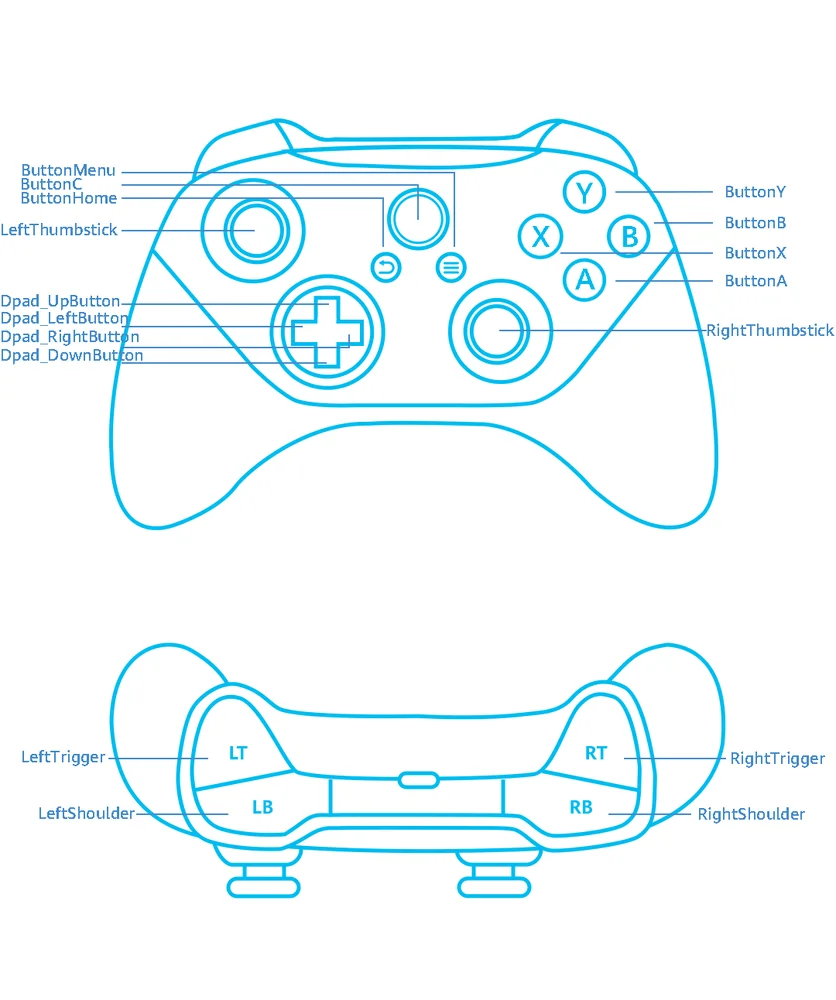
Available APIs
For details about the APIs, please refer to the API reference.
| API | Description |
|---|---|
| OH_GamePad_LeftShoulder_RegisterButtonInputMonitor | Registers a listener for the Left Shoulder button event. |
| OH_GamePad_RightShoulder_RegisterButtonInputMonitor | Registers a listener for the Right Shoulder button event. |
| OH_GamePad_LeftTrigger_RegisterButtonInputMonitor | Registers a listener for the Left Trigger button event. |
| OH_GamePad_RightTrigger_RegisterButtonInputMonitor | Registers a listener for the Right Trigger button event. |
| OH_GamePad_ButtonMenu_RegisterButtonInputMonitor | Registers a listener for the Menu button event. |
| OH_GamePad_ButtonHome_RegisterButtonInputMonitor | Registers a listener for the Home button event. |
| OH_GamePad_ButtonA_RegisterButtonInputMonitor | Registers a listener for the A button event. |
| OH_GamePad_ButtonB_RegisterButtonInputMonitor | Registers a listener for the B button event. |
| OH_GamePad_ButtonX_RegisterButtonInputMonitor | Registers a listener for the X button event. |
| OH_GamePad_ButtonY_RegisterButtonInputMonitor | Registers a listener for the Y button event. |
| OH_GamePad_ButtonC_RegisterButtonInputMonitor | Registers a listener for the C button event. |
| OH_GamePad_Dpad_LeftButton_RegisterButtonInputMonitor | Registers a listener for the Left Directional button event. |
| OH_GamePad_Dpad_RightButton_RegisterButtonInputMonitor | Registers a listener for the Right Directional button event. |
| OH_GamePad_Dpad_UpButton_RegisterButtonInputMonitor | Registers a listener for the Up Directional button event. |
| OH_GamePad_Dpad_DownButton_RegisterButtonInputMonitor | Registers a listener for the Down Directional button event. |
| OH_GamePad_LeftThumbstick_RegisterButtonInputMonitor | Registers a listener for the Left Thumbstick button event. |
| OH_GamePad_RightThumbstick_RegisterButtonInputMonitor | Registers a listener for the Right Thumbstick button event. |
| OH_GamePad_LeftTrigger_RegisterAxisInputMonitor | Registers a listener for the Left Trigger axis event. |
| OH_GamePad_RightTrigger_RegisterAxisInputMonitor | Registers a listener for the Right Trigger axis event. |
| OH_GamePad_Dpad_RegisterAxisInputMonitor | Registers a listener for the Directional Pad button axis event. |
| OH_GamePad_LeftThumbstick_RegisterAxisInputMonitor | Registers a listener for the Left Thumbstick axis event. |
| OH_GamePad_RightThumbstick_RegisterAxisInputMonitor | Registers a listener for the Right Thumbstick axis event. |
How to Develop
Linking the Dynamic Library
target_link_libraries(entry PUBLIC libohgame_controller.z.so)
Importing the Module
#include <GameControllerKit/game_pad.h>
Registering and Unregistering a Listener for the Axis Event
Call the corresponding APIs to register or unregister axis event callbacks and obtain the axis value through the callback functions.
The following table lists the physical axes and the APIs for obtaining their values.
| Physical Axis | Axis Value Acquisition API |
|---|---|
| LeftThumbstick | X-axis value: OH_GamePad_AxisEvent_GetXAxisValue Y-axis value: OH_GamePad_AxisEvent_GetYAxisValue |
| RightThumbstick | Z-axis value: OH_GamePad_AxisEvent_GetZAxisValue RZ-axis value: OH_GamePad_AxisEvent_GetRZAxisValue |
| DPAD | HatX-axis value: OH_GamePad_AxisEvent_GetHatXAxisValue HatY-axis value: OH_GamePad_AxisEvent_GetHatYAxisValue |
| LeftTrigger | Brake-axis value: OH_GamePad_AxisEvent_GetBrakeAxisValue |
| RightTrigger | Gas-axis value: OH_GamePad_AxisEvent_GetGasAxisValue |
The following uses the Left Thumbstick axis event as an example.
napi_value GamePad::LeftThumbstick_RegisterAxisInputMonitor(napi_env env, napi_callback_info info) {
    napi_value result;
    GameController_ErrorCode errorCode =
        OH_GamePad_LeftThumbstick_RegisterAxisInputMonitor(GamePad::LeftThumbstick_OnAxisEvent);
    if (errorCode != GameController_ErrorCode::GAME_CONTROLLER_SUCCESS) {
        OH_LOG_ERROR(LOG_APP, "LeftThumbstick_RegisterAxisInputMonitor Failed, %{public}d", errorCode);
        napi_create_double(env, errorCode, &result);
        return result;
    }
    OH_LOG_INFO(LOG_APP, "LeftThumbstick_RegisterAxisInputMonitor Success");
    napi_create_double(env, 0, &result);
    return result;
}

napi_value GamePad::LeftThumbstick_UnregisterAxisInputMonitor(napi_env env, napi_callback_info info) {
    napi_value result;
    GameController_ErrorCode errorCode = OH_GamePad_LeftThumbstick_UnregisterAxisInputMonitor();
    if (errorCode != GameController_ErrorCode::GAME_CONTROLLER_SUCCESS) {
        OH_LOG_ERROR(LOG_APP, "LeftThumbstick_UnregisterAxisInputMonitor Failed, %{public}d", errorCode);
        napi_create_double(env, errorCode, &result);
        return result;
    }
    OH_LOG_INFO(LOG_APP, "LeftThumbstick_UnregisterAxisInputMonitor Success");
    napi_create_double(env, 0, &result);
    return result;
}

void GamePad::LeftThumbstick_OnAxisEvent(const struct GamePad_AxisEvent *axisEvent) {
    std::string val = "X";
    double xAxisValue;
    OH_GamePad_AxisEvent_GetXAxisValue(axisEvent, &xAxisValue);
    val.append(std::to_string(xAxisValue)).append("_Y");
    double yAxisValue;
    OH_GamePad_AxisEvent_GetYAxisValue(axisEvent, &yAxisValue);
    val.append(std::to_string(yAxisValue));
    OnAxisEvent(axisEvent, "LeftThumbstick_OnAxisEvent", val);
}
Registering and Unregistering a Listener for the Button Event
Call the corresponding APIs to register or unregister button event callbacks and obtain the button value from the callback functions.
The following table lists the button names and their values.
| Button | Value |
|---|---|
| LeftShoulder | 2307 |
| RightShoulder | 2308 |
| LeftTrigger | 2309 |
| RightTrigger | 2310 |
| LeftThumbstick | 2314 |
| RightThumbstick | 2315 |
| ButtonHome | 2311 |
| ButtonMenu | 2312 |
| ButtonA | 2301 |
| ButtonB | 2302 |
| ButtonC | 2303 |
| ButtonX | 2304 |
| ButtonY | 2305 |
| Dpad_UpButton | 2012 |
| Dpad_DownButton | 2013 |
| Dpad_LeftButton | 2014 |
| Dpad_RightButton | 2015 |
The following uses the Left Shoulder button event as an example.
napi_value GamePad::LeftShoulder_RegisterButtonInputMonitor(napi_env env, napi_callback_info info) {
    napi_value result;
    GameController_ErrorCode errorCode =
        OH_GamePad_LeftShoulder_RegisterButtonInputMonitor(GamePad::LeftShoulder_OnButtonEvent);
    if (errorCode != GameController_ErrorCode::GAME_CONTROLLER_SUCCESS) {
        OH_LOG_ERROR(LOG_APP, "LeftShoulder_RegisterButtonInputMonitor Failed, %{public}d", errorCode);
        napi_create_double(env, errorCode, &result);
        return result;
    }
    OH_LOG_INFO(LOG_APP, "LeftShoulder_RegisterButtonInputMonitor Success");
    napi_create_double(env, 0, &result);
    return result;
}

napi_value GamePad::LeftShoulder_UnregisterButtonInputMonitor(napi_env env, napi_callback_info info) {
    napi_value result;
    GameController_ErrorCode errorCode = OH_GamePad_LeftShoulder_UnregisterButtonInputMonitor();
    if (errorCode != GameController_ErrorCode::GAME_CONTROLLER_SUCCESS) {
        OH_LOG_ERROR(LOG_APP, "LeftShoulder_UnregisterButtonInputMonitor Failed, %{public}d", errorCode);
        napi_create_double(env, errorCode, &result);
        return result;
    }
    OH_LOG_INFO(LOG_APP, "LeftShoulder_UnregisterButtonInputMonitor Success");
    napi_create_double(env, 0, &result);
    return result;
}

void GamePad::LeftShoulder_OnButtonEvent(const struct GamePad_ButtonEvent *buttonEvent) {
    OnButtonEvent(buttonEvent, "LeftShoulder_OnButtonEvent");
}

void GamePad::OnButtonEvent(const struct GamePad_ButtonEvent *buttonEvent, const std::string &buttonName) {
    std::string temp;
    temp.append("OnButtonEvent:").append(buttonName);
    char *deviceId;
    OH_GamePad_ButtonEvent_GetDeviceId(buttonEvent, &deviceId);
    temp.append(" ,deviceId:").append(deviceId);
    free(deviceId);
    GamePad_Button_ActionType action;
    OH_GamePad_ButtonEvent_GetButtonAction(buttonEvent, &action);
    temp.append(" ,action:").append(std::to_string(action));
    std::int32_t buttonCode;
    OH_GamePad_ButtonEvent_GetButtonCode(buttonEvent, &buttonCode);
    temp.append(" ,code:").append(std::to_string(buttonCode));
    char *buttonCodeName;
    OH_GamePad_ButtonEvent_GetButtonCodeName(buttonEvent, &buttonCodeName);
    temp.append(" ,codeName:").append(buttonCodeName);
    free(buttonCodeName);
    std::int64_t actionTime;
    OH_GamePad_ButtonEvent_GetActionTime(buttonEvent, &actionTime);
    temp.append(" ,actionTime:").append(std::to_string(actionTime));
    std::int32_t count;
    OH_GamePad_PressedButtons_GetCount(buttonEvent, &count);
    temp.append(" ,count:").append(std::to_string(count));
    std::string pressedButtonCodes;
    for (std::int32_t idx = 0; idx < count; idx++) {
        GamePad_PressedButton *pressedButton;
        OH_GamePad_PressedButtons_GetButtonInfo(buttonEvent, idx, &pressedButton);
        int code;
        OH_GamePad_PressedButton_GetButtonCode(pressedButton, &code);
        char *name;
        OH_GamePad_PressedButton_GetButtonCodeName(pressedButton, &name);
        if (idx != 0) {
            pressedButtonCodes = pressedButtonCodes.append(";");
        }
        pressedButtonCodes = pressedButtonCodes.append(std::to_string(code) + "|").append(name);
        free(name);
        OH_GamePad_DestroyPressedButton(&pressedButton);
    }
    temp.append(" ,pressedButtonCodes:").append(pressedButtonCodes);
    OH_LOG_INFO(LOG_APP, "%{public}s", temp.c_str());
    Log::GetInstance()->PrintLog(temp);
}