调试助手使用指导
公共事件与通知提供了供开发者查看公共事件信息及通知信息、发布公共事件等一些调试功能的工具。这些工具已经随系统集成,开发者进入shell环境,可以直接调用相关命令。
cem调试助手
publish
-
介绍
发布公共事件。
-
用法
cem publish [<options>]参数如下表所示
| 参数 | 参数说明 |
|---|---|
| -e/--event | 必选参数,发布事件名称 |
| -s/--sticky | 可选参数,发布粘性事件,默认发布非粘性事件 |
| -o/--ordered | 可选参数,发布有序事件,默认发布无序事件 |
| -c/--code | 可选参数,公共事件结果码 |
| -d/--data | 可选参数,公共事件携带数据 |
| -h/--help | 帮助信息 |
-
示例
cem publish --event "testevent"发布名称为testevent的公共事件

cem publish -e "testevent" -s -o -c 100 -d "this is data"发布名称为testevent的粘性有序公共事件,该事件的结果码为100,携带数据内容为“this is data”

dump
-
介绍
打印公共事件相关信息。
-
用法
cem dump [<options>]参数如下表所示
| 参数 | 参数说明 |
|---|---|
| -a/--all | 打印开机以来所有已发送的公共事件及其具体信息 |
| -e/--event | 查询特定名称事件的具体信息 |
| -h/--help | 帮助信息 |
- 示例
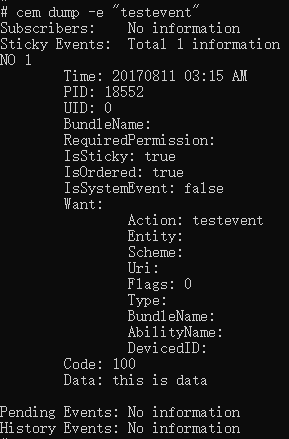
cem dump -e "testevent"
打印公共事件名称为testevent的具体信息。
help
-
介绍
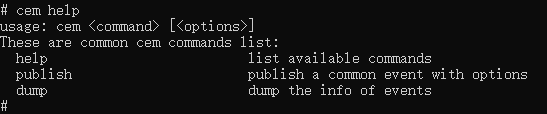
打印帮助信息。
-
用法
cem help -
示例
anm调试助手
dump
-
介绍
打印通知相关信息。
-
用法
anm dump [<options>]参数如下表所示
| 参数 | 参数说明 |
|---|---|
| -A/--active | 打印所有活跃的通知信息 |
| -R/--recent | 打印最近的通知信息 |
| -D/--distributed | 打印来自其他设备的分布式通知信息 |
| --setRecentCount | 可选参数,设置打印最近的通知消息缓存个数 |
| -h/--help | 帮助信息 |
-
示例
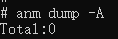
anm dump -A打印活跃的通知信息
anm dump --setRecentCount 10设置打印最近通知消息缓存数量为10
help
-
介绍
打印帮助信息。
-
用法
anm help -
示例
