@ohos.arkui.dragController (DragController)
The dragController module provides APIs for initiating drag actions. When receiving a gesture event, such as a touch or long-press event, an application can initiate a drag action and carry drag information therein.
NOTE
The initial APIs of this module are supported since API version 10. Newly added APIs will be marked with a superscript to indicate their earliest API version. The functionality of this module depends on UI context. This means that the APIs of this module cannot be used where the UI context is unclear. For details, see UIContext. You can preview how this component looks on a real device, but not in DevEco Studio Previewer.
Modules to Import
import { dragController } from "@kit.ArkUI";
dragController.executeDrag(deprecated)
executeDrag(custom: CustomBuilder|DragItemInfo, dragInfo: DragInfo,callback:AsyncCallback<DragEventParam>): void
Initiates a drag action, with the object to be dragged and the drag information passed in. This API uses an asynchronous callback to return the result.
NOTE
This API is deprecated since API version 18. You are advised to use executeDrag instead on the obtained DragController object.
Since API version 11, you can use the getDragController API in UIContext to obtain the DragController object associated with the current UI context.
Atomic service API: This API can be used in atomic services since API version 12.
System capability: SystemCapability.ArkUI.ArkUI.Full
Parameters
| Name | Type | Mandatory | Description |
|---|---|---|---|
| custom | CustomBuilder |DragItemInfo | Yes | Object to be dragged. NOTE The global builder is not supported. If the Image component is used in the builder, enable synchronous loading, that is, set the syncLoad attribute of the component to true. The builder is used only to generate the image displayed during the current dragging. Changes to the builder, if any, apply to the next dragging, but not to the current dragging. |
| dragInfo | DragInfo | Yes | Drag information. |
| callback | AsyncCallback<DragEventParam> | Yes | Callback used to return the result. |
Error codes
For details about the error codes, see Universal Error Codes.
| ID | Error Message |
|---|---|
| 401 | Parameter error. Possible causes: 1. Mandatory parameters are left unspecified; 2.Incorrect parameters types; 3. Parameter verification failed. |
| 100001 | Internal handling failed. |
Example
NOTE
You are advised to use the getDragController API in UIContext to obtain the DragController object associated with the current UI context.
import { dragController } from "@kit.ArkUI";
import { unifiedDataChannel } from '@kit.ArkData';

@Entry
@Component
struct DragControllerPage {
  @State text: string = ''

  @Builder DraggingBuilder() {
    Column() {
      Text("DraggingBuilder")
        .fontColor(Color.White)
        .fontSize(12)
    }
    .width(100)
    .height(100)
    .backgroundColor(Color.Blue)
  }

  build() {
    Column() {
      Button('touch to execute drag')
        .margin(10)
        .onTouch((event?:TouchEvent) => {
          if(event){
            if (event.type == TouchType.Down) {
              let text = new unifiedDataChannel.PlainText()
              text.textContent = 'drag text'
              text.abstract = 'abstract'
              let unifiedData = new unifiedDataChannel.UnifiedData(text)

              let dragInfo: dragController.DragInfo = {
                pointerId: 0,
                data: unifiedData,
                extraParams: ''
              }
              class tmp{
                event:DragEvent|undefined = undefined
                extraParams:string = ''
              }
              let eve:tmp = new tmp()
              this.getUIContext().getDragController().executeDrag(()=>{this.DraggingBuilder()}, dragInfo, (err, eve) => { // You are advised to use this.getUIContext().getDragController().executeDrag().
                if(eve.event){
                  if (eve.event.getResult() == DragResult.DRAG_SUCCESSFUL) {
                    // ...
                  } else if (eve.event.getResult() == DragResult.DRAG_FAILED) {
                    // ...
                  }
                }
              })
            }
          }
        })
      Text(this.text)
        .height(100)
        .width(150)
        .margin({top:20})
        .border({color:Color.Black,width:1})
        .onDrop((dragEvent?:DragEvent)=>{
          if(dragEvent){
            let records: Array<unifiedDataChannel.UnifiedRecord> = dragEvent.getData().getRecords();
            let plainText: unifiedDataChannel.PlainText = records[0] as unifiedDataChannel.PlainText;
            this.text = plainText.textContent;
          }
        })
    }
    .width('100%')
    .height('100%')
  }
}
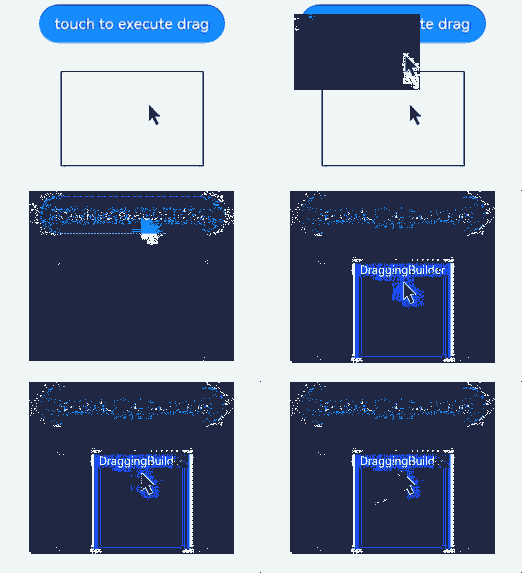
dragController.executeDrag(deprecated)
executeDrag(custom: CustomBuilder|DragItemInfo, dragInfo: DragInfo): Promise<DragEventParam>
Initiates a drag action, with the object to be dragged and the drag information passed in. This API uses a promise to return the result.
NOTE
This API is deprecated since API version 18. You are advised to use executeDrag instead on the obtained DragController object.
Since API version 11, you can use the getDragController API in UIContext to obtain the DragController object associated with the current UI context.
Atomic service API: This API can be used in atomic services since API version 12.
System capability: SystemCapability.ArkUI.ArkUI.Full
Parameters
| Name | Type | Mandatory | Description |
|---|---|---|---|
| custom | CustomBuilder |DragItemInfo | Yes | Object to be dragged. |
| dragInfo | DragInfo | Yes | Drag information. |
Return value
| Type | Description |
|---|---|
| Promise<DragEventParam> | Promise used to return the result. |
Error codes For details about the error codes, see Universal Error Codes.
| ID | Error Message |
|---|---|
| 401 | Parameter error. Possible causes: 1. Mandatory parameters are left unspecified; 2.Incorrect parameters types; 3. Parameter verification failed. |
| 100001 | Internal handling failed. |
Example
NOTE
You are advised to use the getDragController API in UIContext to obtain the DragController object associated with the current UI context.
import { dragController } from "@kit.ArkUI"
import { image } from '@kit.ImageKit';
import { unifiedDataChannel } from '@kit.ArkData';

@Entry
@Component
struct DragControllerPage {
  @State pixmap: image.PixelMap|undefined = undefined
  @State text: string = ''

  @Builder DraggingBuilder() {
    Column() {
      Text("DraggingBuilder")
        .fontColor(Color.White)
    }
    .width(100)
    .height(100)
    .backgroundColor(Color.Blue)
  }

  @Builder PixmapBuilder() {
    Column() {
      Text("PixmapBuilder")
        .fontColor(Color.White)
        .fontSize(15)
    }
    .width(100)
    .height(100)
    .backgroundColor(Color.Blue)
  }

  aboutToAppear() {
    let pb: CustomBuilder = (): void => {
      this.PixmapBuilder()
    }
    this.getUIContext().getComponentSnapshot().createFromBuilder(pb).then((pix: image.PixelMap) => {
      this.pixmap = pix;
    })
  }

  build() {
    Column() {
      Button('touch to execute drag')
        .margin(10)
        .onTouch((event?:TouchEvent) => {
          if(event){
            if (event.type == TouchType.Down) {
              let text = new unifiedDataChannel.PlainText()
              text.textContent = 'drag text'
              text.abstract = 'abstract'
              let unifiedData = new unifiedDataChannel.UnifiedData(text)

              let dragInfo: dragController.DragInfo = {
                pointerId: 0,
                data: unifiedData,
                extraParams: ''
              }
              let dragItemInfo: DragItemInfo = {
                pixelMap: this.pixmap,
                builder: ()=>{this.DraggingBuilder()},
                extraInfo: "DragItemInfoTest"
              }

              class tmp{
                event:DragResult|undefined = undefined
                extraParams:string = ''
              }
              let eve:tmp = new tmp()
              this.getUIContext().getDragController().executeDrag(dragItemInfo, dragInfo) // You are advised to use this.getUIContext().getDragController().executeDrag().
                .then((eve) => {
                  if (eve.event.getResult() == DragResult.DRAG_SUCCESSFUL) {
                    // ...
                  } else if (eve.event.getResult() == DragResult.DRAG_FAILED) {
                    // ...
                  }
                })
                .catch((err:Error) => {
                })
            }
          }
        })
      Text(this.text)
        .height(100)
        .width(150)
        .margin({top:20})
        .border({color:Color.Black,width:1})
        .onDrop((dragEvent?:DragEvent)=>{
          if(dragEvent){
            let records: Array<unifiedDataChannel.UnifiedRecord> = dragEvent.getData().getRecords();
            let plainText: unifiedDataChannel.PlainText = records[0] as unifiedDataChannel.PlainText;
            this.text = plainText.textContent;
          }
        })
    }
    .width('100%')
    .height('100%')
  }
}

DragInfo
Atomic service API: This API can be used in atomic services since API version 12.
System capability: SystemCapability.ArkUI.ArkUI.Full
Defines the attributes required for initiating a drag action and information carried in the dragging process.
| Name | Type | Mandatory | Description |
|---|---|---|---|
| pointerId | number | Yes | ID of the touch point on the screen when dragging is started. The value is an integer ranging from 0 to 9. |
| data | unifiedDataChannel.UnifiedData | No | Data carried in the dragging process. |
| extraParams | string | No | Additional information about the drag action. Not supported currently. The default value is null. |
| touchPoint11+ | TouchPoint | No | Coordinates of the touch point. If this parameter is not set, the touch point is centered horizontally and shifted downward by 20% from the top. |
| previewOptions11+ | DragPreviewOptions | No | Processing mode of the drag preview and the display of the number badge during dragging. |
dragController.createDragAction(deprecated)
createDragAction(customArray: Array<CustomBuilder |DragItemInfo>, dragInfo: DragInfo): DragAction
Creates a drag action object for initiating drag and drop operations. You need to explicitly specify one or more drag previews, the drag data, and the drag handle point. If a drag operation initiated by an existing drag action object is not completed, no new object can be created, and calling the API will throw an exception. After the lifecycle of the drag action object ends, the callback functions registered on this object become invalid. Therefore, it is necessary to hold this object within a longer scope and replace the old value with a new object returned by createDragAction before each drag initiation.
NOTE This API is supported since API version 10 and deprecated since API version 18. You are advised to use createDragAction instead on the obtained DragController object.
Since API version 11, you can use the getDragController API in UIContext to obtain the DragController object associated with the current UI context.
For optimal drag and drop performance, limit the number of drag previews.
Atomic service API: This API can be used in atomic services since API version 12.
System capability: SystemCapability.ArkUI.ArkUI.Full
Parameters
| Name | Type | Mandatory | Description |
|---|---|---|---|
| customArray | Array<CustomBuilder |DragItemInfo> | Yes | Object to be dragged. |
| dragInfo | DragInfo | Yes | Drag information. |
Return value
| Type | Description |
|---|---|
| DragAction | DragAction object, which is used to subscribe to drag state changes and start the drag service. |
Error codes
For details about the error codes, see Universal Error Codes.
| ID | Error Message |
|---|---|
| 401 | Parameter error. Possible causes: 1. Mandatory parameters are left unspecified; 2.Incorrect parameters types; 3. Parameter verification failed. |
| 100001 | Internal handling failed. |
Example
NOTE
You are advised to use the getDragController API in UIContext to obtain the DragController object associated with the current UI context.
import { dragController } from "@kit.ArkUI";
import { image } from '@kit.ImageKit';
import { unifiedDataChannel } from '@kit.ArkData';

@Entry
@Component
struct DragControllerPage {
  @State pixmap: image.PixelMap|null = null
  @State text: string = ''
  private dragAction: dragController.DragAction|null = null;
  customBuilders:Array<CustomBuilder|DragItemInfo> = new Array<CustomBuilder|DragItemInfo>();
  @Builder DraggingBuilder() {
    Column() {
      Text("DraggingBuilder")
        .fontColor(Color.White)
        .fontSize(12)
    }
    .width(100)
    .height(100)
    .backgroundColor(Color.Blue)
  }

  build() {
    Column() {

      Column() {
        Text(this.text)
          .width('100%')
          .height('100%')
          .fontColor(Color.White)
          .fontSize(18)
          .onDrop((dragEvent?:DragEvent)=>{
            if(dragEvent){
              let records: Array<unifiedDataChannel.UnifiedRecord> = dragEvent.getData().getRecords();
              let plainText: unifiedDataChannel.PlainText = records[0] as unifiedDataChannel.PlainText;
              this.text = plainText.textContent;
            }
          })
      }
      .width(100)
      .height(100)
      .backgroundColor(Color.Red)
      .margin(10)

      Button('Drag Multiple Objects').onTouch((event?:TouchEvent) => {
        if(event){
          if (event.type == TouchType.Down) {
            console.info("muti drag Down by listener");
            this.customBuilders.splice(0, this.customBuilders.length);
            this.customBuilders.push(()=>{this.DraggingBuilder()});
            this.customBuilders.push(()=>{this.DraggingBuilder()});
            this.customBuilders.push(()=>{this.DraggingBuilder()});
            let text = new unifiedDataChannel.PlainText()
            text.textContent = 'drag text'
            let unifiedData = new unifiedDataChannel.UnifiedData(text)
            let dragInfo: dragController.DragInfo = {
              pointerId: 0,
              data: unifiedData,
              extraParams: ''
            }
            try{
              this.dragAction = this.getUIContext().getDragController().createDragAction(this.customBuilders, dragInfo) // You are advised to use this.getUIContext().getDragController().createDragAction().
              if(!this.dragAction){
                console.info("listener dragAction is null");
                return
              }
              this.dragAction.on('statusChange', (dragAndDropInfo: dragController.DragAndDropInfo)=>{
                if (dragAndDropInfo.status == dragController.DragStatus.STARTED) {
                  console.info("drag has start");
                } else if (dragAndDropInfo.status == dragController.DragStatus.ENDED){
                  console.info("drag has end");
                  if (!this.dragAction) {
                    return
                  }
                  this.dragAction.off('statusChange')
                }
              })
              this.dragAction.startDrag().then(()=>{}).catch((err:Error)=>{
                console.info("start drag Error:" + err.message);
              })
            } catch(err) {
              console.info("create dragAction Error:" + err.message);
            }
          }
        }
      }).margin({top:20})
    }
  }
}

DragAction11+
Implements a DragAction object to subscribe to drag state changes and start the drag service.
Atomic service API: This API can be used in atomic services since API version 12.
System capability: SystemCapability.ArkUI.ArkUI.Full
startDrag11+
startDrag(): Promise<void>
Starts the drag service. This API uses a promise to return the result.
Atomic service API: This API can be used in atomic services since API version 12.
System capability: SystemCapability.ArkUI.ArkUI.Full
Error codes
| ID | Error Message |
|---|---|
| 100001 | Internal handling failed. |
Example
NOTE
You are advised to use the getDragController API in UIContext to obtain the DragController object associated with the current UI context.
import { dragController } from "@kit.ArkUI";
import { unifiedDataChannel } from '@kit.ArkData';

@Entry
@Component
struct DragControllerPage {
  private dragAction: dragController.DragAction|null = null;
  customBuilders:Array<CustomBuilder|DragItemInfo> = new Array<CustomBuilder|DragItemInfo>();
  @Builder DraggingBuilder() {
    Column() {
      Text("DraggingBuilder")
        .fontColor(Color.White)
        .fontSize(12)
    }
    .width(100)
    .height(100)
    .backgroundColor(Color.Blue)
  }

  build() {
    Column() {
      Button('Touch to Drag').onTouch((event?:TouchEvent) => {
        if(event){
          if (event.type == TouchType.Down) {
            this.customBuilders.splice(0, this.customBuilders.length);
            this.customBuilders.push(()=>{this.DraggingBuilder()});
            let text = new unifiedDataChannel.PlainText()
            text.textContent = 'drag text'
            let unifiedData = new unifiedDataChannel.UnifiedData(text)
            let dragInfo: dragController.DragInfo = {
              pointerId: 0,
              data: unifiedData,
              extraParams: ''
            }
            try{
              this.dragAction = this.getUIContext().getDragController().createDragAction(this.customBuilders, dragInfo) // You are advised to use this.getUIContext().getDragController().createDragAction().
              if(!this.dragAction){
                console.info("listener dragAction is null");
                return;
              }
              this.dragAction.startDrag().then(()=>{}).catch((err:Error)=>{
                console.info("start drag Error:" + err.message);
              })
            } catch(err) {
              console.info("create dragAction Error:" + err.message);
            }
          }
        }
      }).margin({top:20})
    }
  }
}
on('statusChange')11+
on(type: 'statusChange', callback: Callback<DragAndDropInfo>): void
Subscribes to drag state changes.
Atomic service API: This API can be used in atomic services since API version 12.
System capability: SystemCapability.ArkUI.ArkUI.Full
Parameters
| Name | Type | Mandatory | Description |
|---|---|---|---|
| type | string | Yes | Event type. The value is fixed at 'statusChange', which indicates the drag state change event. |
| callback | Callback<DragAndDropInfo> | Yes | Callback used to return a DragAndDropInfo instance. |
Example
NOTE
You are advised to use the getDragController API in UIContext to obtain the DragController object associated with the current UI context.
import { dragController } from "@kit.ArkUI";
import { unifiedDataChannel } from '@kit.ArkData';

@Entry
@Component
struct DragControllerPage {
  private dragAction: dragController.DragAction|null = null;
  customBuilders:Array<CustomBuilder|DragItemInfo> = new Array<CustomBuilder|DragItemInfo>();
  @Builder DraggingBuilder() {
    Column() {
      Text("DraggingBuilder")
        .fontColor(Color.White)
        .fontSize(12)
    }
    .width(100)
    .height(100)
    .backgroundColor(Color.Blue)
  }

  build() {
    Column() {
      Button('touch to execute drag').onTouch((event?:TouchEvent) => {
        if(event){
          if (event.type == TouchType.Down) {
            this.customBuilders.splice(0, this.customBuilders.length);
            this.customBuilders.push(()=>{this.DraggingBuilder()});
            let text = new unifiedDataChannel.PlainText()
            text.textContent = 'drag text'
            let unifiedData = new unifiedDataChannel.UnifiedData(text)
            let dragInfo: dragController.DragInfo = {
              pointerId: 0,
              data: unifiedData,
              extraParams: ''
            }
            let func = (dragAndDropInfo: dragController.DragAndDropInfo) => {
              console.info("Register to listen on drag status", JSON.stringify(dragAndDropInfo));
            }
            try{
              this.dragAction = this.getUIContext().getDragController().createDragAction(this.customBuilders, dragInfo) // You are advised to use this.getUIContext().getDragController().createDragAction().
              if(!this.dragAction){
                console.info("listener dragAction is null");
                return;
              }
              // Subscribe to drag state changes. The information in func will be logged once a change is detected.
              this.dragAction.on('statusChange', func);
              this.dragAction.startDrag().then(()=>{}).catch((err:Error)=>{
                console.info("start drag Error:" + err.message);
              })
            } catch(err) {
              console.info("create dragAction Error:" + err.message);
            }
          }
        }
      }).margin({top:20})
    }
  }
}
off('statusChange')11+
off(type: 'statusChange', callback?: Callback<DragAndDropInfo>): void
Unsubscribes from drag state changes.
Atomic service API: This API can be used in atomic services since API version 12.
System capability: SystemCapability.ArkUI.ArkUI.Full
Parameters
| Name | Type | Mandatory | Description |
|---|---|---|---|
| type | string | Yes | Event type. The value is fixed at 'statusChange', which indicates the drag state change event. |
| callback | Callback<DragAndDropInfo> | No | Callback to unregister. If this parameter is not specified, this API unregisters all callbacks for the specified event. |
Example
NOTE
You are advised to use the getDragController API in UIContext to obtain the DragController object associated with the current UI context.
import { dragController } from "@kit.ArkUI";
import { unifiedDataChannel } from '@kit.ArkData';

@Entry
@Component
struct DragControllerPage {
  private dragAction: dragController.DragAction|null = null;
  customBuilders:Array<CustomBuilder|DragItemInfo> = new Array<CustomBuilder|DragItemInfo>();
  @Builder DraggingBuilder() {
    Column() {
      Text("DraggingBuilder")
        .fontColor(Color.White)
        .fontSize(12)
    }
    .width(100)
    .height(100)
    .backgroundColor(Color.Blue)
  }

  build() {
    Column() {
      Button('touch to execute drag').onTouch((event?:TouchEvent) => {
        if(event){
          if (event.type == TouchType.Down) {
            this.customBuilders.splice(0, this.customBuilders.length);
            this.customBuilders.push(()=>{this.DraggingBuilder()});
            let text = new unifiedDataChannel.PlainText()
            text.textContent = 'drag text'
            let unifiedData = new unifiedDataChannel.UnifiedData(text)
            let dragInfo: dragController.DragInfo = {
              pointerId: 0,
              data: unifiedData,
              extraParams: ''
            }
            let func = (dragAndDropInfo: dragController.DragAndDropInfo) => {
              console.info("Register to listen on drag status", JSON.stringify(dragAndDropInfo));
            }
            try{
              this.dragAction = this.getUIContext().getDragController().createDragAction(this.customBuilders, dragInfo) // You are advised to use this.getUIContext().getDragController().createDragAction().
              if(!this.dragAction){
                console.info("listener dragAction is null");
                return;
              }
              this.dragAction.on('statusChange', func);
              // Unsubscribe from drag state changes. The information in func will not be logged after a drag operation starts.
              this.dragAction.off('statusChange', func);
              this.dragAction.startDrag().then(()=>{}).catch((err:Error)=>{
                console.info("start drag Error:" + err.message);
              })
            } catch(err) {
              console.info("create dragAction Error:" + err.message);
            }
          }
        }
      }).margin({top:20})
    }
  }
}
DragAndDropInfo11+
Atomic service API: This API can be used in atomic services since API version 12.
System capability: SystemCapability.ArkUI.ArkUI.Full
Provides the data reported when the state changes during dragging.
| Name | Type | Mandatory | Description |
|---|---|---|---|
| status | DragStatus | Yes | Current dragging state (started or ended). |
| event | DragEvent | Yes | Drag event corresponding to the current state. The drag event initiated by dragController only supports the APIs for obtaining the result and behavior, and is used exclusively for the dragging end state. |
| extraParams | string | No | Additional information about the drag action. Not supported currently. The default value is null. |
DragStatus11+
Atomic service API: This API can be used in atomic services since API version 12.
System capability: SystemCapability.ArkUI.ArkUI.Full
Describes the dragging start and end states.
| Name | Value | Description |
|---|---|---|
| STARTED | 0 | Dragging is started. |
| ENDED | 1 | Dragging ends. |
AnimationOptions11+
Atomic service API: This API can be used in atomic services since API version 12.
System capability: SystemCapability.ArkUI.ArkUI.Full
Defines the attributes required for initiating a drag action and information carried in the dragging process.
| Name | Type | Mandatory | Description |
|---|---|---|---|
| duration | number | No | Animation duration, in ms. Default value: 1000 NOTE - If this parameter is set to a value less than 0, the value 0 is used. - Floating-point values will be rounded down to integers. For example, if the value set is 1.2, 1 will be used. |
| curve | Curve |ICurve | No | Animation curve. Default value: Curve.EaseInOut |
DragEventParam12+
Atomic service API: This API can be used in atomic services since API version 12.
System capability: SystemCapability.ArkUI.ArkUI.Full
Represents the callback used to return the result after a drag ends.
| Name | Type | Mandatory | Description |
|---|---|---|---|
| event | DragEvent | Yes | Drag event information that includes only the drag result. |
| extraParams | string | Yes | Additional information about the drag event. |
dragController.getDragPreview(deprecated)
getDragPreview(): DragPreview
Obtains the DragPreview object, which represents the preview displayed during a drag operation.
NOTE
This API is supported since API version 10 and deprecated since API version 18. You are advised to use getDragPreview instead on the obtained DragController object.
Since API version 11, you can use the getDragController API in UIContext to obtain the DragController object associated with the current UI context.
Atomic service API: This API can be used in atomic services since API version 12.
System capability: SystemCapability.ArkUI.ArkUI.Full
Return value
| Type | Description |
|---|---|
| DragPreview | DragPreview object. It provides the API for setting the preview style. It does not work in the OnDrop and OnDragEnd callbacks. |
Example
For details, see animate.
DragPreview11+
Implements a DragPreview object. This API does not work in the OnDrop and OnDragEnd callbacks.
Atomic service API: This API can be used in atomic services since API version 12.
System capability: SystemCapability.ArkUI.ArkUI.Full
setForegroundColor11+
setForegroundColor(color: ResourceColor): void
Sets the foreground color of the drag preview. This API does not work in the OnDrop and OnDragEnd callbacks. It can only be used on the object obtained through the getDragPreview() API.
Atomic service API: This API can be used in atomic services since API version 12.
System capability: SystemCapability.ArkUI.ArkUI.Full
Parameters
| Name | Type | Mandatory | Description |
|---|---|---|---|
| color | ResourceColor | Yes | Foreground color of the drag preview. |
Example
For details, see animate.
animate11+
animate(options: AnimationOptions, handler: () => void): void
Applies a foreground color animation to the drag preview. This API does not work in the OnDrop and OnDragEnd callbacks. It can only be used on the object obtained through the getDragPreview() API.
Atomic service API: This API can be used in atomic services since API version 12.
System capability: SystemCapability.ArkUI.ArkUI.Full
Parameters
| Name | Type | Mandatory | Description |
|---|---|---|---|
| options | AnimationOptions | Yes | Animation settings. |
| handler | () => void | Yes | Callback used to change attributes such as the background mask color. |
Example
NOTE
You are advised to use the getDragController API in UIContext to obtain the DragController object associated with the current UI context.
- In the EntryAbility.ets file, obtain the UI context and save it to LocalStorage.
import { AbilityConstant, UIAbility, Want } from '@kit.AbilityKit';
import { hilog } from '@kit.PerformanceAnalysisKit';
import { window, UIContext } from '@kit.ArkUI';

let uiContext: UIContext;
let localStorage: LocalStorage = new LocalStorage('uiContext');

export default class EntryAbility extends UIAbility {
storage: LocalStorage = localStorage;

onCreate(want: Want, launchParam: AbilityConstant.LaunchParam): void {
  hilog.info(0x0000, 'testTag', '%{public}s', 'Ability onCreate');
}

onDestroy(): void {
  hilog.info(0x0000, 'testTag', '%{public}s', 'Ability onDestroy');
}

onWindowStageCreate(windowStage: window.WindowStage): void {
  hilog.info(0x0000, 'testTag', '%{public}s', 'Ability onWindowStageCreate');

  windowStage.loadContent('pages/Index', this.storage, (err, data) => {
    if (err.code) {
      hilog.error(0x0000, 'testTag', 'Failed to load the content. Cause: %{public}s', JSON.stringify(err) ?? '');
      return;
    }
    hilog.info(0x0000, 'testTag', 'Succeeded in loading the content. Data: %{public}s', JSON.stringify(data) ?? '');
    windowStage.getMainWindow((err, data) => {
      if (err.code) {
        hilog.error(0x0000, 'Failed to obtain the main window. Cause:' + err.message, '');
        return;
      }
      let windowClass: window.Window = data;
      uiContext = windowClass.getUIContext();
      this.storage.setOrCreate<UIContext>('uiContext', uiContext);
    })
  });
}
}
- In the Index.ets file, call this.getUIContext().getSharedLocalStorage() to obtain the UI context and then use the DragController object obtained to perform subsequent operations.
import { unifiedDataChannel } from '@kit.ArkData';
import { hilog } from '@kit.PerformanceAnalysisKit';
import { dragController, curves, promptAction, UIContext } from "@kit.ArkUI";
import { image } from '@kit.ImageKit';
import { BusinessError } from '@kit.BasicServicesKit';

@Entry()
@Component
struct DragControllerPage {
@State pixmap: image.PixelMap|null = null;
storages = this.getUIContext().getSharedLocalStorage();

@Builder DraggingBuilder() {
  Column() {
    Text("DraggingBuilder")
      .fontColor(Color.White)
      .fontSize(12)
  }
  .width(100)
  .height(100)
  .backgroundColor(Color.Blue)
}

@Builder PixmapBuilder() {
  Column() {
    Text("PixmapBuilder")
  }
  .width(100)
  .height(100)
  .backgroundColor(Color.Blue)
}

build() {
  Column() {
    Button('Drag Here')
      .margin(10)
      .onDragEnter(() => {
      try {
        let uiContext: UIContext = this.storages?.get<UIContext>('uiContext') as UIContext;
        let previewObj: dragController.DragPreview = uiContext.getDragController().getDragPreview();
        let foregroundColor: ResourceColor = Color.Green;

        let previewAnimation: dragController.AnimationOptions = {
          curve: curves.cubicBezierCurve(0.2,0,0,1),
        }
        previewObj.animate(previewAnimation, () => {
          previewObj.setForegroundColor(foregroundColor);
        });
      } catch (error) {
        let msg = (error as BusinessError).message;
        let code = (error as BusinessError).code;
        hilog.error(0x0000, `show error code is ${code}, message is ${msg}`, '');
      }
    })
      .onDrop(() => {
        this.getUIContext().getPromptAction().showToast({duration: 100, message: 'Drag Success', bottom: 400})
      })
    Button('Drag').onTouch((event?:TouchEvent) => {
      if(event){
        if (event.type == TouchType.Down) {
          let text = new unifiedDataChannel.Text()
          let unifiedData = new unifiedDataChannel.UnifiedData(text)
          let dragInfo: dragController.DragInfo = {
            pointerId: 0,
            data: unifiedData,
            extraParams: ''
          }
          class tmp{
            event:DragEvent|undefined = undefined
            extraParams:string = ''
          }
          let eve:tmp = new tmp()
          this.getUIContext().getDragController().executeDrag(() => { // You are advised to usethis.getUIContext().getDragController().executeDrag().
            this.DraggingBuilder()
          }, dragInfo, (err , eve) => {
            hilog.info(0x0000, `ljx ${JSON.stringify(err)}`, '')
            if (eve && eve.event) {
              if (eve.event.getResult() == DragResult.DRAG_SUCCESSFUL) {
                hilog.info(0x0000, 'success', '');
              } else if (eve.event.getResult() == DragResult.DRAG_FAILED) {
                hilog.info(0x0000, 'failed', '');
              }
            }
          })
        }
      }
    }).margin({top:100})
  }
  .width('100%')
  .height('100%')
}
}

DragStartRequestStatus18+
Enumerates the states defining whether an application can initiate a drag operation.
Atomic service API: This API can be used in atomic services since API version 18.
System capability: SystemCapability.ArkUI.ArkUI.Full
| Name | Value | Description |
|---|---|---|
| WAITING | 0 | The application is preparing data and cannot initiate a drag operation yet. |
| READY | 1 | The application has completed data preparation and is ready to initiate a drag operation. |
你可能感兴趣的鸿蒙文章
harmony 鸿蒙ARKUI_TextPickerCascadeRangeContent
harmony 鸿蒙ARKUI_TextPickerRangeContent
harmony 鸿蒙ArkUI_AnimateCompleteCallback
harmony 鸿蒙ArkUI_ContextCallback