Ability Assistant Usage
The ability assistant enables you to start applications, atomic services, and test cases and debug applications. By using this tool, you can send commands in the hdc shell to perform various system operations, such as starting abilities, forcibly stopping processes, and printing ability information.
Query-related Commands
-
help
Displays help information for the ability assistant.
Return value
Returns the help information.
Method
aa help
Ability-related Commands
-
start
Starts an ability.
| Name | Description |
|---|---|
| -h/--help | Help information. |
| -d | Device ID. This parameter is optional. |
| -a | Ability name. This parameter is mandatory. |
| -b | Bundle name. This parameter is mandatory. |
| -D | Debugging mode. This parameter is optional. |
Return value
Returns "start ability successfully." if the ability is started; returns "error: failed to start ability." otherwise.
Method
aa start [-d <device-id>] -a <ability-name> -b <bundle-name> [-D]
-
stop-service
Stops a Service ability.
| Name | Description |
|---|---|
| -h/--help | Help information. |
| -d | Device ID. This parameter is optional. |
| -a | Ability name. This parameter is mandatory. |
| -b | Bundle name. This parameter is mandatory. |
Return value
Returns "stop service ability successfully." if the Service ability is stopped; returns "error: failed to stop service ability." otherwise.
Method
aa stop-service [-d <device-id>] -a <ability-name> -b <bundle-name>
-
dump
Prints ability-related information.
| Name | Level-2 Parameter | Description |
|---|---|---|
| -h/--help | - | Prints help information. |
| -a/--all | - | Prints ability information in all missions. |
| -l/--mission-list | type (All logs are printed if this parameter is left unspecified.) | Prints mission stack information. The following values are available for type: - NORMAL - DEFAULT_STANDARD - DEFAULT_SINGLE - LAUNCHER |
| -e/--extension | elementName | Prints extended component information. |
| -u/--userId | UserId | Prints stack information of a specified user ID. This parameter must be used together with other parameters. Example commands: aa dump -a -u 100 and aa dump -d -u 100. |
| -d/--data | - | Prints Data ability information. |
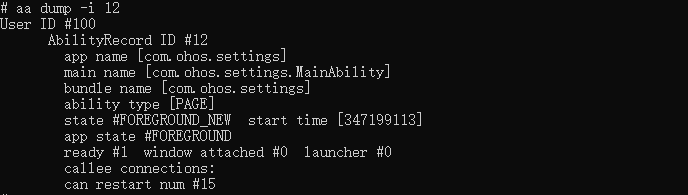
| -i/--ability | AbilityRecord ID | Prints detailed information about a specified ability. |
| -c/--client | - | Prints detailed ability information. This parameter must be used together with other parameters. Example commands: aa dump -a -c and aa dump -i 21 -c. |
Method
aa dump -a

aa dump -l

aa dump -i 12
-
force-stop
Forcibly stops a process based on the bundle name.
Return value
Returns "force stop process successfully." if the process is forcibly stopped; returns "error: failed to force stop process." otherwise.
Method
aa force-stop <bundle-name>
你可能感兴趣的鸿蒙文章
harmony 鸿蒙Ability Framework Overview
harmony 鸿蒙Test Framework Usage
harmony 鸿蒙ContinuationManager Development
harmony 鸿蒙Data Ability Development
harmony 鸿蒙FA Widget Development