Introduction to Image Kit
Image Kit provides APIs for you to parse, process, and reconstruct images. It handles tasks like decoding, encoding, editing, processing, and receiving images.
Highlights
- Supports encoding and decoding of popular image formats, such as HEIF, JPEG, PNG, and WebP.
- Supports HDR image encoding and decoding, providing users with a better color experience; leveraging AI to make SDR images look like HDR.
- Provides a variety of image editing and processing capabilities, including image transformation, PixelMap operations, and filter effects.
- Uses efficient algorithms and optimization policies to make image processing faster and more efficient.
Basic Concepts
Be familiar with the following basic concepts before development:
-
Image decoding
The operation of decoding an image in a supported format into a PixelMap for image display or processing.
-
PixelMap
An uncompressed bitmap obtained after image decoding. It is used for image display or processing.
-
Picture
An object that includes a main picture, auxiliary picture, and metadata. The main picture is a PixelMap object that contains most information about the image and is mainly used for image display or processing. The auxiliary picture is used to store data related to but different from the main picture, revealing more comprehensive details. The metadata is generally used to store information about the image file.
-
Image editing and processing
A series of operations on the PixelMap, such as rotation, scaling, opacity setting, image information obtaining, and pixel data reading and writing. The origin of the coordinate system is at the upper left corner.
-
Image encoding
The operation of encoding a PixelMap or Picture into an image in different formats for subsequent processing, such as storage and transmission.
How to Use
Image Kit provides abundant image processing capabilities. You can use the entire process of image decoding, editing, processing, and re-encoding, or you can just pass the decoded PixelMap to the Image component for display without extra processing. Both decoding and encoding offer many options to fit different development needs.
You can manipulate specific parts of an image by performing PixelMap operations on the decoded PixelMap. Additionally, you can apply image transformations such as cropping, scaling, translating, rotating, flipping, and opacity setting.
You can add filter effects to images using ImageEffect and enhance image details, convert color spaces, and process HDR images with ImageProcessing.
You can read and edit image EXIF data, which means you can obtain and set extra properties in image files, like basic image information (width, height, rotation), photography settings (aperture, focal length), and GPS information (longitude, latitude).
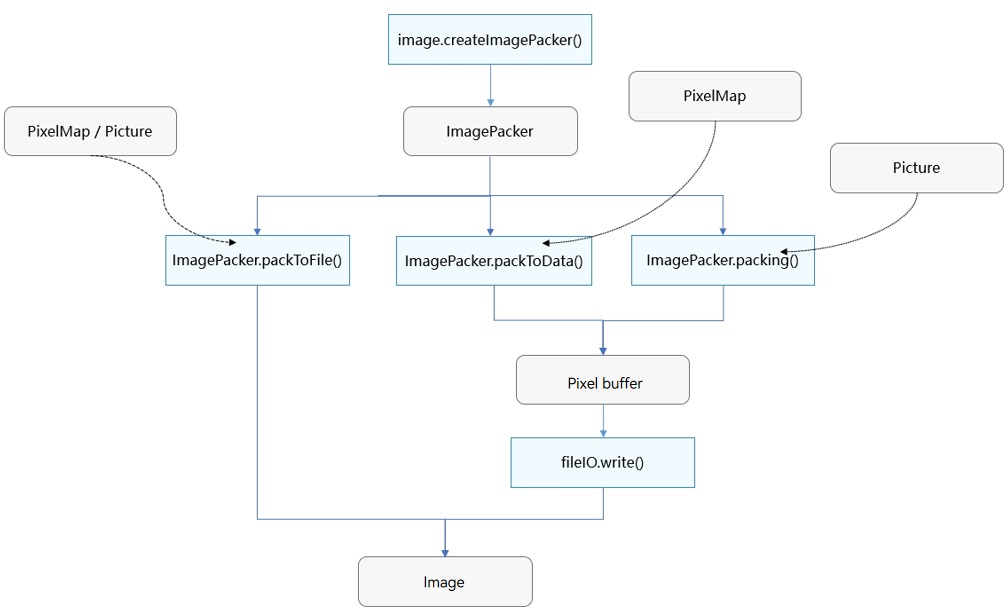
Figure 1 and Figure 2 show the image decoding and encoding processes. The PixelMap obtained after decoding can be used for image display, editing, and processing.
Figure 1 Image decoding process
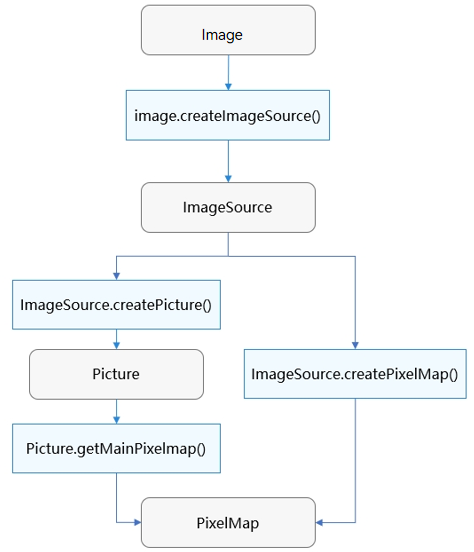
Figure 2 Image encoding process
Constraints
-
Constraints on read and write permissions
During image processing, applications may need to request the read and write permissions from users on images. For details about how to request the permissions, see Requesting User Authorization.
-
Selecting appropriate C APIs
Image Kit provides two sets of C APIs: C APIs dependent on JS objects and C APIs independent of JS objects.
-
C APIs that depend on JS objects
These APIs are used to encode and decode images, receive images, and process image data. Example code related to these functionalities is provided in Using Image to Decode Images. You can find these APIs in Image. These APIs are introduced prior to API version 11, and no additional features will be included in later versions. Therefore, these APIs are not recommended.
-
C APIs independent of JS objects
In addition to the functionalities mentioned above, these APIs implements new features such as picture encoding and decoding. For details about the development guide, see Using Image_NativeModule to Decode Images. You can find these APIs in Image_NativeModule. These APIs are available since API version 12 and are expected to keep evolving. You are encouraged to use them.
NOTE
You are not advised to use both sets of C APIs in your code. It may cause compatibility issues in some scenarios.
-
Related Kits
Image Kit handles image encoding, decoding, receiving, editing, and processing. It supports the Image component, Gallery, and other applications that have image-related requirements. The PixelMap obtained after image decoding can be passed to the Image component for display. The ImageReceiver can be used to implement secondary processing of preview streams.
你可能感兴趣的鸿蒙文章
harmony 鸿蒙Allocating Memory for Image Decoding (C/C++)
harmony 鸿蒙Allocating Memory for Image Decoding (ArkTS)
harmony 鸿蒙Using ImageSource to Decode Images
harmony 鸿蒙Using ImageEffect to Edit Images
harmony 鸿蒙Using ImagePacker to Encode Images
harmony 鸿蒙Using Image_NativeModule to Process Image Information