Class (ShaderEffect)
Implements the shader effect. After a shader effect is set for a pen or brush, the shader effect instead of the color attribute is used for drawing. In this case, the alpha value set for the pen or brush still takes effect.
NOTE
The initial APIs of this module are supported since API version 11. Newly added APIs will be marked with a superscript to indicate their earliest API version.
The initial APIs of this class are supported since API version 12.
This module uses the physical pixel unit, px.
This module operates under a single-threaded model. The caller needs to manage thread safety and context state transitions.
Modules to Import
import { drawing } from '@kit.ArkGraphics2D';
createComposeShader20+
static createComposeShader(dstShaderEffect: ShaderEffect, srcShaderEffect: ShaderEffect, blendMode: BlendMode): ShaderEffect
Creates a shader by blending two existing shaders in a certain way.
System capability: SystemCapability.Graphics.Drawing
Parameters
| Name | Type | Mandatory | Description |
|---|---|---|---|
| dstShaderEffect | ShaderEffect | Yes | Shader that serves as the destination color in blend mode. |
| srcShaderEffect | ShaderEffect | Yes | Shader that serves as the source color in blend mode. |
| blendMode | BlendMode | Yes | Blend mode. |
Returns
| Type | Description |
|---|---|
| ShaderEffect | ShaderEffect object created. |
Error codes
For details about the following error code, see Drawing and Display Error Codes.
| ID | Error Message |
|---|---|
| 25900001 | Parameter error.Possible causes: Incorrect parameter range. |
Example
import { drawing } from '@kit.ArkGraphics2D';

let dstShader = drawing.ShaderEffect.createColorShader(0xFF0000FF);
let srcShader = drawing.ShaderEffect.createColorShader(0xFFFF0000);
let shader = drawing.ShaderEffect.createComposeShader(dstShader, srcShader, drawing.BlendMode.SRC);
createImageShader20+
static createImageShader(pixelmap: image.PixelMap, tileX: TileMode, tileY: TileMode, samplingOptions: SamplingOptions, matrix?: Matrix|null): ShaderEffect
Creates a shader based on an image. You are advised not to use the function for the canvas of the capture type because it affects the performance.
System capability: SystemCapability.Graphics.Drawing
Parameters
| Name | Type | Mandatory | Description |
|---|---|---|---|
| pixelmap | image.PixelMap | Yes | Image object to be sampled. |
| tileX | TileMode | Yes | Tile mode in the horizontal direction. |
| tileY | TileMode | Yes | Tile mode in the vertical direction. |
| samplingOptions | SamplingOptions | Yes | Image sampling options. |
| matrix | Matrix |null | No | (Optional) Matrix transformation applied to an image. If this parameter is left empty, no transformation is applied. |
Returns
| Type | Description |
|---|---|
| ShaderEffect | ShaderEffect object created. |
Error codes
For details about the following error code, see Drawing and Display Error Codes.
| ID | Error Message |
|---|---|
| 25900001 | Parameter error.Possible causes: Incorrect parameter range. |
Example
import { RenderNode } from '@kit.ArkUI';
import { image } from '@kit.ImageKit';
import { drawing } from '@kit.ArkGraphics2D';

class DrawingRenderNode extends RenderNode {
  draw(context: DrawContext) {
    const width = 1000;
    const height = 1000;
    const bufferSize = width * height * 4;
    const color: ArrayBuffer = new ArrayBuffer(bufferSize);

    const colorData = new Uint8Array(color);
    for (let i = 0; i < colorData.length; i += 4) {
      colorData[i] = 255;
      colorData[i+1] = 156;
      colorData[i+2] = 0;
      colorData[i+3] = 255;
    }

    let opts: image.InitializationOptions = {
      editable: true,
      pixelFormat: 3,
      size: { height, width }
    }

    let pixelMap: image.PixelMap = image.createPixelMapSync(color, opts);
    let matrix = new drawing.Matrix();
    let options = new drawing.SamplingOptions(drawing.FilterMode.FILTER_MODE_NEAREST);
    if (pixelMap != null) {
      let imageShader =
        drawing.ShaderEffect.createImageShader(pixelMap, drawing.TileMode.REPEAT, drawing.TileMode.MIRROR, options,
          matrix);
    }
  }
}
createColorShader12+
static createColorShader(color: number): ShaderEffect
Creates a ShaderEffect object with a single color.
System capability: SystemCapability.Graphics.Drawing
Parameters
| Name | Type | Mandatory | Description |
|---|---|---|---|
| color | number | Yes | Color in the ARGB format. The value is a 32-bit unsigned integer. |
Returns
| Type | Description |
|---|---|
| ShaderEffect | ShaderEffect object with a single color. |
Error codes
For details about the error codes, see Universal Error Codes.
| ID | Error Message |
|---|---|
| 401 | Parameter error.Possible causes:1.Mandatory parameters are left unspecified;2.Incorrect parameter types. |
Example
import { drawing } from '@kit.ArkGraphics2D';

let shaderEffect = drawing.ShaderEffect.createColorShader(0xFFFF0000);
createLinearGradient12+
static createLinearGradient(startPt: common2D.Point, endPt: common2D.Point, colors: Array<number>, mode: TileMode, pos?: Array<number>|null, matrix?: Matrix|null): ShaderEffect
Creates a ShaderEffect object that generates a linear gradient between two points.
System capability: SystemCapability.Graphics.Drawing
Parameters
| Name | Type | Mandatory | Description |
|---|---|---|---|
| startPt | common2D.Point | Yes | Start point. |
| endPt | common2D.Point | Yes | End point. |
| colors | Array<number> | Yes | Array of colors to distribute between the two points. The values in the array are 32-bit (ARGB) unsigned integers. |
| mode | TileMode | Yes | Tile mode of the shader effect. |
| pos | Array<number> |null | No | Relative position of each color in the color array. The array length must be the same as that of colors. The first element in the array must be 0.0, the last element must be 1.0, and the middle elements must be between 0.0 and 1.0 and increase by index. The default value is null, indicating that colors are evenly distributed between the two points. |
| matrix | Matrix |null | No | Matrix object used to perform matrix transformation on the shader effect. The default value is null, indicating the identity matrix. |
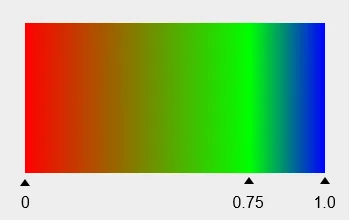
The preceding figure shows the display effect when the colors array is set to red, green, and blue and the pos array is set to 0.0, 0.75, and 1.0. The triangle subscript is the relative position of a color between the start point and end point. Gradient colors are used between them.
Returns
| Type | Description |
|---|---|
| ShaderEffect | ShaderEffect object created. |
Error codes
For details about the error codes, see Universal Error Codes.
| ID | Error Message |
|---|---|
| 401 | Parameter error.Possible causes:1.Mandatory parameters are left unspecified;2.Incorrect parameter types; 3. Parameter verification failed. |
Example
import { common2D,drawing } from '@kit.ArkGraphics2D';

let startPt: common2D.Point = { x: 100, y: 100 };
let endPt: common2D.Point = { x: 300, y: 300 };
let shaderEffect = drawing.ShaderEffect.createLinearGradient(startPt, endPt, [0xFF00FF00, 0xFFFF0000], drawing.TileMode.REPEAT);
createRadialGradient12+
static createRadialGradient(centerPt: common2D.Point, radius: number, colors: Array<number>, mode: TileMode, pos?: Array<number>|null, matrix?: Matrix|null): ShaderEffect
Creates a ShaderEffect object that generates a radial gradient based on the center and radius of a circle. A radial gradient refers to the color transition that spreads out gradually from the center of a circle.
System capability: SystemCapability.Graphics.Drawing
Parameters
| Name | Type | Mandatory | Description |
|---|---|---|---|
| centerPt | common2D.Point | Yes | Center of the circle. |
| radius | number | Yes | Radius of the gradient. A negative number is invalid. The value is a floating point number. |
| colors | Array<number> | Yes | Array of colors to distribute between the center and ending shape of the circle. The values in the array are 32-bit (ARGB) unsigned integers. |
| mode | TileMode | Yes | Tile mode of the shader effect. |
| pos | Array<number> |null | No | Relative position of each color in the color array. The array length must be the same as that of colors. The first element in the array must be 0.0, the last element must be 1.0, and the middle elements must be between 0.0 and 1.0 and increase by index. The default value is null, indicating that colors are evenly distributed between the center and ending shape of the circle. |
| matrix | Matrix |null | No | Matrix object used to perform matrix transformation on the shader effect. The default value is null, indicating the identity matrix. |
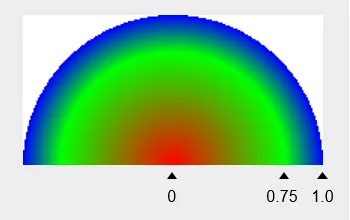
The preceding figure shows the display effect when the colors array is set to red, green, and blue and the pos array is set to 0.0, 0.75, and 1.0. The triangle subscript is the relative position of the color between the center and ending shape of the circle. Gradient colors are used between them.
Returns
| Type | Description |
|---|---|
| ShaderEffect | ShaderEffect object created. |
Error codes
For details about the error codes, see Universal Error Codes.
| ID | Error Message |
|---|---|
| 401 | Parameter error.Possible causes:1.Mandatory parameters are left unspecified;2.Incorrect parameter types; 3. Parameter verification failed. |
Example
import { common2D,drawing } from '@kit.ArkGraphics2D';

let centerPt: common2D.Point = { x: 100, y: 100 };
let shaderEffect = drawing.ShaderEffect.createRadialGradient(centerPt, 100, [0xFF00FF00, 0xFFFF0000], drawing.TileMode.REPEAT);
createSweepGradient12+
static createSweepGradient(centerPt: common2D.Point, colors: Array<number>, mode: TileMode, startAngle: number, endAngle: number, pos?: Array<number>|null, matrix?: Matrix|null): ShaderEffect
Creates a ShaderEffect object that generates a color sweep gradient around a given center point, either in a clockwise or counterclockwise direction.
System capability: SystemCapability.Graphics.Drawing
Parameters
| Name | Type | Mandatory | Description |
|---|---|---|---|
| centerPt | common2D.Point | Yes | Center of the circle. |
| colors | Array<number> | Yes | Array of colors to distribute between the start angle and end angle. The values in the array are 32-bit (ARGB) unsigned integers. |
| mode | TileMode | Yes | Tile mode of the shader effect. |
| startAngle | number | Yes | Start angle of the sweep gradient, in degrees. The value 0 indicates the positive direction of the X axis. A positive number indicates an offset towards the positive direction, and a negative number indicates an offset towards the negative direction. The value is a floating point number. |
| endAngle | number | Yes | End angle of the sweep gradient, in degrees. The value 0 indicates the positive direction of the X axis. A positive number indicates an offset towards the positive direction, and a negative number indicates an offset towards the negative direction. A value less than the start angle is invalid. The value is a floating point number. |
| pos | Array<number> |null | No | Relative position of each color in the color array. The array length must be the same as that of colors. The first element in the array must be 0.0, the last element must be 1.0, and the middle elements must be between 0.0 and 1.0 and increase by index. The default value is null, indicating that the colors are evenly distributed between the start angle and end angle. |
| matrix | Matrix |null | No | Matrix object used to perform matrix transformation on the shader effect. The default value is null, indicating the identity matrix. |
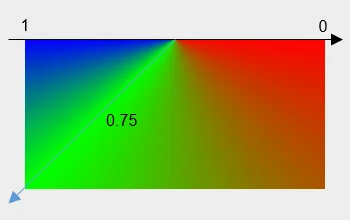
The preceding figure shows the display effect when the colors array is set to red, green, and blue, the pos array is set to 0.0, 0.75, and 1.0, startAngle is set to 0 degrees, and endAngle is set to 180 degrees. In the figure, 0.0 corresponds to the position of 0 degrees, 0.75 corresponds to the position of 135 degrees, and 1.0 corresponds to the position of 180 degrees. Gradient colors are used between them.
Returns
| Type | Description |
|---|---|
| ShaderEffect | ShaderEffect object created. |
Error codes
For details about the error codes, see Universal Error Codes.
| ID | Error Message |
|---|---|
| 401 | Parameter error.Possible causes:1.Mandatory parameters are left unspecified;2.Incorrect parameter types; 3. Parameter verification failed. |
Example
import { common2D,drawing } from '@kit.ArkGraphics2D';

let centerPt: common2D.Point = { x: 100, y: 100 };
let shaderEffect = drawing.ShaderEffect.createSweepGradient(centerPt, [0xFF00FF00, 0xFFFF0000], drawing.TileMode.REPEAT, 100, 200);
createConicalGradient12+
static createConicalGradient(startPt: common2D.Point, startRadius: number, endPt: common2D.Point, endRadius: number, colors: Array<number>, mode: TileMode, pos?: Array<number>|null, matrix?: Matrix|null): ShaderEffect
Creates a ShaderEffect object that generates a conical gradient between two given circles.
System capability: SystemCapability.Graphics.Drawing
Parameters
| Name | Type | Mandatory | Description |
|---|---|---|---|
| startPt | common2D.Point | Yes | Center of the start circle of the gradient. |
| startRadius | number | Yes | Radius of the start circle of the gradient. A negative number is invalid. The value is a floating point number. |
| endPt | common2D.Point | Yes | Center of the end circle of the gradient. |
| endRadius | number | Yes | Radius of the end circle of the gradient. A negative value is invalid. The value is a floating point number. |
| colors | Array<number> | Yes | Array of colors to distribute between the start circle and end circle. The values in the array are 32-bit (ARGB) unsigned integers. |
| mode | TileMode | Yes | Tile mode of the shader effect. |
| pos | Array<number> |null | No | Relative position of each color in the color array. The array length must be the same as that of colors. The first element in the array must be 0.0, the last element must be 1.0, and the middle elements must be between 0.0 and 1.0 and increase by index. The default value is null, indicating that colors are evenly distributed between the two circles. |
| matrix | Matrix |null | No | Matrix object used to perform matrix transformation on the shader effect. The default value is null, indicating the identity matrix. |
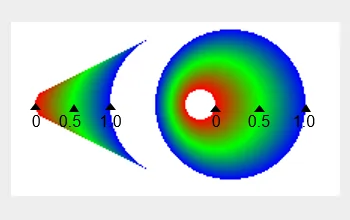
The preceding figure shows the display effect when the colors array is set to red, green, and blue and the pos array is set to 0.0, 0.5, and 1.0. The left part shows the drawing result when the start circle is not in the end circle, and the right part shows the drawing result when the start circle is in the end circle.
Returns
| Type | Description |
|---|---|
| ShaderEffect | ShaderEffect object created. |
Error codes
For details about the error codes, see Universal Error Codes.
| ID | Error Message |
|---|---|
| 401 | Parameter error.Possible causes:1.Mandatory parameters are left unspecified;2.Incorrect parameter types; 3. Parameter verification failed. |
Example
import { common2D,drawing } from '@kit.ArkGraphics2D';

let startPt: common2D.Point = { x: 100, y: 100 };
let endPt: common2D.Point = {x: 200, y: 200};
let shaderEffect = drawing.ShaderEffect.createConicalGradient(startPt, 100, endPt, 50, [0xFF00FF00, 0xFFFF0000], drawing.TileMode.REPEAT);
你可能感兴趣的鸿蒙文章
openharmony 鸿蒙 capi-drawing-gpu-context-h
openharmony 鸿蒙 capi-drawing-nativepixelmap-
openharmony 鸿蒙 capi-nativevsync-oh-nativevsync-expectedraterange
openharmony 鸿蒙 capi-drawing-oh-drawing-brush
openharmony 鸿蒙 capi-drawing-oh-drawing-image-info
openharmony 鸿蒙 capi-drawing-text-linetypography-h
openharmony 鸿蒙 capi-oh-nativeimage-oh-nativeimage
openharmony 鸿蒙 capi-drawing-typeface-h