伙伴设备与OpenHarmony设备互通的开发指南
简介
伙伴设备需要与OpenHarmony设备互通,比如以下主要场景:
- 媒体控制:手表显示OpenHarmony设备当前播放的音乐、视频;手表或耳机等伙伴设备可以控制OpenHarmony设备媒体播放(上/下一首、播放暂停等)。
- 电话反控:OpenHarmony设备来电通知手表,手表显示来电号码,联系人名称;手表或耳机等伙伴设备可以接听、拒接OpenHarmony设备来电。
- 健康监测:穿戴设备实时采集人体数据上报给OpenHarmony设备;OpenHarmony设备可实时浏览健康检测数据。
这些场景需要保证伙伴设备长时间与OpenHarmony设备保持互通,当存在数据交互比如媒体控制、电话控制、人体健康等数据时,应用需要保证活动。本指南主要提供了应用进程保持可唤醒状态解决方案,保证伙伴设备需要的伙伴设备厂商应用在数据交互时可被唤醒并正常运行。
关键流程
- 伙伴设备应用需要先实现PartnerAgentExtensionAbility,里面实现应用被系统唤醒后需要实现的数据传输业务操作。
- 伙伴设备触发和伙伴设备的蓝牙配对操作,再调用 bindDevice 接口注册伙伴设备。PartnerAgent服务感知到伙伴设备注册后,才会调用蓝牙服务接口进行BLE扫描和监听蓝牙连接状态去发现伙伴设备,进而拉起伙伴设备ExtensionAbility。若伙伴设备未注册,PartnerAgent服务不会拉起伙伴设备Extension。
- 该注册信息会持久化存储,OpenHarmony设备重启后依旧生效。
- 伙伴设备应用不需要使用该设备后,可调用 unbindDevice 接口解注册设备。
约束与限制
为了降低PartnerAgentExtensionAbility能力被三方应用滥用的风险,现通过基础访问模式的功能约束对应用进行安全管控。
说明:
严格遵从基础访问模式的功能约束。在此模式下,开发者应仅提供伙伴设备业务通知功能。系统会逐步增加基础访问模式的安全管控能力,包括但不限于:不允许申请长短时任务、不允许调用相机、不允许使用录音、不允许使用媒体、不允许使用定位、不允许使用联系人&通话、不允许使用WIFI、不允许使用NFC。因此未遵从此约定可能会导致功能异常。
开发步骤
创建文件目录层级
开发者在实现一个伙伴设备生命周期管理应用时,需要在DevEco Studio工程中新建一个PartnerAgentExtensionAbility,具体步骤如下:
-
在工程Module对应的ets目录下,右键选择“New > Directory”,新建一个目录,并命名为entryability。
-
在entryability目录下,右键选择“New > File”,新建两个文件,分别为EntryAbility.ets、PartnerAgentAbility.ets。目录如下:
/src/main/
├── ets/entryability
│       └──EntryAbility.ets               # 显示按钮交互界面
│       └──PartnerAgentAbility.ets        # 自定义类继承PartnerAgentExtensionAbility并加上需要的生命周期回调
│   ├───pages
│       └── Index.ets                     # 绘制按钮交互页面,注册/解注册设备功能
├── resources/base/profile/main_pages.json
申请蓝牙权限
需要申请权限ohos.permission.ACCESS_BLUETOOTH。如何配置和申请权限,请参考声明权限和向用户申请授权。
PartnerAgentExtensionAbility实现
应用需要实现PartnerAgentExtensionAbility,本模块会在OpenHarmony设备BLE扫描到或连上已注册的伙伴设备时被拉起,OpenHarmony设备和已注册伙伴设备断开蓝牙连接后,本模块会延迟3分钟销毁伙伴设备Extension进程。它通过提供以下函数运行保持应用可唤醒。
-
onDeviceDiscovered(deviceAddress: PartnerDeviceAddress)
已注册设备ACL连接成功或BLE扫描发现时触发该回调,开发者可以在此进行一些数据传输业务操作,如蓝牙SPP连接、设备发现信息打印等。
-
onDestroyWithReason(reason: PartnerAgentExtensionAbilityDestroyReason)
当不再使用服务且准备将该实例销毁时,触发该回调,回调中通知销毁该实例原因,开发者可以在该回调中清理资源,如解绑设备、设备丢失信息打印等。
import { partnerAgent } from '@kit.ConnectivityKit';
import { PartnerAgentExtensionAbility } from '@kit.ConnectivityKit';

export default class PartnerAgentAbility extends PartnerAgentExtensionAbility {
  onDeviceDiscovered(deviceAddress: partnerAgent.PartnerDeviceAddress): void {
    console.info(`[testTag] onDeviceDiscovered success: ${deviceAddress.bluetoothAddress?.address} ${deviceAddress.bluetoothAddress?.addressType}`);
  }

  onDestroyWithReason(reason: partnerAgent.PartnerAgentExtensionAbilityDestroyReason): void {
    console.info(`[testTag] onDestroyWithReason is: ${reason}`);
  }
}
注册设备流程
调用bindDevice接口注册设备,注册过的设备才会触发伙伴设备Extension拉起流程。
-
注册前需要调用接口isDeviceControlEnabled判断当前设备的互通功能是否打开。
-
该设备在注册前需要保证与本机蓝牙处于配对状态。
-
拉起Ability的name为工程Module对应的module.json5配置文件中注册PartnerAgentExtensionAbility,type标签设置为“partnerAgent”的ability的name。需与应用模块级配置文件module.json5 中的extensionabilities name属性值相同。
// 注册的设备地址信息
let btAddr: common.BluetoothAddress = {
  "address": 'XX:XX:XX:XX:XX:XX',
  "addressType": common.BluetoothAddressType.VIRTUAL,
};
let deviceAddress: partnerAgent.PartnerDeviceAddress = {
  "bluetoothAddress": btAddr,
};

// 判断当前设备的互通功能是否已经打开
let isEnabled = partnerAgent.isDeviceControlEnabled(deviceAddress);
console.info(`[testTag] device ${btAddr.address} is enabled: ${isEnabled}`);

// 注册设备支持的能力
let capability: partnerAgent.DeviceCapability = {
  "supportBR": true,
  "supportBleAdvertiser": true,
};
// 应用注册设备的业务功能,包括媒体控制、通话控制。
let businessCap: partnerAgent.BusinessCapability = {
  "supportMediaControl": true,
  "supportTelephonyControl": false,
};
if (isEnabled == false) {
  // PartnerAgentAbility为设备发现时拉起的ability的name
  partnerAgent.bindDevice(deviceAddress, capability, businessCap, "PartnerAgentAbility")
    .then(() => {
      console.info(`[testTag] bind device success:  ${btAddr.address}`);
    })
    .catch((err: BusinessError) => {
      console.error(`errCode: ${err.code}, errMessage: ${err.message}`);
    });
}
解注册设备流程
当伙伴设备应用不再需要被系统保持可唤醒状态,调用应用解注册设备接口unbindDevice
-
解注册前需要调用接口建议调用isDeviceBound接口判断设备注册状态,已注册设备再进行解注册。
-
解注册后,应用的PartnerAgentExtensionAbility进程将不再接收此设备的发现和下线状态通知。
// 获取应用当前注册过的所有设备
let devices: partnerAgent.PartnerDeviceAddress[] = partnerAgent.getBoundDevices();
for (let i = 0; i < devices.length; i++) {
  let addr = devices[i].bluetoothAddress;
  if (addr) {
    console.info(`[testTag] bound device (addr: ${addr.address}, addressType: ${addr.addressType},
        rawAddressType: ${addr.rawAddressType})`);
  }
}

let btAddr: common.BluetoothAddress = {
  "address": 'XX:XX:XX:XX:XX:XX',
  "addressType": common.BluetoothAddressType.VIRTUAL,
};
let deviceAddress: partnerAgent.PartnerDeviceAddress = {
  "bluetoothAddress": btAddr,
};

// 判断当前应用是否已注册过该设备
let isBound = partnerAgent.isDeviceBound(deviceAddress);
console.info(`[testTag] device ${btAddr.address} is bound: ${isBound}`);

if (isBound == true) {
  partnerAgent.unbindDevice(deviceAddress)
    .then(() => {
      console.info(`[testTag] unbindDevice device success:  ${btAddr.address}`);
    })
    .catch((err: BusinessError) => {
      console.error(`[testTag] errCode: ${err.code}, errMessage: ${err.message}`);
    });
}
- 具体工程搭建可参考本章节完整示例。
完整示例
-
PartnerAgentAbility.ets文件。
在PartnerAgentAbility.ets文件中,增加导入PartnerAgentExtensionAbility的依赖包,自定义类继承PartnerAgentExtensionAbility并加上需要的生命周期回调。
import { partnerAgent } from '@kit.ConnectivityKit'; import { PartnerAgentExtensionAbility } from '@kit.ConnectivityKit'; export default class PartnerAgentAbility extends PartnerAgentExtensionAbility { onDeviceDiscovered(deviceAddress: partnerAgent.PartnerDeviceAddress): void { console.info(`[testTag] onDeviceDiscovered success: ${deviceAddress.bluetoothAddress?.address} ${deviceAddress.bluetoothAddress?.addressType}`); } onDestroyWithReason(reason: partnerAgent.PartnerAgentExtensionAbilityDestroyReason): void { console.info(`[testTag] onDestroyWithReason is: ${reason}`); } } -
EntryAbility.ets文件。
EntryAbility中加载ets/pages/Index.ets绘制的页面,请求用户授予访问蓝牙权限。

import { AbilityConstant, ConfigurationConstant, UIAbility, Want } from '@kit.AbilityKit'; import { hilog } from '@kit.PerformanceAnalysisKit'; import { window } from '@kit.ArkUI'; const DOMAIN = 0x0000; export default class EntryAbility extends UIAbility { onCreate(want: Want, launchParam: AbilityConstant.LaunchParam): void { try { this.context.getApplicationContext().setColorMode(ConfigurationConstant.ColorMode.COLOR_MODE_NOT_SET); } catch (err) { hilog.error(DOMAIN, 'testTag', 'Failed to set colorMode. Cause: %{public}s', JSON.stringify(err)); } hilog.info(DOMAIN, 'testTag', '%{public}s', 'Ability onCreate'); } onDestroy(): void { hilog.info(DOMAIN, 'testTag', '%{public}s', 'Ability onDestroy'); } onWindowStageCreate(windowStage: window.WindowStage): void { // Main window is created, set main page for this ability hilog.info(DOMAIN, 'testTag', '%{public}s', 'Ability onWindowStageCreate'); windowStage.loadContent('pages/Index', (err) => { if (err.code) { hilog.error(DOMAIN, 'testTag', 'Failed to load the content. Cause: %{public}s', JSON.stringify(err)); return; } hilog.info(DOMAIN, 'testTag', 'Succeeded in loading the content.'); }); } onWindowStageDestroy(): void { // Main window is destroyed, release UI related resources hilog.info(DOMAIN, 'testTag', '%{public}s', 'Ability onWindowStageDestroy'); } onForeground(): void { // Ability has brought to foreground hilog.info(DOMAIN, 'testTag', '%{public}s', 'Ability onForeground'); } onBackground(): void { // Ability has back to background hilog.info(DOMAIN, 'testTag', '%{public}s', 'Ability onBackground'); } } -
Index.ets文件。
调用注册设备等功能接口。Index.ets中输入要注册的设备蓝牙地址,注册输入的蓝牙设备,去注册输入的蓝牙设备、查询设备的绑定状态,获取本机绑定的设备列表等。
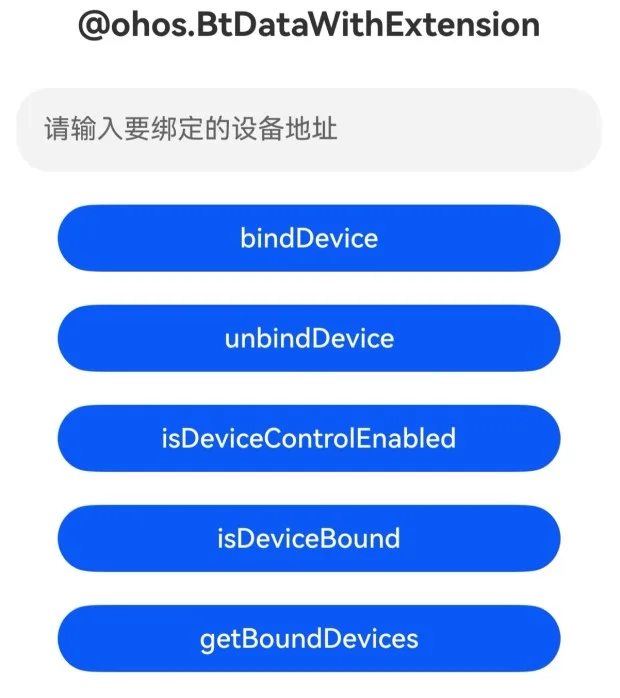
import { BusinessError } from '@kit.BasicServicesKit'; import common from '@ohos.bluetooth.common'; import partnerAgent from '@ohos.FusionConnectivity.partnerAgent'; @Entry @Component struct Index { @State perBtAddress: string = ''; build() { Column() { Text("@ohos.BtDataWithExtension") .fontSize(20) .margin({ bottom: 16 }) .fontWeight(FontWeight.Bold) TextInput({ placeholder: '请输入要绑定的设备地址', text: this.perBtAddress }) .margin(1) .width('90%') .height(50) .type(InputType.Normal) .onChange((value: string) => { this.perBtAddress = value; }) Row() { Button("bindDevice").width(300).margin(5).onClick(() => { console.info("[testTag] bindDevice"); let btAddr: common.BluetoothAddress = { "address": this.perBtAddress, "addressType": common.BluetoothAddressType.VIRTUAL, }; let deviceAddress: partnerAgent.PartnerDeviceAddress = { "bluetoothAddress": btAddr, }; let capability: partnerAgent.DeviceCapability = { "supportBR": true, "supportBleAdvertiser": true, }; let businessCap: partnerAgent.BusinessCapability = { "supportMediaControl": true, "supportTelephonyControl": false, }; partnerAgent.bindDevice(deviceAddress, capability, businessCap, "PartnerAgentAbility") .then(() => { console.info(`[testTag] bind device success: ${btAddr.address}`); }) .catch((err: BusinessError) => { console.error(`errCode: ${err.code}, errMessage: ${err.message}`); }); }) } Row() { Button("unbindDevice").width(300).margin(5).onClick(() => { console.info("[testTag] unbindDevice"); let btAddr: common.BluetoothAddress = { "address": this.perBtAddress, "addressType": common.BluetoothAddressType.VIRTUAL, }; let deviceAddress: partnerAgent.PartnerDeviceAddress = { "bluetoothAddress": btAddr, }; partnerAgent.unbindDevice(deviceAddress) .then(() => { console.info(`[testTag] unbindDevice device success: ${btAddr.address}`); }) .catch((err: BusinessError) => { console.error(`[testTag] errCode: ${err.code}, errMessage: ${err.message}`); }); }) } Row() { Button("isDeviceControlEnabled").width(300).margin(5).onClick(() => { console.info("[testTag] isEnable"); try { let btAddr: common.BluetoothAddress = { "address": this.perBtAddress, "addressType": common.BluetoothAddressType.VIRTUAL, }; let deviceAddress: partnerAgent.PartnerDeviceAddress = { "bluetoothAddress": btAddr, }; let isEnabled = partnerAgent.isDeviceControlEnabled(deviceAddress); console.info(`[testTag] device ${btAddr.address} is enabled: ${isEnabled}`); } catch (err) { console.error(`[testTag] errCode: ${err.code}, errMessage: ${err.message}`); } }) } Row() { Button("isDeviceBound").width(300).margin(5).onClick(() => { console.info("[testTag] isBound"); try { let btAddr: common.BluetoothAddress = { "address": this.perBtAddress, "addressType": common.BluetoothAddressType.VIRTUAL, }; let deviceAddress: partnerAgent.PartnerDeviceAddress = { "bluetoothAddress": btAddr, }; let isBound = partnerAgent.isDeviceBound(deviceAddress); console.info(`[testTag] device ${btAddr.address} is bound: ${isBound}`); } catch (err) { console.error(`[testTag] errCode: ${err.code}, errMessage: ${err.message}`); } }) } Row() { Button("getBoundDevices").width(300).margin(5).onClick(() => { console.info("[testTag] Get bound devices"); try { let devices: partnerAgent.PartnerDeviceAddress[] = partnerAgent.getBoundDevices(); for (let i = 0; i < devices.length; i++) { let btAddr = devices[i].bluetoothAddress; if (btAddr) { console.info(`[testTag] bound device (addr: ${btAddr.address}, addressType: ${btAddr.addressType}, rawAddressType: ${btAddr.rawAddressType})`); } } } catch (err) { console.error(`[testTag] errCode: ${err.code}, errMessage: ${err.message}`); } }) } } } } -
main_pages.json文件。对应ets/pages/路径下伙伴设备管理功能按钮的绘制页面。
{ "src": [ "pages/Index" ] } -
在工程Module对应的module.json5配置文件中注册PartnerAgentExtensionAbility,type标签需要设置为“partnerAgent”,srcEntry标签表示当前PartnerAgentExtensionAbility组件所对应的代码路径。
"extensionAbilities": [
  {
    "name": "PartnerAgentAbility",
    "srcEntry": "./ets/entryability/PartnerAgentAbility.ets",
    "description": "service",
    "icon": "$media:layered_image",
    "type": "partnerAgent",
    "exported": true
  }
],
"requestPermissions": [
  {
    "name": "ohos.permission.ACCESS_BLUETOOTH",
    "reason": "$string:module_desc",
    "usedScene": {
      "abilities": [
        "EntryFormAbility"
      ],
      "when": "inuse"
    }
  }
]