SegmentButton(系统接口)
分段按钮组件,包含页签类分段按钮、胶囊类单选分段按钮、胶囊类多选分段按钮。
说明:
该组件从API version 11开始支持。后续版本如有新增内容,则采用上角标单独标记该内容的起始版本。
该组件不支持在Wearable设备上使用。在Wearable设备上使用时,应用程序运行异常,异常信息中提示接口未定义。
该组件仅支持2到5个按钮。
当前页面仅包含本模块的系统接口,其他公开接口参见SegmentButton。
导入模块
import { SegmentButton, SegmentButtonOptions, SegmentButtonItemOptionsArray } from '@kit.ArkUI';
SegmentButtonOptions
说明:
不支持设置字体类型。
分段按钮选项类,用于为分段按钮提供初始数据和自定义属性。
装饰器类型: @Observed
系统能力: SystemCapability.ArkUI.ArkUI.Full
模型约束: 此接口仅可在Stage模型下使用。
| 名称 | 类型 | 只读 | 可选 | 说明 |
|---|---|---|---|---|
| backgroundSystemMaterial23+ | uiMaterial.Material | 否 | 是 | 分段按钮组件的背景板的系统材质。不同系统材质包含不同的属性影响效果。 对于胶囊类多选按钮(即type为"capsule"且multiply为true),该属性不生效。 默认值:无材质效果 系统接口: 此接口为系统接口。 |
CommonSegmentButtonOptions
用于定义分段按钮组件可自定义的属性。
系统能力: SystemCapability.ArkUI.ArkUI.Full
模型约束: 此接口仅可在Stage模型下使用。
| 名称 | 类型 | 只读 | 可选 | 说明 |
|---|---|---|---|---|
| backgroundSystemMaterial23+ | uiMaterial.Material | 否 | 是 | 分段按钮组件的背景板的系统材质。不同系统材质包含不同的属性影响效果。 对于胶囊类多选按钮(即type为"capsule"且multiply为true),该属性不生效。 默认值:无材质效果 系统接口: 此接口为系统接口。 |
示例
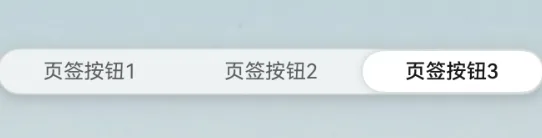
示例1(设置背景板材质)
以下示例通过backgroundSystemMaterial属性,为分段按钮设置了半透明的背景板材质。
从API version 23开始,SegmentButtonOptions和CommonSegmentButtonOptions中新增backgroundSystemMaterial属性。
import {
  ItemRestriction,
  SegmentButton,
  SegmentButtonOptions,
  SegmentButtonTextItem
} from '@kit.ArkUI';
import uiMaterial from '@ohos.arkui.uiMaterial';


@Entry
@Component
struct IndexCl {
  @State tabOptions: SegmentButtonOptions = SegmentButtonOptions.tab({
    buttons: [{ text: '页签按钮1' }, { text: '页签按钮2' }, {
      text: '页签按钮3'
    }] as ItemRestriction<SegmentButtonTextItem>,
    backgroundColor: Color.Transparent,
    // 设置为半透明材质
    backgroundSystemMaterial: new uiMaterial.Material({ type: uiMaterial.MaterialType.SEMI_TRANSPARENT } as uiMaterial.MaterialOptions)
  });

  @State tabSelectedIndexes: number[] = [2];

  build() {
    Stack() {
      // 作为分段按钮的背景,其中('app.media.pic')需要替换为开发者所需的图片
      Image($r('app.media.pic'))
      Column() {
        SegmentButton({
          options: this.tabOptions,
          selectedIndexes: $tabSelectedIndexes
        })
      }
    }
  }
}
你可能感兴趣的鸿蒙文章
openharmony 鸿蒙 ts-drawing-components-shape
openharmony 鸿蒙 ts-universal-attributes-sharp-clipping
openharmony 鸿蒙 ts-universal-attributes-toolbar
openharmony 鸿蒙 ts-container-lazyvgridlayout
openharmony 鸿蒙 ohos-arkui-advanced-FoldSplitContainer
openharmony 鸿蒙 ts-methods-calendarpicker-dialog
openharmony 鸿蒙 ts-uicommonevent
openharmony 鸿蒙 ts-basic-gestures-tapgesture