Class (Canvas)
A carrier that carries the drawn content and drawing status.
NOTE
The initial APIs of this module are supported since API version 11. Newly added APIs will be marked with a superscript to indicate their earliest API version.
This module uses the physical pixel unit, px.
This module operates under a single-threaded model. The caller needs to manage thread safety and context state transitions.
NOTE
The canvas comes with a default brush. The brush is black, has anti-aliasing enabled, and has no other style effects. This default brush is used when no brush or pen is actively set in the canvas.
Modules to Import
import { drawing } from '@kit.ArkGraphics2D';
constructor
constructor(pixelmap: image.PixelMap)
Creates a Canvas object that uses a PixelMap as the drawing target.
Atomic service API: This API can be used in atomic services since API version 22.
System capability: SystemCapability.Graphics.Drawing
Parameters
| Name | Type | Mandatory | Description |
|---|---|---|---|
| pixelmap | image.PixelMap | Yes | PixelMap used to create the object. |
Error codes
For details about the error codes, see Universal Error Codes.
| ID | Error Message |
|---|---|
| 401 | Parameter error.Possible causes:1.Mandatory parameters are left unspecified;2.Incorrect parameter types. |
Example
import { drawing } from '@kit.ArkGraphics2D';
import { image } from '@kit.ImageKit';

const color = new ArrayBuffer(96);
let opts : image.InitializationOptions = {
  editable: true,
  pixelFormat: 3,
  size: {
    height: 4,
    width: 6
  }
}
image.createPixelMap(color, opts).then((pixelMap) => {
  const canvas = new drawing.Canvas(pixelMap);
})
drawRect
drawRect(rect: common2D.Rect): void
Draws a rectangle. By default, black is used for filling.
System capability: SystemCapability.Graphics.Drawing
Parameters
| Name | Type | Mandatory | Description |
|---|---|---|---|
| rect | common2D.Rect | Yes | Rectangle to draw. |
Error codes
For details about the error codes, see Universal Error Codes.
| ID | Error Message |
|---|---|
| 401 | Parameter error.Possible causes:1.Mandatory parameters are left unspecified;2.Incorrect parameter types. |
Example
import { RenderNode } from '@kit.ArkUI';
import { common2D, drawing } from '@kit.ArkGraphics2D';

class DrawingRenderNode extends RenderNode {
  draw(context : DrawContext) {
    const canvas = context.canvas;
    const pen = new drawing.Pen();
    pen.setStrokeWidth(5);
    pen.setColor({alpha: 255, red: 255, green: 0, blue: 0});
    canvas.attachPen(pen);
    canvas.drawRect({ left : 0, right : 10, top : 0, bottom : 10 });
    canvas.detachPen();
  }
}
drawRect12+
drawRect(left: number, top: number, right: number, bottom: number): void
Draws a rectangle. By default, black is used for filling. This API provides better performance than drawRect and is recommended.
System capability: SystemCapability.Graphics.Drawing
Parameters
| Name | Type | Mandatory | Description |
|---|---|---|---|
| left | number | Yes | X coordinate of the upper left corner of the rectangle. The value is a floating point number. |
| top | number | Yes | Y coordinate of the upper left corner of the rectangle. The value is a floating point number. |
| right | number | Yes | X coordinate of the lower right corner of the rectangle. The value is a floating point number. |
| bottom | number | Yes | Y coordinate of the lower right corner of the rectangle. The value is a floating point number. |
Error codes
For details about the error codes, see Universal Error Codes.
| ID | Error Message |
|---|---|
| 401 | Parameter error.Possible causes:1.Mandatory parameters are left unspecified;2.Incorrect parameter types. |
Example
import { RenderNode } from '@kit.ArkUI';
import { drawing } from '@kit.ArkGraphics2D';

class DrawingRenderNode extends RenderNode {

  draw(context : DrawContext) {
    const canvas = context.canvas;
    const pen = new drawing.Pen();
    pen.setStrokeWidth(5);
    pen.setColor({alpha: 255, red: 255, green: 0, blue: 0});
    canvas.attachPen(pen);
    canvas.drawRect(0, 0, 10, 10);
    canvas.detachPen();
  }
}
drawRoundRect12+
drawRoundRect(roundRect: RoundRect): void
Draws a rounded rectangle.
System capability: SystemCapability.Graphics.Drawing
Parameters
| Name | Type | Mandatory | Description |
|---|---|---|---|
| roundRect | RoundRect | Yes | Rounded rectangle. |
Error codes
For details about the error codes, see Universal Error Codes.
| ID | Error Message |
|---|---|
| 401 | Parameter error.Possible causes:1.Mandatory parameters are left unspecified;2.Incorrect parameter types. |
Example
import { RenderNode } from '@kit.ArkUI';
import { common2D, drawing } from '@kit.ArkGraphics2D';

class DrawingRenderNode extends RenderNode {
  draw(context : DrawContext) {
    const canvas = context.canvas;
    let rect: common2D.Rect = { left : 100, top : 100, right : 400, bottom : 500 };
    let roundRect = new drawing.RoundRect(rect, 10, 10);
    canvas.drawRoundRect(roundRect);
  }
}
drawNestedRoundRect12+
drawNestedRoundRect(outer: RoundRect, inner: RoundRect): void
Draws two nested rounded rectangles. The outer rectangle boundary must contain the inner rectangle boundary. Otherwise, there is no drawing effect.
System capability: SystemCapability.Graphics.Drawing
Parameters
| Name | Type | Mandatory | Description |
|---|---|---|---|
| outer | RoundRect | Yes | Outer rounded rectangle. |
| inner | RoundRect | Yes | Inner rounded rectangle. |
Error codes
For details about the error codes, see Universal Error Codes.
| ID | Error Message |
|---|---|
| 401 | Parameter error.Possible causes:1.Mandatory parameters are left unspecified;2.Incorrect parameter types. |
Example
import { RenderNode } from '@kit.ArkUI';
import { common2D, drawing } from '@kit.ArkGraphics2D';

class DrawingRenderNode extends RenderNode {
  draw(context : DrawContext) {
    const canvas = context.canvas;
    let inRect: common2D.Rect = { left : 200, top : 200, right : 400, bottom : 500 };
    let outRect: common2D.Rect = { left : 100, top : 100, right : 400, bottom : 500 };
    let outRoundRect = new drawing.RoundRect(outRect, 10, 10);
    let inRoundRect = new drawing.RoundRect(inRect, 10, 10);
    canvas.drawNestedRoundRect(outRoundRect, inRoundRect);
    canvas.drawRoundRect(outRoundRect);
  }
}
drawBackground12+
drawBackground(brush: Brush): void
Uses a brush to fill the drawable area of the canvas.
System capability: SystemCapability.Graphics.Drawing
Parameters
| Name | Type | Mandatory | Description |
|---|---|---|---|
| brush | Brush | Yes | Brush object. |
Error codes
For details about the error codes, see Universal Error Codes.
| ID | Error Message |
|---|---|
| 401 | Parameter error.Possible causes:1.Mandatory parameters are left unspecified;2.Incorrect parameter types. |
Example
import { RenderNode } from '@kit.ArkUI';
import { common2D, drawing } from '@kit.ArkGraphics2D';

class DrawingRenderNode extends RenderNode {
  draw(context : DrawContext) {
    const canvas = context.canvas;
    const brush = new drawing.Brush();
    const color : common2D.Color = { alpha: 255, red: 255, green: 0, blue: 0 };
    brush.setColor(color);
    canvas.drawBackground(brush);
  }
}
drawShadow12+
drawShadow(path: Path, planeParams: common2D.Point3d, devLightPos: common2D.Point3d, lightRadius: number, ambientColor: common2D.Color, spotColor: common2D.Color, flag: ShadowFlag) : void
Draws a spot shadow and uses a given path to outline the ambient shadow.
System capability: SystemCapability.Graphics.Drawing
Parameters
| Name | Type | Mandatory | Description |
|---|---|---|---|
| path | Path | Yes | Path object, which is used to outline the shadow. |
| planeParams | common2D.Point3d | Yes | 3D vector, which is used to determine the z-axis offset of an occluder relative to the canvas, based on its x and y coordinates. |
| devLightPos | common2D.Point3d | Yes | Position of the light relative to the canvas. |
| lightRadius | number | Yes | Radius of the light. The value is a floating point number. |
| ambientColor | common2D.Color | Yes | Color of the ambient shadow. |
| spotColor | common2D.Color | Yes | Color of the spot shadow. |
| flag | ShadowFlag | Yes | Defines an enum for the shadow flags. |
Error codes
For details about the error codes, see Universal Error Codes.
| ID | Error Message |
|---|---|
| 401 | Parameter error.Possible causes:1.Mandatory parameters are left unspecified;2.Incorrect parameter types;3.Parameter verification failed. |
Example
import { RenderNode } from '@kit.ArkUI';
import { common2D, drawing } from '@kit.ArkGraphics2D';

class DrawingRenderNode extends RenderNode {
  draw(context : DrawContext) {
    const canvas = context.canvas;
    const path = new drawing.Path();
    path.addCircle(100, 200, 100, drawing.PathDirection.CLOCKWISE);
    let pen = new drawing.Pen();
    pen.setAntiAlias(true);
    let pen_color : common2D.Color = { alpha: 0xFF, red: 0xFF, green: 0x00, blue: 0x00 };
    pen.setColor(pen_color);
    pen.setStrokeWidth(10.0);
    canvas.attachPen(pen);
    let brush = new drawing.Brush();
    let brush_color : common2D.Color = { alpha: 0xFF, red: 0x00, green: 0xFF, blue: 0x00 };
    brush.setColor(brush_color);
    canvas.attachBrush(brush);
    let point1 : common2D.Point3d = {x: 100, y: 80, z:80};
    let point2 : common2D.Point3d = {x: 200, y: 10, z:40};
    let color1 : common2D.Color = {alpha: 0xFF, red:0, green:0, blue:0xFF};
    let color2 : common2D.Color = {alpha: 0xFF, red:0xFF, green:0, blue:0};
    let shadowFlag : drawing.ShadowFlag = drawing.ShadowFlag.ALL;
    canvas.drawShadow(path, point1, point2, 30, color1, color2, shadowFlag);
  }
}
drawShadow18+
drawShadow(path: Path, planeParams: common2D.Point3d, devLightPos: common2D.Point3d, lightRadius: number, ambientColor: common2D.Color|number, spotColor: common2D.Color|number, flag: ShadowFlag) : void
Draws a spot shadow and uses a given path to outline the ambient shadow.
System capability: SystemCapability.Graphics.Drawing
Parameters
| Name | Type | Mandatory | Description |
|---|---|---|---|
| path | Path | Yes | Path object, which is used to outline the shadow. |
| planeParams | common2D.Point3d | Yes | 3D vector, which is used to calculate the offset in the Z axis. |
| devLightPos | common2D.Point3d | Yes | Position of the light relative to the canvas. |
| lightRadius | number | Yes | Radius of the light. The value is a floating point number. |
| ambientColor | common2D.Color |number | Yes | Ambient shadow color, represented by a 32-bit unsigned integer in hexadecimal ARGB format. |
| spotColor | common2D.Color |number | Yes | Spot shadow color, represented by a 32-bit unsigned integer in hexadecimal ARGB format. |
| flag | ShadowFlag | Yes | Defines an enum for the shadow flags. |
Error codes
For details about the error codes, see Universal Error Codes.
| ID | Error Message |
|---|---|
| 401 | Parameter error.Possible causes:1.Mandatory parameters are left unspecified;2.Incorrect parameter types;3.Parameter verification failed. |
Example
import { RenderNode } from '@kit.ArkUI';
import { common2D, drawing } from '@kit.ArkGraphics2D';

class DrawingRenderNode extends RenderNode {
  draw(context : DrawContext) {
    const canvas = context.canvas;
    const path = new drawing.Path();
    path.addCircle(300, 600, 100, drawing.PathDirection.CLOCKWISE);
    let point1 : common2D.Point3d = {x: 100, y: 80, z:80};
    let point2 : common2D.Point3d = {x: 200, y: 10, z:40};
    let shadowFlag : drawing.ShadowFlag = drawing.ShadowFlag.ALL;
    canvas.drawShadow(path, point1, point2, 30, 0xFF0000FF, 0xFFFF0000, shadowFlag);
  }
}
getLocalClipBounds12+
getLocalClipBounds(): common2D.Rect
Obtains the bounds of the cropping region of the canvas.
System capability: SystemCapability.Graphics.Drawing
Returns
| Type | Description |
|---|---|
| common2D.Rect | Bounds of the cropping region. |
Example
import { RenderNode } from '@kit.ArkUI';
import { common2D, drawing } from '@kit.ArkGraphics2D';

class DrawingRenderNode extends RenderNode {
  draw(context : DrawContext) {
    const canvas = context.canvas;
    let clipRect: common2D.Rect = {
      left : 150, top : 150, right : 300, bottom : 400
    };
    canvas.clipRect(clipRect,drawing.ClipOp.DIFFERENCE, true);
    console.info("test rect.left: " + clipRect.left);
    console.info("test rect.top: " + clipRect.top);
    console.info("test rect.right: " + clipRect.right);
    console.info("test rect.bottom: " + clipRect.bottom);
    canvas.getLocalClipBounds();
  }
}
getTotalMatrix12+
getTotalMatrix(): Matrix
Obtains the canvas matrix.
System capability: SystemCapability.Graphics.Drawing
Returns
| Type | Description |
|---|---|
| Matrix | Canvas matrix. |
Example
import { RenderNode } from '@kit.ArkUI';
import { drawing } from '@kit.ArkGraphics2D';

class DrawingRenderNode extends RenderNode {
  draw(context : DrawContext) {
    const canvas = context.canvas;
    let matrix = new drawing.Matrix();
    matrix.setMatrix([5, 0, 0, 0, 1, 1, 0, 0, 1]);
    canvas.setMatrix(matrix);
    let matrixResult =canvas.getTotalMatrix();
  }
}
drawCircle
drawCircle(x: number, y: number, radius: number): void
Draws a circle. If the radius is less than or equal to zero, nothing is drawn. By default, black is used for filling.
System capability: SystemCapability.Graphics.Drawing
Parameters
| Name | Type | Mandatory | Description |
|---|---|---|---|
| x | number | Yes | X coordinate of the center of the circle. The value is a floating point number. |
| y | number | Yes | Y coordinate of the center of the circle. The value is a floating point number. |
| radius | number | Yes | Radius of the circle. The value is a floating point number greater than 0. |
Error codes
For details about the error codes, see Universal Error Codes.
| ID | Error Message |
|---|---|
| 401 | Parameter error.Possible causes:1.Mandatory parameters are left unspecified;2.Incorrect parameter types;3.Parameter verification failed. |
Example
import { RenderNode } from '@kit.ArkUI';
import { drawing } from '@kit.ArkGraphics2D';

class DrawingRenderNode extends RenderNode {
  draw(context : DrawContext) {
    const canvas = context.canvas;
    const pen = new drawing.Pen();
    pen.setStrokeWidth(5);
    pen.setColor({alpha: 255, red: 255, green: 0, blue: 0});
    canvas.attachPen(pen);
    canvas.drawCircle(10, 10, 2);
    canvas.detachPen();
  }
}
drawImage
drawImage(pixelmap: image.PixelMap, left: number, top: number, samplingOptions?: SamplingOptions): void
Draws an image. The coordinates of the upper left corner of the image are (left, top).
System capability: SystemCapability.Graphics.Drawing
Parameters
| Name | Type | Mandatory | Description |
|---|---|---|---|
| pixelmap | image.PixelMap | Yes | PixelMap of an image. |
| left | number | Yes | X coordinate of the upper left corner of the image. The value is a floating point number. |
| top | number | Yes | Y coordinate of the upper left corner of the image. The value is a floating point number. |
| samplingOptions12+ | SamplingOptions | No | Sampling options. By default, the SamplingOptions object created using the no-argument constructor is used. |
Error codes
For details about the error codes, see Universal Error Codes.
| ID | Error Message |
|---|---|
| 401 | Parameter error.Possible causes:1.Mandatory parameters are left unspecified;2.Incorrect parameter types. |
Example
import { RenderNode } from '@kit.ArkUI';
import { image } from '@kit.ImageKit';
import { drawing } from '@kit.ArkGraphics2D';

class DrawingRenderNode extends RenderNode {
  draw(context : DrawContext) {
    const width = 1000;
    const height = 1000;
    const bufferSize = width * height * 4;
    const color: ArrayBuffer = new ArrayBuffer(bufferSize);

    const colorData = new Uint8Array(color);
    for (let i = 0; i < colorData.length; i += 4) {
      colorData[i] = 255;
      colorData[i+1] = 156;
      colorData[i+2] = 0;
      colorData[i+3] = 255;
    }

    let opts : image.InitializationOptions = {
      editable: true,
      pixelFormat: 3,
      size: { height, width }
    }

    let pixelMap: image.PixelMap = image.createPixelMapSync(color, opts);
    const canvas = context.canvas;
    let options = new drawing.SamplingOptions(drawing.FilterMode.FILTER_MODE_NEAREST);
    if (pixelMap != null) {
      canvas.drawImage(pixelMap, 0, 0, options);
    }
  }
}
drawImageRect12+
drawImageRect(pixelmap: image.PixelMap, dstRect: common2D.Rect, samplingOptions?: SamplingOptions): void
Draws an image onto a specified area of the canvas.
System capability: SystemCapability.Graphics.Drawing
Parameters
| Name | Type | Mandatory | Description |
|---|---|---|---|
| pixelmap | image.PixelMap | Yes | PixelMap of an image. |
| dstRect | common2D.Rect | Yes | Rectangle object, which specifies the area of the canvas onto which the image will be drawn. |
| samplingOptions | SamplingOptions | No | Sampling options. By default, the SamplingOptions object created using the no-argument constructor is used. |
Error codes
For details about the error codes, see Universal Error Codes.
| ID | Error Message |
|---|---|
| 401 | Parameter error.Possible causes:1.Mandatory parameters are left unspecified;2.Incorrect parameter types. |
Example
import { RenderNode } from '@kit.ArkUI';
import { image } from '@kit.ImageKit';
import { common2D, drawing } from '@kit.ArkGraphics2D';

class DrawingRenderNode extends RenderNode {
  draw(context : DrawContext) {
    const width = 1000;
    const height = 1000;
    const bufferSize = width * height * 4;
    const color: ArrayBuffer = new ArrayBuffer(bufferSize);

    const colorData = new Uint8Array(color);
    for (let i = 0; i < colorData.length; i += 4) {
      colorData[i] = 255;
      colorData[i+1] = 156;
      colorData[i+2] = 0;
      colorData[i+3] = 255;
    }

    let opts : image.InitializationOptions = {
      editable: true,
      pixelFormat: 3,
      size: { height, width }
    }

    let pixelMap: image.PixelMap = image.createPixelMapSync(color, opts);
    const canvas = context.canvas;
    let pen = new drawing.Pen();
    canvas.attachPen(pen);
    let rect: common2D.Rect = { left: 0, top: 0, right: 200, bottom: 200 };
    canvas.drawImageRect(pixelMap, rect);
    canvas.detachPen();
  }
}
drawImageRectWithSrc12+
drawImageRectWithSrc(pixelmap: image.PixelMap, srcRect: common2D.Rect, dstRect: common2D.Rect, samplingOptions?: SamplingOptions, constraint?: SrcRectConstraint): void
Draws a portion of an image onto a specified area of the canvas.
System capability: SystemCapability.Graphics.Drawing
Parameters
| Name | Type | Mandatory | Description |
|---|---|---|---|
| pixelmap | image.PixelMap | Yes | PixelMap of an image. |
| srcRect | common2D.Rect | Yes | Rectangle object, which specifies the portion of the image to draw. |
| dstRect | common2D.Rect | Yes | Rectangle object, which specifies the area of the canvas onto which the image will be drawn. |
| samplingOptions | SamplingOptions | No | Sampling options. By default, the SamplingOptions object created using the no-argument constructor is used. |
| constraint | SrcRectConstraint | No | Constraint type of the source rectangle. The default value is STRICT. |
Error codes
For details about the error codes, see Universal Error Codes.
| ID | Error Message |
|---|---|
| 401 | Parameter error.Possible causes:1.Mandatory parameters are left unspecified;2.Incorrect parameter types. |
Example
import { RenderNode } from '@kit.ArkUI';
import { image } from '@kit.ImageKit';
import { common2D, drawing } from '@kit.ArkGraphics2D';

class DrawingRenderNode extends RenderNode {
  draw(context : DrawContext) {
    const width = 1000;
    const height = 1000;
    const bufferSize = width * height * 4;
    const color: ArrayBuffer = new ArrayBuffer(bufferSize);

    const colorData = new Uint8Array(color);
    for (let i = 0; i < colorData.length; i += 4) {
      colorData[i] = 255;
      colorData[i+1] = 156;
      colorData[i+2] = 0;
      colorData[i+3] = 255;
    }

    let opts : image.InitializationOptions = {
      editable: true,
      pixelFormat: 3,
      size: { height, width }
    }

    let pixelMap: image.PixelMap = image.createPixelMapSync(color, opts);
    const canvas = context.canvas;
    let pen = new drawing.Pen();
    canvas.attachPen(pen);
    let srcRect: common2D.Rect = { left: 0, top: 0, right: 100, bottom: 100 };
    let dstRect: common2D.Rect = { left: 100, top: 100, right: 200, bottom: 200 };
    canvas.drawImageRectWithSrc(pixelMap, srcRect, dstRect);
    canvas.detachPen();
  }
}
drawColor
drawColor(color: common2D.Color, blendMode?: BlendMode): void
Fills the drawable area of the canvas with the specified color and BlendMode.
System capability: SystemCapability.Graphics.Drawing
Parameters
| Name | Type | Mandatory | Description |
|---|---|---|---|
| color | common2D.Color | Yes | Color in ARGB format. The value of each color channel is an integer ranging from 0 to 255. |
| blendMode | BlendMode | No | Blend mode. The default mode is SRC_OVER. |
Error codes
For details about the error codes, see Universal Error Codes.
| ID | Error Message |
|---|---|
| 401 | Parameter error.Possible causes:1.Mandatory parameters are left unspecified;2.Incorrect parameter types;3.Parameter verification failed. |
Example
import { RenderNode } from '@kit.ArkUI';
import { common2D, drawing } from '@kit.ArkGraphics2D';

class DrawingRenderNode extends RenderNode {
  draw(context : DrawContext) {
    const canvas = context.canvas;
    let color: common2D.Color = {
      alpha : 255,
      red: 0,
      green: 10,
      blue: 10
    }
    canvas.drawColor(color, drawing.BlendMode.CLEAR);
  }
}
drawColor12+
drawColor(alpha: number, red: number, green: number, blue: number, blendMode?: BlendMode): void
Fills the drawable area of the canvas with the specified color and BlendMode. This API provides better performance than drawColor and is recommended.
System capability: SystemCapability.Graphics.Drawing
Parameters
| Name | Type | Mandatory | Description |
|---|---|---|---|
| alpha | number | Yes | Alpha channel value of the color in ARGB format. The value is an integer ranging from 0 to 255. Any passed-in floating point number is rounded down. |
| red | number | Yes | Red channel value of the color in ARGB format. The value is an integer ranging from 0 to 255. Any passed-in floating point number is rounded down. |
| green | number | Yes | Green channel value of the color in ARGB format. The value is an integer ranging from 0 to 255. Any passed-in floating point number is rounded down. |
| blue | number | Yes | Blue channel value of the color in ARGB format. The value is an integer ranging from 0 to 255. Any passed-in floating point number is rounded down. |
| blendMode | BlendMode | No | Blend mode. The default mode is SRC_OVER. |
Error codes
For details about the error codes, see Universal Error Codes.
| ID | Error Message |
|---|---|
| 401 | Parameter error.Possible causes:1.Mandatory parameters are left unspecified;2.Incorrect parameter types;3.Parameter verification failed. |
Example
import { RenderNode } from '@kit.ArkUI';
import { drawing } from '@kit.ArkGraphics2D';

class DrawingRenderNode extends RenderNode {
  draw(context : DrawContext) {
    const canvas = context.canvas;
    canvas.drawColor(255, 0, 10, 10, drawing.BlendMode.CLEAR);
  }
}
drawColor18+
drawColor(color: number, blendMode?: BlendMode): void
Fills the drawable area of the canvas with the specified color and BlendMode.
System capability: SystemCapability.Graphics.Drawing
Parameters
| Name | Type | Mandatory | Description |
|---|---|---|---|
| color | number | Yes | Color in hexadecimal ARGB format. |
| blendMode | BlendMode | No | Blend mode. The default mode is SRC_OVER. |
Error codes
For details about the error codes, see Universal Error Codes.
| ID | Error Message |
|---|---|
| 401 | Parameter error.Possible causes:1.Mandatory parameters are left unspecified;2.Incorrect parameter types;3.Parameter verification failed. |
Example
import { RenderNode } from '@kit.ArkUI';
import { drawing } from '@kit.ArkGraphics2D';

class DrawingRenderNode extends RenderNode {
  draw(context : DrawContext) {
    const canvas = context.canvas;
    canvas.drawColor(0xff000a0a, drawing.BlendMode.CLEAR);
  }
}
drawVertices23+
drawVertices(vertexMode: VertexMode, vertexCount: number, positions: Array<common2D.Point>, texs: Array<common2D.Point> |null, colors: Array<number> |null, indexCount: number, indices: Array<number> |null, mode: BlendMode): void
Draws a triangle mesh described by the vertex array.
System capability: SystemCapability.Graphics.Drawing
Parameters
| Name | Type | Mandatory | Description |
|---|---|---|---|
| vertexMode | VertexMode | Yes | Connection mode of the vertex to be drawn. |
| vertexCount | number | Yes | Number of elements in the vertex array. The value is an integer greater than or equal to 3. |
| positions | Array<common2D.Point> | Yes | Array that holds the position of every vertex. The array cannot be null and its length must be equal to the value of vertexCount. |
| texs | Array<common2D.Point> |null | Yes | Array of texture space coordinates corresponding to the vertices. This array can be null, which indicates that the texture space is invalid. If not null, the length of the array must be equal to the value of vertexCount. |
| colors | Array<number> |null | Yes | Array of colors corresponding to the vertices, which is used for interpolation in triangles. This array can be null, which indicates that the color effect is the default color set by the user. If not null, the length of the array must be equal to the value of vertexCount. |
| indexCount | number | Yes | Number of indices. The value can be 0 or a value greater than or equal to 3. If the value is not 0, the value must be an integer greater than or equal to 3. |
| indices | Array<number> |null | Yes | Array of vertex indices. The value can be null. In this case, the value of indexCount is ignored (an integer greater than or equal to 3 or equal to 0). If not null, the value length must be the same as that of indexCount. |
| mode | BlendMode | Yes | Color blend mode. |
Error codes
For details about the following error code, see Drawing and Display Error Codes.
| ID | Error Message |
|---|---|
| 25900001 | Parameter error. Possible causes: Incorrect parameter range. |
Example
import { RenderNode } from '@kit.ArkUI';
import { common2D, drawing } from '@kit.ArkGraphics2D';

class DrawingRenderNode extends RenderNode {
  draw(context: DrawContext): void {
    const canvas = context.canvas;
    let pointsArray = new Array<common2D.Point>();
    const point1: common2D.Point = { x: 100.0, y: 100.0 };
    const point2: common2D.Point = { x: 200.0, y: 100.0 };
    const point3: common2D.Point = { x: 150.0, y: 200.0 };
    pointsArray.push(point1);
    pointsArray.push(point2);
    pointsArray.push(point3);
    let texsArray = new Array<common2D.Point>();
    const texs1: common2D.Point = { x: 0.0, y: 0.0 };
    const texs2: common2D.Point = { x: 1.0, y: 0.0 };
    const texs3: common2D.Point = { x: 0.5, y: 1.0 };
    texsArray.push(texs1);
    texsArray.push(texs2);
    texsArray.push(texs3);
    const colors = [0xFFFF0000, 0xFF00FF00, 0xFF0000FF];
    const indices = [0, 1, 2];
    canvas.drawVertices(drawing.VertexMode.TRIANGLESSTRIP_VERTEXMODE, 3, pointsArray, texsArray, colors, 3, indices,drawing.BlendMode.SRC);
  }
}
drawPixelMapMesh12+
drawPixelMapMesh(pixelmap: image.PixelMap, meshWidth: number, meshHeight: number, vertices: Array<number>, vertOffset: number, colors: Array<number>, colorOffset: number): void
Draws a PixelMap based on a mesh, with the mesh vertices evenly distributed across the PixelMap. (This API works with brushes but not pens.)
System capability: SystemCapability.Graphics.Drawing
Parameters
| Name | Type | Mandatory | Description |
|---|---|---|---|
| pixelmap | image.PixelMap | Yes | PixelMap to draw. |
| meshWidth | number | Yes | Number of columns in the mesh. The value is an integer greater than 0. |
| meshHeight | number | Yes | Number of rows in the mesh. The value is an integer greater than 0. |
| vertices | Array<number> | Yes | Array of vertices, which specify the position to draw. The value is a floating-point array and the size must be ((meshWidth+1) * (meshHeight+1) + vertOffset) * 2. |
| vertOffset | number | Yes | Number of vert elements to skip before drawing. The value is an integer greater than or equal to 0. |
| colors | Array<number> | Yes | Array of colors, which specify the color at each vertex. The value is an integer array and can be null. The size must be (meshWidth+1) * (meshHeight+1) + colorOffset. |
| colorOffset | number | Yes | Number of color elements to skip before drawing. The value is an integer greater than or equal to 0. |
Error codes
For details about the error codes, see Universal Error Codes.
| ID | Error Message |
|---|---|
| 401 | Parameter error.Possible causes:1.Mandatory parameters are left unspecified;2.Incorrect parameter types. |
Example
import { RenderNode } from '@kit.ArkUI';
import { image } from '@kit.ImageKit';
import { drawing } from '@kit.ArkGraphics2D';

class DrawingRenderNode extends RenderNode {
  draw(context : DrawContext) {
    const width = 1000;
    const height = 1000;
    const bufferSize = width * height * 4;
    const color: ArrayBuffer = new ArrayBuffer(bufferSize);

    const colorData = new Uint8Array(color);
    for (let i = 0; i < colorData.length; i += 4) {
      colorData[i] = 255;
      colorData[i+1] = 156;
      colorData[i+2] = 0;
      colorData[i+3] = 255;
    }

    let opts : image.InitializationOptions = {
      editable: true,
      pixelFormat: 3,
      size: { height, width }
    }

    let pixelMap: image.PixelMap = image.createPixelMapSync(color, opts);
    const canvas = context.canvas;
    if (pixelMap != null) {
      const brush = new drawing.Brush(); // Only brush is supported. There is no drawing effect when pen is used.
      canvas.attachBrush(brush);
      let verts : Array<number> = [0, 0, 50, 0, 410, 0, 0, 180, 50, 180, 410, 180, 0, 360, 50, 360, 410, 360]; // 18
      canvas.drawPixelMapMesh(pixelMap, 2, 2, verts, 0, null, 0);
      canvas.detachBrush();
    }
  }
}
clear12+
clear(color: common2D.Color): void
Clears the canvas with a given color. This API has the same effect as drawColor.
System capability: SystemCapability.Graphics.Drawing
Parameters
| Name | Type | Mandatory | Description |
|---|---|---|---|
| color | common2D.Color | Yes | Color in ARGB format. The value of each color channel is an integer ranging from 0 to 255. |
Error codes
For details about the error codes, see Universal Error Codes.
| ID | Error Message |
|---|---|
| 401 | Parameter error.Possible causes:1.Mandatory parameters are left unspecified;2.Incorrect parameter types. |
Example
import { RenderNode } from '@kit.ArkUI';
import { common2D, drawing } from '@kit.ArkGraphics2D';

class DrawingRenderNode extends RenderNode {
  draw(context : DrawContext) {
    const canvas = context.canvas;
    let color: common2D.Color = {alpha: 255, red: 255, green: 0, blue: 0};
    canvas.clear(color);
  }
}
clear18+
clear(color: common2D.Color|number): void
Clears the canvas with a given color.
System capability: SystemCapability.Graphics.Drawing
Parameters
| Name | Type | Mandatory | Description |
|---|---|---|---|
| color | common2D.Color |number | Yes | Color, represented by an unsigned integer in hexadecimal ARGB format. |
Example
import { RenderNode } from '@kit.ArkUI';
import { drawing } from '@kit.ArkGraphics2D';

class DrawingRenderNode extends RenderNode {
  draw(context : DrawContext) {
    const canvas = context.canvas;
    let color: number = 0xffff0000;
    canvas.clear(color);
  }
}
getWidth12+
getWidth(): number
Obtains the canvas width.
System capability: SystemCapability.Graphics.Drawing
Returns
| Type | Description |
|---|---|
| number | Canvas width. The value is a floating point number. |
Example
import { RenderNode } from '@kit.ArkUI';
import { drawing } from '@kit.ArkGraphics2D';

class DrawingRenderNode extends RenderNode {
  draw(context : DrawContext) {
    const canvas = context.canvas;
    let width = canvas.getWidth();
    console.info('get canvas width:' + width);
  }
}
getHeight12+
getHeight(): number
Obtains the canvas height.
System capability: SystemCapability.Graphics.Drawing
Returns
| Type | Description |
|---|---|
| number | Canvas height. The value is a floating point number. |
Example
import { RenderNode } from '@kit.ArkUI';
import { drawing } from '@kit.ArkGraphics2D';

class DrawingRenderNode extends RenderNode {
  draw(context : DrawContext) {
    const canvas = context.canvas;
    let height = canvas.getHeight();
    console.info('get canvas height:' + height);
  }
}
drawOval12+
drawOval(oval: common2D.Rect): void
Draws an oval on the canvas, where the shape and position of the oval are defined by its bounding rectangle.
System capability: SystemCapability.Graphics.Drawing
Parameters
| Name | Type | Mandatory | Description |
|---|---|---|---|
| oval | common2D.Rect | Yes | Rectangle. The oval inscribed within the rectangle is the oval to draw. |
Error codes
For details about the error codes, see Universal Error Codes.
| ID | Error Message |
|---|---|
| 401 | Parameter error.Possible causes:1.Mandatory parameters are left unspecified;2.Incorrect parameter types. |
Example
import { RenderNode } from '@kit.ArkUI';
import { common2D, drawing } from '@kit.ArkGraphics2D';

class DrawingRenderNode extends RenderNode {
  draw(context : DrawContext) {
    const canvas = context.canvas;
    const pen = new drawing.Pen();
    pen.setStrokeWidth(5);
    const color : common2D.Color = { alpha: 255, red: 255, green: 0, blue: 0 };
    pen.setColor(color);
    canvas.attachPen(pen);
    const rect: common2D.Rect = {left:100, top:50, right:400, bottom:500};
    canvas.drawOval(rect);
    canvas.detachPen();
  }
}
drawArc12+
drawArc(arc: common2D.Rect, startAngle: number, sweepAngle: number): void
Draws an arc on the canvas. with the start angle and sweep angle specified. If the absolute value of the sweep angle exceeds 360 degrees, an ellipse is drawn.
System capability: SystemCapability.Graphics.Drawing
Parameters
| Name | Type | Mandatory | Description |
|---|---|---|---|
| arc | common2D.Rect | Yes | Rectangular boundary that encapsulates the oval including the arc. |
| startAngle | number | Yes | Start angle, in degrees. The value is a floating point number. When the degree is 0, the start point is located at the right end of the oval. A positive number indicates that the start point is placed clockwise, and a negative number indicates that the start point is placed counterclockwise. |
| sweepAngle | number | Yes | Angle to sweep, in degrees. The value is a floating point number. A positive number indicates a clockwise sweep, and a negative value indicates a counterclockwise swipe. The valid range is from -360 degrees to 360 degrees. If the absolute value of the sweep angle exceeds 360 degrees, an ellipse is drawn. |
Error codes
For details about the error codes, see Universal Error Codes.
| ID | Error Message |
|---|---|
| 401 | Parameter error.Possible causes:1.Mandatory parameters are left unspecified;2.Incorrect parameter types. |
Example
import { RenderNode } from '@kit.ArkUI';
import { common2D, drawing } from '@kit.ArkGraphics2D';

class DrawingRenderNode extends RenderNode {
  draw(context : DrawContext) {
    const canvas = context.canvas;
    const pen = new drawing.Pen();
    pen.setStrokeWidth(5);
    const color : common2D.Color = { alpha: 255, red: 255, green: 0, blue: 0 };
    pen.setColor(color);
    canvas.attachPen(pen);
    const rect: common2D.Rect = {left:100, top:50, right:400, bottom:200};
    canvas.drawArc(rect, 90, 180);
    canvas.detachPen();
  }
}
drawPoint
drawPoint(x: number, y: number): void
Draws a point.
System capability: SystemCapability.Graphics.Drawing
Parameters
| Name | Type | Mandatory | Description |
|---|---|---|---|
| x | number | Yes | X coordinate of the point. The value is a floating point number. |
| y | number | Yes | Y coordinate of the point. The value is a floating point number. |
Error codes
For details about the error codes, see Universal Error Codes.
| ID | Error Message |
|---|---|
| 401 | Parameter error.Possible causes:1.Mandatory parameters are left unspecified;2.Incorrect parameter types. |
Example
import { RenderNode } from '@kit.ArkUI';
import { drawing } from '@kit.ArkGraphics2D';

class DrawingRenderNode extends RenderNode {
  draw(context : DrawContext) {
    const canvas = context.canvas;
    const pen = new drawing.Pen();
    pen.setStrokeWidth(5);
    pen.setColor({alpha: 255, red: 255, green: 0, blue: 0});
    canvas.attachPen(pen);
    canvas.drawPoint(10, 10);
    canvas.detachPen();
  }
}
drawPoints12+
drawPoints(points: Array<common2D.Point>, mode?: PointMode): void
Draws a group of points, line segments, or polygons on the canvas, with the specified drawing mode. An array is used to hold these points.
System capability: SystemCapability.Graphics.Drawing
Parameters
| Name | Type | Mandatory | Description |
|---|---|---|---|
| points | Array<common2D.Point> | Yes | Array that holds the points to draw. The length cannot be 0. |
| mode | PointMode | No | Mode in which the points are drawn. The default value is drawing.PointMode.POINTS. |
Error codes
For details about the error codes, see Universal Error Codes.
| ID | Error Message |
|---|---|
| 401 | Parameter error. Possible causes: 1. Mandatory parameters are left unspecified;2. Incorrect parameter types; 3. Parameter verification failed. |
Example
import { RenderNode } from '@kit.ArkUI';
import { common2D, drawing } from '@kit.ArkGraphics2D';

class DrawingRenderNode extends RenderNode {
  draw(context : DrawContext) {
    const canvas = context.canvas;
    const pen = new drawing.Pen();
    pen.setStrokeWidth(30);
    const color : common2D.Color = { alpha: 255, red: 255, green: 0, blue: 0 };
    pen.setColor(color);
    canvas.attachPen(pen);
    canvas.drawPoints([{x: 100, y: 200}, {x: 150, y: 230}, {x: 200, y: 300}], drawing.PointMode.POINTS);
    canvas.detachPen();
  }
}
drawPath
drawPath(path: Path): void
Draws a custom path, which contains a set of path outlines. Each path outline can be open or closed.
System capability: SystemCapability.Graphics.Drawing
Parameters
| Name | Type | Mandatory | Description |
|---|---|---|---|
| path | Path | Yes | Path object to draw. |
Error codes
For details about the error codes, see Universal Error Codes.
| ID | Error Message |
|---|---|
| 401 | Parameter error.Possible causes:1.Mandatory parameters are left unspecified;2.Incorrect parameter types. |
Example
import { RenderNode } from '@kit.ArkUI';
import { drawing } from '@kit.ArkGraphics2D';

class DrawingRenderNode extends RenderNode {
  draw(context : DrawContext) {
    const canvas = context.canvas;
    const pen = new drawing.Pen();
    pen.setStrokeWidth(5);
    pen.setColor({alpha: 255, red: 255, green: 0, blue: 0});
    let path = new drawing.Path();
    path.moveTo(10,10);
    path.cubicTo(10, 10, 10, 10, 15, 15);
    path.close();
    canvas.attachPen(pen);
    canvas.drawPath(path);
    canvas.detachPen();
  }
}
drawLine
drawLine(x0: number, y0: number, x1: number, y1: number): void
Draws a line segment from the start point to the end point. If the coordinates of the start point are the same as those of the end point, nothing is drawn.
System capability: SystemCapability.Graphics.Drawing
Parameters
| Name | Type | Mandatory | Description |
|---|---|---|---|
| x0 | number | Yes | X coordinate of the start point of the line segment. The value is a floating point number. |
| y0 | number | Yes | Y coordinate of the start point of the line segment. The value is a floating point number. |
| x1 | number | Yes | X coordinate of the end point of the line segment. The value is a floating point number. |
| y1 | number | Yes | Y coordinate of the end point of the line segment. The value is a floating point number. |
Error codes
For details about the error codes, see Universal Error Codes.
| ID | Error Message |
|---|---|
| 401 | Parameter error.Possible causes:1.Mandatory parameters are left unspecified;2.Incorrect parameter types. |
Example
import { RenderNode } from '@kit.ArkUI';
import { drawing } from '@kit.ArkGraphics2D';

class DrawingRenderNode extends RenderNode {
  draw(context : DrawContext) {
    const canvas = context.canvas;
    const pen = new drawing.Pen();
    pen.setStrokeWidth(5);
    pen.setColor({alpha: 255, red: 255, green: 0, blue: 0});
    canvas.attachPen(pen);
    canvas.drawLine(0, 0, 20, 20);
    canvas.detachPen();
  }
}
drawTextBlob
drawTextBlob(blob: TextBlob, x: number, y: number): void
Draws a text blob. If the typeface used to construct blob does not support a character, that character will not be drawn.
System capability: SystemCapability.Graphics.Drawing
Parameters
| Name | Type | Mandatory | Description |
|---|---|---|---|
| blob | TextBlob | Yes | TextBlob object. |
| x | number | Yes | X coordinate of the left point (red point in the figure below) of the text baseline (blue line in the figure below). The value is a floating point number. |
| y | number | Yes | Y coordinate of the left point (red point in the figure below) of the text baseline (blue line in the figure below). The value is a floating point number. |
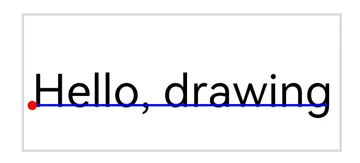
Error codes
For details about the error codes, see Universal Error Codes.
| ID | Error Message |
|---|---|
| 401 | Parameter error.Possible causes:1.Mandatory parameters are left unspecified;2.Incorrect parameter types. |
Example
import { RenderNode } from '@kit.ArkUI';
import { drawing } from '@kit.ArkGraphics2D';

class DrawingRenderNode extends RenderNode {
  draw(context : DrawContext) {
    const canvas = context.canvas;
    const brush = new drawing.Brush();
    brush.setColor({alpha: 255, red: 255, green: 0, blue: 0});
    const font = new drawing.Font();
    font.setSize(20);
    const textBlob = drawing.TextBlob.makeFromString("Hello, drawing", font, drawing.TextEncoding.TEXT_ENCODING_UTF8);
    canvas.attachBrush(brush);
    canvas.drawTextBlob(textBlob, 20, 20);
    canvas.detachBrush();
  }
}
drawSingleCharacter12+
drawSingleCharacter(text: string, font: Font, x: number, y: number): void
Draws a single character. If the typeface of the current font does not support the character to draw, the system typeface is used to draw the character.
System capability: SystemCapability.Graphics.Drawing
Parameters
| Name | Type | Mandatory | Description |
|---|---|---|---|
| text | string | Yes | Single character to draw. The length of the string must be 1. |
| font | Font | Yes | Font object. |
| x | number | Yes | X coordinate of the left point (red point in the figure below) of the character baseline (blue line in the figure below). The value is a floating point number. |
| y | number | Yes | Y coordinate of the left point (red point in the figure below) of the character baseline (blue line in the figure below). The value is a floating point number. |
Error codes
For details about the error codes, see Universal Error Codes.
| ID | Error Message |
|---|---|
| 401 | Parameter error.Possible causes:1.Mandatory parameters are left unspecified;2.Incorrect parameter types;3.Parameter verification failed. |
Example
import { RenderNode } from '@kit.ArkUI';
import { drawing } from '@kit.ArkGraphics2D';

class DrawingRenderNode extends RenderNode {
  draw(context : DrawContext) {
    const canvas = context.canvas;
    const brush = new drawing.Brush();
    brush.setColor({alpha: 255, red: 255, green: 0, blue: 0});
    const font = new drawing.Font();
    font.setSize(20);
    canvas.attachBrush(brush);
    canvas.drawSingleCharacter("H", font, 100, 100);
    canvas.drawSingleCharacter("i", font, 120, 100);
    canvas.detachBrush();
  }
}
drawSingleCharacterWithFeatures20+
drawSingleCharacterWithFeatures(text: string, font: Font, x: number, y: number, features: Array<FontFeature>): void
Draws a single character with font features. If the typeface of the current font does not support the character to draw, the system typeface is used to draw the character.
System capability: SystemCapability.Graphics.Drawing
Parameters
| Name | Type | Mandatory | Description |
|---|---|---|---|
| text | string | Yes | Single character to draw. The length of the string must be 1. |
| font | Font | Yes | Font object. |
| x | number | Yes | X coordinate of the left endpoint of the drawn character baseline. The value is a floating point number. |
| y | number | Yes | Y coordinate of the left endpoint of the drawn character baseline. The value is a floating point number. |
| features | Array<FontFeature> | Yes | Array of the font feature object. For an empty array, the preset font features in the TrueType Font (TTF) file are used. |
Error codes
For details about the following error code, see Drawing and Display Error Codes.
| ID | Error Message |
|---|---|
| 25900001 | Parameter error. Possible causes: Incorrect parameter range. |
Example
import { RenderNode } from '@kit.ArkUI';
import { drawing } from '@kit.ArkGraphics2D';

class DrawingRenderNode extends RenderNode {
  draw(context : DrawContext) {
    const canvas = context.canvas;
    const brush = new drawing.Brush();
    brush.setColor({alpha: 255, red: 255, green: 0, blue: 0});
    const font = new drawing.Font();
    font.setSize(20);
    let fontFeatures : Array<drawing.FontFeature> = [];
    fontFeatures.push({name: 'calt', value: 0});
    canvas.attachBrush(brush);
    canvas.drawSingleCharacterWithFeatures("H", font, 100, 100, fontFeatures);
    canvas.drawSingleCharacterWithFeatures("i", font, 180, 100, fontFeatures);
    canvas.detachBrush();
  }
}
drawRegion12+
drawRegion(region: Region): void
Draws a region.
System capability: SystemCapability.Graphics.Drawing
Parameters
| Name | Type | Mandatory | Description |
|---|---|---|---|
| region | Region | Yes | Region to draw. |
Error codes
For details about the error codes, see Universal Error Codes.
| ID | Error Message |
|---|---|
| 401 | Parameter error.Possible causes:1.Mandatory parameters are left unspecified;2.Incorrect parameter types. |
Example
import { RenderNode } from '@kit.ArkUI';
import { drawing } from '@kit.ArkGraphics2D';

class DrawingRenderNode extends RenderNode {
  draw(context : DrawContext) {
    const canvas = context.canvas;
    const pen = new drawing.Pen();
    let region = new drawing.Region();
    pen.setStrokeWidth(10);
    pen.setColor({ alpha: 255, red: 255, green: 0, blue: 0 });
    canvas.attachPen(pen);
    region.setRect(100, 100, 400, 400);
    canvas.drawRegion(region);
    canvas.detachPen();
  }
}
attachPen
attachPen(pen: Pen): void
Attaches a pen to the canvas. When you draw on the canvas, the pen's style is used to outline shapes.
NOTE
If the pen effect changes after this API is called, you must call the API again if you want to use the new effect in the subsequent drawing.
System capability: SystemCapability.Graphics.Drawing
Parameters
| Name | Type | Mandatory | Description |
|---|---|---|---|
| pen | Pen | Yes | Pen object. |
Error codes
For details about the error codes, see Universal Error Codes.
| ID | Error Message |
|---|---|
| 401 | Parameter error.Possible causes:1.Mandatory parameters are left unspecified;2.Incorrect parameter types. |
Example
import { RenderNode } from '@kit.ArkUI';
import { drawing } from '@kit.ArkGraphics2D';

class DrawingRenderNode extends RenderNode {
  draw(context : DrawContext) {
    const canvas = context.canvas;
    const pen = new drawing.Pen();
    pen.setStrokeWidth(5);
    pen.setColor({alpha: 255, red: 255, green: 0, blue: 0});
    canvas.attachPen(pen);
    canvas.drawRect({ left : 0, right : 10, top : 0, bottom : 10 });
    canvas.detachPen();
  }
}
attachBrush
attachBrush(brush: Brush): void
Attaches a brush to the canvas. When you draw on the canvas, the brush's style is used to fill the interior of shapes.
NOTE
If the brush effect changes after this API is called, you must call the API again if you want to use the new effect in the subsequent drawing.
System capability: SystemCapability.Graphics.Drawing
Parameters
| Name | Type | Mandatory | Description |
|---|---|---|---|
| brush | Brush | Yes | Brush object. |
Error codes
For details about the error codes, see Universal Error Codes.
| ID | Error Message |
|---|---|
| 401 | Parameter error.Possible causes:1.Mandatory parameters are left unspecified;2.Incorrect parameter types. |
Example
import { RenderNode } from '@kit.ArkUI';
import { drawing } from '@kit.ArkGraphics2D';

class DrawingRenderNode extends RenderNode {
  draw(context : DrawContext) {
    const canvas = context.canvas;
    const brush = new drawing.Brush();
    brush.setColor({alpha: 255, red: 255, green: 0, blue: 0});
    canvas.attachBrush(brush);
    canvas.drawRect({ left : 0, right : 10, top : 0, bottom : 10 });
    canvas.detachBrush();
  }
}
detachPen
detachPen(): void
Detaches the pen from the canvas. When you draw on the canvas, the pen is no longer used to outline shapes.
System capability: SystemCapability.Graphics.Drawing
Example
import { RenderNode } from '@kit.ArkUI';
import { drawing } from '@kit.ArkGraphics2D';

class DrawingRenderNode extends RenderNode {
  draw(context : DrawContext) {
    const canvas = context.canvas;
    const pen = new drawing.Pen();
    pen.setStrokeWidth(5);
    pen.setColor({alpha: 255, red: 255, green: 0, blue: 0});
    canvas.attachPen(pen);
    canvas.drawRect({ left : 0, right : 10, top : 0, bottom : 10 });
    canvas.detachPen();
  }
}
detachBrush
detachBrush(): void
Detaches the brush from the canvas. When you draw on the canvas, the brush is no longer used to fill the interior of shapes.
System capability: SystemCapability.Graphics.Drawing
Example
import { RenderNode } from '@kit.ArkUI';
import { drawing } from '@kit.ArkGraphics2D';

class DrawingRenderNode extends RenderNode {
  draw(context : DrawContext) {
    const canvas = context.canvas;
    const brush = new drawing.Brush();
    brush.setColor({alpha: 255, red: 255, green: 0, blue: 0});
    canvas.attachBrush(brush);
    canvas.drawRect({ left : 0, right : 10, top : 0, bottom : 10 });
    canvas.detachBrush();
  }
}
clipPath12+
clipPath(path: Path, clipOp?: ClipOp, doAntiAlias?: boolean): void
Clips the drawable area of the canvas using a custom path.
System capability: SystemCapability.Graphics.Drawing
Parameters
| Name | Type | Mandatory | Description |
|---|---|---|---|
| path | Path | Yes | Path object. |
| clipOp | ClipOp | No | Clip mode. The default value is INTERSECT. |
| doAntiAlias | boolean | No | Whether to enable anti-aliasing. The value true means to enable anti-aliasing, and false means the opposite. Default value: false. |
Error codes
For details about the error codes, see Universal Error Codes.
| ID | Error Message |
|---|---|
| 401 | Parameter error.Possible causes:1.Mandatory parameters are left unspecified;2.Incorrect parameter types. |
Example
import { RenderNode } from '@kit.ArkUI';
import { common2D, drawing } from '@kit.ArkGraphics2D';

class DrawingRenderNode extends RenderNode {
  draw(context : DrawContext) {
    const canvas = context.canvas;
    let path = new drawing.Path();
    path.moveTo(10, 10);
    path.cubicTo(100, 100, 80, 150, 300, 150);
    path.close();
    canvas.clipPath(path, drawing.ClipOp.INTERSECT, true);
    canvas.clear({alpha: 255, red: 255, green: 0, blue: 0});
  }
}
clipRect12+
clipRect(rect: common2D.Rect, clipOp?: ClipOp, doAntiAlias?: boolean): void
Clips the drawable area of the canvas using a rectangle.
System capability: SystemCapability.Graphics.Drawing
Parameters
| Name | Type | Mandatory | Description |
|---|---|---|---|
| rect | common2D.Rect | Yes | Rectangle. |
| clipOp | ClipOp | No | Clip mode. The default value is INTERSECT. |
| doAntiAlias | boolean | No | Whether to enable anti-aliasing. The value true means to enable anti-aliasing, and false means the opposite. Default value: false. |
Error codes
For details about the error codes, see Universal Error Codes.
| ID | Error Message |
|---|---|
| 401 | Parameter error.Possible causes:1.Mandatory parameters are left unspecified;2.Incorrect parameter types. |
Example
import { RenderNode } from '@kit.ArkUI';
import { common2D, drawing } from '@kit.ArkGraphics2D';

class DrawingRenderNode extends RenderNode {
  draw(context : DrawContext) {
    const canvas = context.canvas;
    canvas.clipRect({left : 10, right : 500, top : 300, bottom : 900}, drawing.ClipOp.DIFFERENCE, true);
    canvas.clear({alpha: 255, red: 255, green: 0, blue: 0});
  }
}
save12+
save(): number
Saves the canvas states (canvas matrix and drawable area) to the top of the stack. This API must be used in pair with restore.
System capability: SystemCapability.Graphics.Drawing
Returns
| Type | Description |
|---|---|
| number | Number of canvas statuses. The value is a positive integer. |
Example
import { RenderNode } from '@kit.ArkUI';
import { common2D, drawing } from '@kit.ArkGraphics2D';

class DrawingRenderNode extends RenderNode {
  draw(context : DrawContext) {
    const canvas = context.canvas;
    let rect: common2D.Rect = {left: 10, right: 200, top: 100, bottom: 300};
    canvas.drawRect(rect);
    canvas.save();
  }
}
saveLayer12+
saveLayer(rect?: common2D.Rect|null, brush?: Brush|null): number
Saves the matrix and cropping region of the canvas, and allocates a PixelMap for subsequent drawing. If you call restore, changes made to the matrix and clipping region are discarded, and the PixelMap is drawn.
System capability: SystemCapability.Graphics.Drawing
Parameters
| Name | Type | Mandatory | Description |
|---|---|---|---|
| rect | common2D.Rect |null | No | Rect object, which is used to limit the size of the graphics layer. The default value is the current canvas size. |
| brush | Brush |null | No | Brush object. The alpha value, filter effect, and blend mode of the brush are applied when the PixelMap is drawn. If null is passed in, no effect is applied. |
Returns
| Type | Description |
|---|---|
| number | Number of canvas statuses that have been saved. The value is a positive integer. |
Error codes
For details about the error codes, see Universal Error Codes.
| ID | Error Message |
|---|---|
| 401 | Parameter error. Possible causes: Mandatory parameters are left unspecified. |
Example
import { RenderNode } from '@kit.ArkUI';
import { common2D, drawing } from '@kit.ArkGraphics2D';

class DrawingRenderNode extends RenderNode {
  draw(context : DrawContext) {
    const canvas = context.canvas;
    canvas.saveLayer(null, null);
    const brushRect = new drawing.Brush();
    const colorRect: common2D.Color = {alpha: 255, red: 255, green: 255, blue: 0};
    brushRect.setColor(colorRect);
    canvas.attachBrush(brushRect);
    const rect: common2D.Rect = {left:100, top:100, right:500, bottom:500};
    canvas.drawRect(rect);

    const brush = new drawing.Brush();
    brush.setBlendMode(drawing.BlendMode.DST_OUT);
    canvas.saveLayer(rect, brush);

    const brushCircle = new drawing.Brush();
    const colorCircle: common2D.Color = {alpha: 255, red: 0, green: 0, blue: 255};
    brushCircle.setColor(colorCircle);
    canvas.attachBrush(brushCircle);
    canvas.drawCircle(500, 500, 200);
    canvas.restore();
    canvas.restore();
    canvas.detachBrush();
  }
}
scale12+
scale(sx: number, sy: number): void
Applies a scaling matrix on top of the current canvas matrix (identity matrix by default). Subsequent drawing and clipping operations will automatically have a scaling effect applied to the shapes and positions.
System capability: SystemCapability.Graphics.Drawing
Parameters
| Name | Type | Mandatory | Description |
|---|---|---|---|
| sx | number | Yes | Scale ratio on the X axis. The value is a floating point number. |
| sy | number | Yes | Scale ratio on the Y axis. The value is a floating point number. |
Error codes
For details about the error codes, see Universal Error Codes.
| ID | Error Message |
|---|---|
| 401 | Parameter error.Possible causes:1.Mandatory parameters are left unspecified;2.Incorrect parameter types. |
Example
import { RenderNode } from '@kit.ArkUI';
import { common2D, drawing } from '@kit.ArkGraphics2D';

class DrawingRenderNode extends RenderNode {
  draw(context : DrawContext) {
    const canvas = context.canvas;
    const pen = new drawing.Pen();
    pen.setStrokeWidth(5);
    pen.setColor({alpha: 255, red: 255, green: 0, blue: 0});
    canvas.attachPen(pen);
    canvas.scale(2, 0.5);
    canvas.drawRect({left : 10, right : 500, top : 300, bottom : 900});
    canvas.detachPen();
  }
}
skew12+
skew(sx: number, sy: number) : void
Applies a skewing matrix on top of the current canvas matrix (identity matrix by default). Subsequent drawing and clipping operations will automatically have a skewing effect applied to the shapes and positions.
System capability: SystemCapability.Graphics.Drawing
Parameters
| Name | Type | Mandatory | Description |
|---|---|---|---|
| sx | number | Yes | Amount of tilt on the X axis. The value is a floating point number. A positive number tilts the drawing rightwards along the positive direction of the Y axis, and a negative number tilts the drawing leftwards along the positive direction of the Y axis. |
| sy | number | Yes | Amount of tilt on the Y axis. The value is a floating point number. A positive number tilts the drawing downwards along the positive direction of the X axis, and a negative number tilts the drawing upwards along the positive direction of the X axis. |
Error codes
For details about the error codes, see Universal Error Codes.
| ID | Error Message |
|---|---|
| 401 | Parameter error.Possible causes:1.Mandatory parameters are left unspecified;2.Incorrect parameter types. |
Example
import { RenderNode } from '@kit.ArkUI';
import { common2D, drawing } from '@kit.ArkGraphics2D';

class DrawingRenderNode extends RenderNode {
  draw(context : DrawContext) {
    const canvas = context.canvas;
    const pen = new drawing.Pen();
    pen.setStrokeWidth(5);
    pen.setColor({alpha: 255, red: 255, green: 0, blue: 0});
    canvas.attachPen(pen);
    canvas.skew(0.1, 0.1);
    canvas.drawRect({left : 10, right : 500, top : 300, bottom : 900});
    canvas.detachPen();
  }
}
rotate12+
rotate(degrees: number, sx: number, sy: number) : void
Applies a rotation matrix on top of the current canvas matrix (identity matrix by default). Subsequent drawing and clipping operations will automatically have a rotation effect applied to their shapes and positions.
System capability: SystemCapability.Graphics.Drawing
Parameters
| Name | Type | Mandatory | Description |
|---|---|---|---|
| degrees | number | Yes | Angle to rotate, in degrees. The value is a floating point number. A positive value indicates a clockwise rotation, and a negative value indicates a counterclockwise rotation. |
| sx | number | Yes | X coordinate of the rotation center. The value is a floating point number. |
| sy | number | Yes | Y coordinate of the rotation center. The value is a floating point number. |
Error codes
For details about the error codes, see Universal Error Codes.
| ID | Error Message |
|---|---|
| 401 | Parameter error.Possible causes:1.Mandatory parameters are left unspecified;2.Incorrect parameter types. |
Example
import { RenderNode } from '@kit.ArkUI';
import { common2D, drawing } from '@kit.ArkGraphics2D';

class DrawingRenderNode extends RenderNode {
  draw(context : DrawContext) {
    const canvas = context.canvas;
    const pen = new drawing.Pen();
    pen.setStrokeWidth(5);
    pen.setColor({alpha: 255, red: 255, green: 0, blue: 0});
    canvas.attachPen(pen);
    canvas.rotate(30, 100, 100);
    canvas.drawRect({left : 10, right : 500, top : 300, bottom : 900});
    canvas.detachPen();
  }
}
translate12+
translate(dx: number, dy: number): void
Applies a translation matrix on top of the current canvas matrix (identity matrix by default). Subsequent drawing and clipping operations will automatically have a translation effect applied to the shapes and positions.
System capability: SystemCapability.Graphics.Drawing
Parameters
| Name | Type | Mandatory | Description |
|---|---|---|---|
| dx | number | Yes | Distance to translate on the X axis. The value is a floating point number. |
| dy | number | Yes | Distance to translate on the Y axis. The value is a floating point number. |
Error codes
For details about the error codes, see Universal Error Codes.
| ID | Error Message |
|---|---|
| 401 | Parameter error.Possible causes:1.Mandatory parameters are left unspecified;2.Incorrect parameter types. |
Example
import { RenderNode } from '@kit.ArkUI';
import { common2D, drawing } from '@kit.ArkGraphics2D';

class DrawingRenderNode extends RenderNode {
  draw(context : DrawContext) {
    const canvas = context.canvas;
    const pen = new drawing.Pen();
    pen.setStrokeWidth(5);
    pen.setColor({alpha: 255, red: 255, green: 0, blue: 0});
    canvas.attachPen(pen);
    canvas.translate(10, 10);
    canvas.drawRect({left : 10, right : 500, top : 300, bottom : 900});
    canvas.detachPen();
  }
}
getSaveCount12+
getSaveCount(): number
Obtains the number of canvas states (canvas matrix and clipping area) saved in the stack.
System capability: SystemCapability.Graphics.Drawing
Returns
| Type | Description |
|---|---|
| number | Number of canvas statuses that have been saved. The value is a positive integer. |
Example
import { RenderNode } from '@kit.ArkUI';
import { common2D, drawing } from '@kit.ArkGraphics2D';

class DrawingRenderNode extends RenderNode {
  draw(context : DrawContext) {
    const canvas = context.canvas;
    const pen = new drawing.Pen();
    pen.setStrokeWidth(5);
    pen.setColor({alpha: 255, red: 255, green: 0, blue: 0});
    canvas.attachPen(pen);
    canvas.drawRect({left: 10, right: 200, top: 100, bottom: 300});
    canvas.save();
    canvas.drawRect({left : 10, right : 500, top : 300, bottom : 900});
    canvas.getSaveCount();
    canvas.detachPen();
  }
}
restoreToCount12+
restoreToCount(count: number): void
Restores the canvas state (canvas matrix and clipping area) to a specified number.
System capability: SystemCapability.Graphics.Drawing
Parameters
| Name | Type | Mandatory | Description |
|---|---|---|---|
| count | number | Yes | Depth of the canvas statuses to restore. The value is an integer. If the value is less than or equal to 1, the canvas is restored to the initial state. If the value is greater than the number of canvas statuses that have been saved, no operation is performed. |
Error codes
For details about the error codes, see Universal Error Codes.
| ID | Error Message |
|---|---|
| 401 | Parameter error.Possible causes:1.Mandatory parameters are left unspecified;2.Incorrect parameter types. |
Example
import { RenderNode } from '@kit.ArkUI';
import { common2D, drawing } from '@kit.ArkGraphics2D';

class DrawingRenderNode extends RenderNode {
  draw(context : DrawContext) {
    const canvas = context.canvas;
    const pen = new drawing.Pen();
    pen.setStrokeWidth(5);
    pen.setColor({alpha: 255, red: 255, green: 0, blue: 0});
    canvas.attachPen(pen);
    canvas.drawRect({left: 10, right: 200, top: 100, bottom: 300});
    canvas.save();
    canvas.drawRect({left: 10, right: 200, top: 100, bottom: 500});
    canvas.save();
    canvas.drawRect({left: 100, right: 300, top: 100, bottom: 500});
    canvas.save();
    canvas.restoreToCount(2);
    canvas.drawRect({left : 10, right : 500, top : 300, bottom : 900});
    canvas.detachPen();
  }
}
restore12+
restore(): void
Restores the canvas state (canvas matrix and clipping area) saved on the top of the stack.
System capability: SystemCapability.Graphics.Drawing
Example
import { RenderNode } from '@kit.ArkUI';
import { common2D, drawing } from '@kit.ArkGraphics2D';

class DrawingRenderNode extends RenderNode {
  draw(context : DrawContext) {
    const canvas = context.canvas;
    const pen = new drawing.Pen();
    pen.setStrokeWidth(5);
    pen.setColor({alpha: 255, red: 255, green: 0, blue: 0});
    canvas.attachPen(pen);
    canvas.restore();
    canvas.detachPen();
  }
}
concatMatrix12+
concatMatrix(matrix: Matrix): void
Multiplies the current canvas matrix by the incoming matrix on the left. This API does not affect previous drawing operations, but subsequent drawing and clipping operations will be influenced by this matrix in terms of shape and position.
System capability: SystemCapability.Graphics.Drawing
Parameters
| Name | Type | Mandatory | Description |
|---|---|---|---|
| matrix | Matrix | Yes | Matrix object. |
Error codes
For details about the error codes, see Universal Error Codes.
| ID | Error Message |
|---|---|
| 401 | Parameter error.Possible causes:1.Mandatory parameters are left unspecified;2.Incorrect parameter types. |
Example
import { RenderNode } from '@kit.ArkUI';
import { drawing } from '@kit.ArkGraphics2D';

class DrawingRenderNode extends RenderNode {
  draw(context : DrawContext) {
    const canvas = context.canvas;
    let matrix = new drawing.Matrix();
    matrix.setMatrix([5, 0, 0, 0, 1, 2, 0, 0, 1]);
    canvas.concatMatrix(matrix);
    canvas.drawRect({left: 10, right: 200, top: 100, bottom: 500});
  }
}
setMatrix12+
setMatrix(matrix: Matrix): void
Sets a matrix for the canvas. Subsequent drawing and clipping operations will be affected by this matrix in terms of shape and position.
System capability: SystemCapability.Graphics.Drawing
Parameters
| Name | Type | Mandatory | Description |
|---|---|---|---|
| matrix | Matrix | Yes | Matrix object. |
Error codes
For details about the error codes, see Universal Error Codes.
| ID | Error Message |
|---|---|
| 401 | Parameter error.Possible causes:1.Mandatory parameters are left unspecified;2.Incorrect parameter types. |
Example
import { RenderNode } from '@kit.ArkUI';
import { drawing } from '@kit.ArkGraphics2D';

class DrawingRenderNode extends RenderNode {
  draw(context : DrawContext) {
    const canvas = context.canvas;
    let matrix = new drawing.Matrix()
    matrix.setMatrix([5, 0, 0, 0, 1, 1, 0, 0, 1]);
    canvas.setMatrix(matrix);
    canvas.drawRect({left: 10, right: 200, top: 100, bottom: 500});
  }
}
isClipEmpty12+
isClipEmpty(): boolean
Checks whether the region that can be drawn is empty after clipping.
System capability: SystemCapability.Graphics.Drawing
Returns
| Type | Description |
|---|---|
| boolean | Check result. The value true means that the region is empty, and false means the opposite. |
Example
import { RenderNode } from '@kit.ArkUI';
import { drawing } from '@kit.ArkGraphics2D';

class DrawingRenderNode extends RenderNode {
  draw(context : DrawContext) {
    const canvas = context.canvas;
    if (canvas.isClipEmpty()) {
      console.info("canvas.isClipEmpty() returned true");
    } else {
      console.info("canvas.isClipEmpty() returned false");
    }
  }
}
clipRegion12+
clipRegion(region: Region, clipOp?: ClipOp): void
Clips a region on the canvas.
System capability: SystemCapability.Graphics.Drawing
Parameters
| Name | Type | Mandatory | Description |
|---|---|---|---|
| region | Region | Yes | Region object, which indicates the range to clip. |
| clipOp | ClipOp | No | Clipping mode. The default value is INTERSECT. |
Error codes
For details about the error codes, see Universal Error Codes.
| ID | Error Message |
|---|---|
| 401 | Parameter error.Possible causes:1.Mandatory parameters are left unspecified;2.Incorrect parameter types. |
Example
import { RenderNode } from '@kit.ArkUI';
import { common2D, drawing } from '@kit.ArkGraphics2D';

class DrawingRenderNode extends RenderNode {
  draw(context : DrawContext) {
    const canvas = context.canvas;
    let region : drawing.Region = new drawing.Region();
    region.setRect(0, 0, 500, 500);
    canvas.clipRegion(region);
    let color: common2D.Color = {alpha: 255, red: 255, green: 0, blue: 0};
    canvas.clear(color);
  }
}
clipRoundRect12+
clipRoundRect(roundRect: RoundRect, clipOp?: ClipOp, doAntiAlias?: boolean): void
Clips a rounded rectangle on the canvas.
System capability: SystemCapability.Graphics.Drawing
Parameters
| Name | Type | Mandatory | Description |
|---|---|---|---|
| roundRect | RoundRect | Yes | RoundRect object, which indicates the range to clip. |
| clipOp | ClipOp | No | Clipping mode. The default value is INTERSECT. |
| doAntiAlias | boolean | No | Whether to enable anti-aliasing. The value true means to enable anti-aliasing, and false means the opposite. Default value: false. |
Error codes
For details about the error codes, see Universal Error Codes.
| ID | Error Message |
|---|---|
| 401 | Parameter error.Possible causes:1.Mandatory parameters are left unspecified;2.Incorrect parameter types. |
Example
import { RenderNode } from '@kit.ArkUI';
import { common2D, drawing } from '@kit.ArkGraphics2D';

class DrawingRenderNode extends RenderNode {
  draw(context : DrawContext) {
    const canvas = context.canvas;
    let rect: common2D.Rect = { left: 10, top: 100, right: 200, bottom: 300 };
    let roundRect = new drawing.RoundRect(rect, 10, 10);
    canvas.clipRoundRect(roundRect);
    let color: common2D.Color = {alpha: 255, red: 255, green: 0, blue: 0};
    canvas.clear(color);
  }
}
resetMatrix12+
resetMatrix(): void
Resets the matrix of this canvas to an identity matrix.
System capability: SystemCapability.Graphics.Drawing
Example
import { RenderNode } from '@kit.ArkUI';
import { drawing } from '@kit.ArkGraphics2D';

class DrawingRenderNode extends RenderNode {
  draw(context : DrawContext) {
    const canvas = context.canvas;
    canvas.scale(4, 6);
    canvas.resetMatrix();
  }
}
quickRejectPath18+
quickRejectPath(path: Path): boolean
Checks whether the path is not intersecting with the canvas area. The canvas area includes its boundaries.
System capability: SystemCapability.Graphics.Drawing
Parameters
| Name | Type | Mandatory | Description |
|---|---|---|---|
| path | Path | Yes | Path object. |
Returns
| Type | Description |
|---|---|
| boolean | Check result. The value true means that the path is not intersecting with the canvas area, and false means the opposite. |
Example
import { RenderNode } from '@kit.ArkUI';
import { drawing } from '@kit.ArkGraphics2D';

class DrawingRenderNode extends RenderNode {
  draw(context : DrawContext) {
    const canvas = context.canvas;
    let path = new drawing.Path();
    path.moveTo(10, 10);
    path.cubicTo(10, 10, 10, 10, 15, 15);
    path.close();
    if (canvas.quickRejectPath(path)) {
      console.info("canvas and path do not intersect.");
    } else {
      console.info("canvas and path intersect.");
    }
  }
}
quickRejectRect18+
quickRejectRect(rect: common2D.Rect): boolean
Checks whether the rectangle is not intersecting with the canvas area. The canvas area includes its boundaries.
System capability: SystemCapability.Graphics.Drawing
Parameters
| Name | Type | Mandatory | Description |
|---|---|---|---|
| rect | common2D.Rect | Yes | Describes a rectangle. |
Returns
| Type | Description |
|---|---|
| boolean | Check result. The value true means that the rectangle is not intersecting with the canvas area, and false means the opposite. |
Example
import { RenderNode } from '@kit.ArkUI';
import { common2D, drawing } from '@kit.ArkGraphics2D';

class DrawingRenderNode extends RenderNode {
  draw(context : DrawContext) {
    const canvas = context.canvas;
    let rect: common2D.Rect = { left : 10, top : 20, right : 50, bottom : 30 };
    if (canvas.quickRejectRect(rect)) {
      console.info("canvas and rect do not intersect.");
    } else {
      console.info("canvas and rect intersect.");
    }
  }
}
drawArcWithCenter18+
drawArcWithCenter(arc: common2D.Rect, startAngle: number, sweepAngle: number, useCenter: boolean): void
Draws an arc on the canvas. It enables you to define the start angle, sweep angle, and whether the arc's endpoints should connect to its center.
System capability: SystemCapability.Graphics.Drawing
Parameters
| Name | Type | Mandatory | Description |
|---|---|---|---|
| arc | common2D.Rect | Yes | Rectangular boundary that encapsulates the oval including the arc. |
| startAngle | number | Yes | Start angle, in degrees. The value is a floating point number. When the degree is 0, the start point is located at the right end of the oval. A positive number indicates that the start point is placed clockwise, and a negative number indicates that the start point is placed counterclockwise. |
| sweepAngle | number | Yes | Angle to sweep, in degrees. The value is a floating point number. A positive number indicates a clockwise sweep, and a negative value indicates a counterclockwise swipe. The swipe angle can exceed 360 degrees, and a complete ellipse is drawn. |
| useCenter | boolean | Yes | Whether the start point and end point of the arc are connected to its center. The value true means that they are connected to the center; the value false means the opposite. |
Example
import { RenderNode } from '@kit.ArkUI';
import { common2D, drawing } from '@kit.ArkGraphics2D';

class DrawingRenderNode extends RenderNode {
  draw(context : DrawContext) {
    const canvas = context.canvas;
    const pen = new drawing.Pen();
    pen.setStrokeWidth(5);
    const color : common2D.Color = { alpha: 255, red: 255, green: 0, blue: 0 };
    pen.setColor(color);
    canvas.attachPen(pen);
    const rect: common2D.Rect = { left: 100, top: 50, right: 400, bottom: 200 };
    canvas.drawArcWithCenter(rect, 90, 180, false);
    canvas.detachPen();
  }
}
drawImageNine18+
drawImageNine(pixelmap: image.PixelMap, center: common2D.Rect, dstRect: common2D.Rect, filterMode: FilterMode): void
Splits an image into nine sections using two horizontal and two vertical lines: four edge sections, four corner sections, and a central section. When this API is used, the anti-aliasing enablement setting does not take effect.
If the four corner sections are smaller than the target rectangle, they will be drawn in the target rectangle without scaling. Otherwise, they will be scaled to fit the target rectangle. Any remaining space will be filled by stretching or compressing the other five sections to cover the entire target rectangle.
System capability: SystemCapability.Graphics.Drawing
Parameters
| Name | Type | Mandatory | Description |
|---|---|---|---|
| pixelmap | image.PixelMap | Yes | PixelMap to draw. |
| center | common2D.Rect | Yes | Central rectangle that divides the image into nine sections by extending its four edges. |
| dstRect | common2D.Rect | Yes | Target rectangle drawn on the canvas. |
| filterMode | FilterMode | Yes | Filter mode. |
Error codes
For details about the error codes, see Universal Error Codes.
| ID | Error Message |
|---|---|
| 401 | Parameter error.Possible causes:1.Mandatory parameters are left unspecified;2.Incorrect parameter types;3.Parameter verification failed. |
Example
import { RenderNode } from '@kit.ArkUI';
import { common2D, drawing } from '@kit.ArkGraphics2D';
import { image } from '@kit.ImageKit';

class DrawingRenderNode extends RenderNode {
  draw(context : DrawContext) {
    const canvas = context.canvas;
    const width = 1000;
    const height = 1000;
    const bufferSize = width * height * 4;
    const color: ArrayBuffer = new ArrayBuffer(bufferSize);

    const colorData = new Uint8Array(color);
    const blockSize = 50;
    for (let y = 0; y < height; y++) {
      for (let x = 0; x < width; x++) {
        const index = (y * width + x) * 4; // Calculate the index of the existing pixel.
        const blockX = Math.floor(x / blockSize);
        const blockY = Math.floor(y / blockSize);

        // Determine the color based on the parity of the block coordinates.
        if ((blockX + blockY) % 2 === 0) {
          // Red block (R, G, B, A)
          colorData[index] = 255;     // R
          colorData[index + 1] = 0;   // G
          colorData[index + 2] = 0;   // B
        } else {
          // Blue block
          colorData[index] = 0;       // R
          colorData[index + 1] = 0;   // G
          colorData[index + 2] = 255; // B
        }
        colorData[index + 3] = 255; // Alpha is always 255 (opaque).
      }
    }

    let opts : image.InitializationOptions = {
      editable: true,
      pixelFormat: 3,
      size: { height, width }
    }
    let pixelMap: image.PixelMap = image.createPixelMapSync(color, opts);
    canvas.drawImage(pixelMap, 0, 0); // Original image
    let center: common2D.Rect = { left: 20, top: 10, right: 50, bottom: 40 };
    let dst: common2D.Rect = { left: 70, top: 0, right: 100, bottom: 30 };
    let dst1: common2D.Rect = { left: 110, top: 0, right: 200, bottom: 90 };
    canvas.drawImageNine(pixelMap, center, dst, drawing.FilterMode.FILTER_MODE_NEAREST); // Example 1
    canvas.drawImageNine(pixelMap, center, dst1, drawing.FilterMode.FILTER_MODE_NEAREST); // Example 2
  }
}
drawImageLattice18+
drawImageLattice(pixelmap: image.PixelMap, lattice: Lattice, dstRect: common2D.Rect, filterMode: FilterMode): void
Splits an image into multiple sections based on the lattice object's configuration and draws each section into the specified target rectangle on the canvas. When this API is used, the anti-aliasing enablement setting does not take effect.
The intersections of even-numbered rows and columns (starting from 0) are fixed points. If the fixed lattice area fits within the target rectangle, it will be drawn without scaling. Otherwise, it will be scaled proportionally to fit the target rectangle. Any remaining space will be filled by stretching or compressing the remaining sections to cover the entire target rectangle.
System capability: SystemCapability.Graphics.Drawing
Parameters
| Name | Type | Mandatory | Description |
|---|---|---|---|
| pixelmap | image.PixelMap | Yes | PixelMap to draw. |
| lattice | Lattice | Yes | Lattice object. |
| dstRect | common2D.Rect | Yes | Target rectangle. |
| filterMode | FilterMode | Yes | Filter mode. |
Error codes
For details about the error codes, see Universal Error Codes.
| ID | Error Message |
|---|---|
| 401 | Parameter error.Possible causes:1.Mandatory parameters are left unspecified;2.Incorrect parameter types;3.Parameter verification failed. |
Example
import { RenderNode } from '@kit.ArkUI';
import { common2D, drawing } from '@kit.ArkGraphics2D';
import { image } from '@kit.ImageKit';

class DrawingRenderNode extends RenderNode {
  draw(context : DrawContext) {
    const canvas = context.canvas;
    const width = 1000;
    const height = 1000;
    const bufferSize = width * height * 4;
    const color: ArrayBuffer = new ArrayBuffer(bufferSize);

    const colorData = new Uint8Array(color);
    const blockSize = 50;
    for (let y = 0; y < height; y++) {
      for (let x = 0; x < width; x++) {
        const index = (y * width + x) * 4; // Calculate the index of the existing pixel.
        const blockX = Math.floor(x / blockSize);
        const blockY = Math.floor(y / blockSize);

        // Determine the color based on the parity of the block coordinates.
        if ((blockX + blockY) % 2 === 0) {
          // Red block (R, G, B, A)
          colorData[index] = 255;     // R
          colorData[index + 1] = 0;   // G
          colorData[index + 2] = 0;   // B
        } else {
          // Blue block
          colorData[index] = 0;       // R
          colorData[index + 1] = 0;   // G
          colorData[index + 2] = 255; // B
        }
        colorData[index + 3] = 255; // Alpha is always 255 (opaque).
      }
    }

    let opts : image.InitializationOptions = {
      editable: true,
      pixelFormat: 3,
      size: { height, width }
    }
    let pixelMap: image.PixelMap = image.createPixelMapSync(color, opts);
    canvas.drawImage(pixelMap, 0, 0); // Original image
    let xDivs: Array<number> = [28, 36, 44, 52];
    let yDivs: Array<number> = [28, 36, 44, 52];
    let lattice = drawing.Lattice.createImageLattice(xDivs, yDivs, 4, 4);
    let dst: common2D.Rect = { left: 100, top: 0, right: 164, bottom: 64 };
    let dst1: common2D.Rect = { left: 200, top: 0, right: 360, bottom: 160 };
    canvas.drawImageLattice(pixelMap, lattice, dst, drawing.FilterMode.FILTER_MODE_NEAREST); // Example 1
    canvas.drawImageLattice(pixelMap, lattice, dst1, drawing.FilterMode.FILTER_MODE_NEAREST); // Example 2
  }
}
你可能感兴趣的鸿蒙文章
openharmony 鸿蒙 capi-drawing-gpu-context-h
openharmony 鸿蒙 capi-drawing-nativepixelmap-
openharmony 鸿蒙 capi-nativevsync-oh-nativevsync-expectedraterange
openharmony 鸿蒙 capi-drawing-oh-drawing-brush
openharmony 鸿蒙 capi-drawing-oh-drawing-image-info
openharmony 鸿蒙 capi-drawing-text-linetypography-h
openharmony 鸿蒙 capi-oh-nativeimage-oh-nativeimage
openharmony 鸿蒙 capi-drawing-typeface-h