Canvas Operations and State Processing (C/C++)
Overview
After creating or obtaining a canvas, you can perform graphics operations and status processing based on the canvas. Canvas operations are optional. You need to perform canvas operations before subsequent drawing. Otherwise, the canvas operations do not take effect.
Common canvas operations are as follows:
-
Clipping
-
Matrix transformation, such as translation, scaling, and rotation
-
Status saving and restoration
Clipping
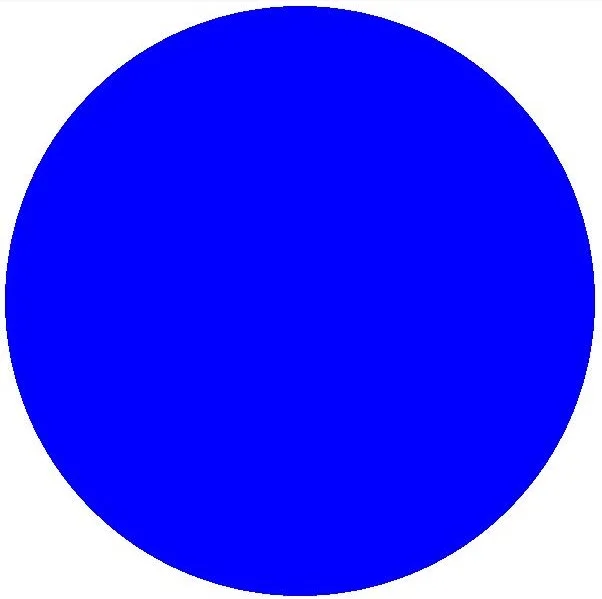
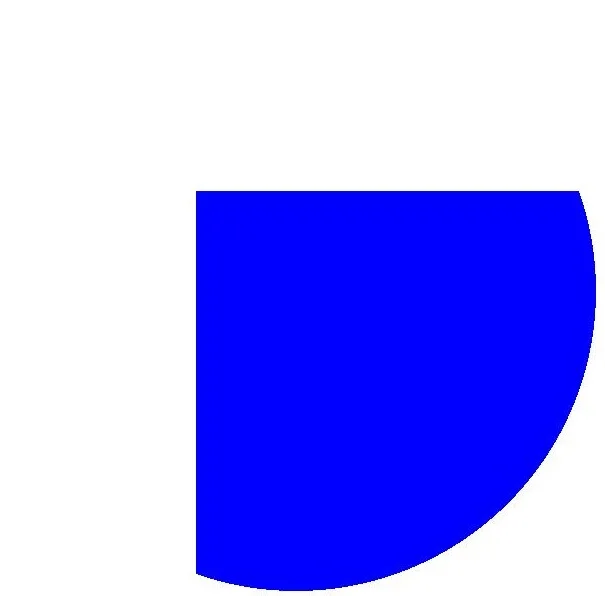
Clipping is a common operation in graphics processing. It is performed on the canvas and can be used to restrict the drawing region, confining all drawing operations to the specified area. The corresponding effect is displayed only after the clipping operation is performed before drawing.
The following clipping operations are supported:
-
Clipping a rectangle
-
Clipping a rounded rectangle
-
Clipping a custom path
-
Clipping a region
Available APIs
The following table lists the APIs for clipping. For details, see drawing_canvas.h.
| API | Description |
|---|---|
| void OH_Drawing_CanvasClipRect (OH_Drawing_Canvas *, const OH_Drawing_Rect *, OH_Drawing_CanvasClipOp clipOp, bool doAntiAlias) | Clips a rectangle. |
| void OH_Drawing_CanvasClipRoundRect (OH_Drawing_Canvas *, const OH_Drawing_RoundRect *, OH_Drawing_CanvasClipOp clipOp, bool doAntiAlias) | Clips a rounded rectangle. |
| void OH_Drawing_CanvasClipPath (OH_Drawing_Canvas *, const OH_Drawing_Path *, OH_Drawing_CanvasClipOp clipOp, bool doAntiAlias) | Clips a path. |
| OH_Drawing_ErrorCode OH_Drawing_CanvasClipRegion (OH_Drawing_Canvas *canvas, const OH_Drawing_Region *region, OH_Drawing_CanvasClipOp clipOp) | Clips a rectangle. |
How to Develop
The following uses the rectangle clipping on the canvas as an example. The logic of other clipping operations is similar. You only need to call the corresponding API and ensure that the data type to be clipped is correct. For details about the usage and parameters, see drawing_canvas.h.
Use the OH_Drawing_CanvasClipRect API to clip a rectangle. There are four input parameters:
-
The first parameter is the canvas, on which the clipping operation is performed. Ensure that the canvas has been created or obtained. For details, see Obtaining a Canvas and Displaying Drawing Results (C/C++).
-
The second parameter is the rectangle region to be clipped.
-
The third parameter is the clipping operation type, which can be INTERSECT or DIFFERENCE.
-
The fourth parameter is whether anti-aliasing is required.
// Create a brush object.
OH_Drawing_Brush *brush = OH_Drawing_BrushCreate();
// Set the brush fill color to blue.
OH_Drawing_BrushSetColor(brush, 0xff0000ff);
// Set the brush for the canvas.
OH_Drawing_CanvasAttachBrush(canvas, brush);
OH_Drawing_Rect *rect = OH_Drawing_RectCreate(value400_, value400_, value1200_, value1200_);
// Clip the rectangle region.
OH_Drawing_CanvasClipRect(canvas, rect, OH_Drawing_CanvasClipOp::INTERSECT, true);
OH_Drawing_Point *point = OH_Drawing_PointCreate(value600_, value600_);
// Draw a circle.
OH_Drawing_CanvasDrawCircle(canvas, point, value600_);
// Remove the brush from the canvas.
OH_Drawing_CanvasDetachBrush(canvas);
// Destroy the brush object and reclaim the memory occupied by the object.
OH_Drawing_BrushDestroy(brush);
| Original Image | Clipped Image |
|---|---|
 |  |
Matrix Transformation
Matrix transformation is a common canvas operation. It is a coordinate system conversion used to change graphics.
The following matrix transformation operations are supported:
-
Translation
-
Scaling
-
Rotation
Available APIs
The following table lists the APIs for matrix transformation. For details, see drawing_matrix.h.
| API | Description |
|---|---|
| void OH_Drawing_CanvasTranslate (OH_Drawing_Canvas *, float dx, float dy) | Translates a canvas by a given distance. |
| void OH_Drawing_CanvasScale (OH_Drawing_Canvas *, float sx, float sy) | Scales a canvas. |
| void OH_Drawing_CanvasRotate (OH_Drawing_Canvas *, float degrees, float px, float py) | Rotates a canvas by a given angle. A positive value indicates a clockwise rotation, and a negative value indicates a counterclockwise rotation. |
| void OH_Drawing_CanvasSkew (OH_Drawing_Canvas *, float sx, float sy) | Skews a canvas. This function premultiplies the current canvas matrix by a skew transformation matrix and applies the resulting matrix to the canvas. The skew transformation matrix is as follows: |1 sx 0||sy 1 0||0 0 1|. |
Translation
Use the OH_Drawing_MatrixCreateTranslation() API to translate the canvas. The API takes two parameters, which are the translation amount in the horizontal and vertical directions, respectively. The unit is px.
The following shows the sample code and effect:
// Create a brush object.
OH_Drawing_Brush* brush = OH_Drawing_BrushCreate();
// Set the fill color.
OH_Drawing_BrushSetColor(brush, OH_Drawing_ColorSetArgb(RGBA_MAX, RGBA_MAX, RGBA_MIN, RGBA_MIN));
// Set the brush for the canvas.
OH_Drawing_CanvasAttachBrush(canvas, brush);
// Create a matrix object that is translated by 300 px in the horizontal and vertical directions.
OH_Drawing_Matrix *matrix = OH_Drawing_MatrixCreateTranslation(value300_, value300_);
// Perform matrix transformation on the canvas.
OH_Drawing_CanvasConcatMatrix(canvas, matrix);
// Draw a rectangle.
OH_Drawing_Rect *rect = OH_Drawing_RectCreate(value200_, value300_, value700_, value600_);
OH_Drawing_CanvasDrawRect(canvas, rect);
// Remove the brush from the canvas.
OH_Drawing_CanvasDetachBrush(canvas);
OH_Drawing_RectDestroy(rect);
OH_Drawing_MatrixDestroy(matrix);
| Original Image | Translated Image |
|---|---|
 |  |
Rotation
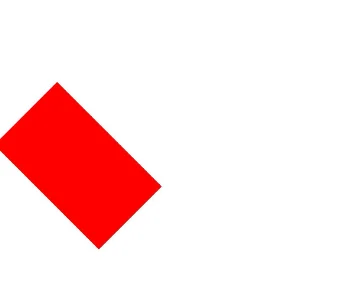
Use the OH_Drawing_MatrixCreateRotation() API to rotate the canvas. The API takes three parameters: rotation angle, and X and Y coordinates of the rotation center.
The following shows the sample code and effect:
// Create a brush object.
OH_Drawing_Brush* brush = OH_Drawing_BrushCreate();
// Set the fill color.
OH_Drawing_BrushSetColor(brush, OH_Drawing_ColorSetArgb(RGBA_MAX, RGBA_MAX, RGBA_MIN, RGBA_MIN));
// Set the brush for the canvas.
OH_Drawing_CanvasAttachBrush(canvas, brush);
// Create a rotation matrix object. The three parameters are the rotation angle and X and Y coordinates of the rotation center.
OH_Drawing_Matrix* matrix = OH_Drawing_MatrixCreateRotation(45, value200_, value300_);
// Perform matrix transformation on the canvas.
OH_Drawing_CanvasConcatMatrix(canvas, matrix);
// Draw a rectangle.
OH_Drawing_Rect *rect = OH_Drawing_RectCreate(value200_, value300_, value700_, value600_);
OH_Drawing_CanvasDrawRect(canvas, rect);
// Remove the brush from the canvas.
OH_Drawing_CanvasDetachBrush(canvas);
OH_Drawing_RectDestroy(rect);
OH_Drawing_MatrixDestroy(matrix);
| Original Image | Rotated Image |
|---|---|
 |  |
Scaling
Use OH_Drawing_MatrixCreateScale() to scale the canvas. The API takes four parameters, which are the scaling factors along the X and Y axes and the X and Y coordinates of the rotation center.
The following shows the sample code and effect:
// Create a brush object.
OH_Drawing_Brush* brush = OH_Drawing_BrushCreate();
// Set the fill color.
OH_Drawing_BrushSetColor(brush, OH_Drawing_ColorSetArgb(RGBA_MAX, RGBA_MAX, RGBA_MIN, RGBA_MIN));
// Set the brush for the canvas.
OH_Drawing_CanvasAttachBrush(canvas, brush);
// Create a scaling matrix object. The four parameters are the X and Y coordinates of the rotation center and the scaling factors in the horizontal and vertical directions.
OH_Drawing_Matrix* matrix = OH_Drawing_MatrixCreateScale(2, 2, value200_, value300_);
// Perform matrix transformation on the canvas.
OH_Drawing_CanvasConcatMatrix(canvas, matrix);
// Draw a rectangle.
OH_Drawing_Rect *rect = OH_Drawing_RectCreate(value200_, value300_, value700_, value600_);
OH_Drawing_CanvasDrawRect(canvas, rect);
// Remove the brush from the canvas.
OH_Drawing_CanvasDetachBrush(canvas);
OH_Drawing_RectDestroy(rect);
| Original Image | Scaled up Image |
|---|---|
 |  |
Saving and Restoring the Canvas Status
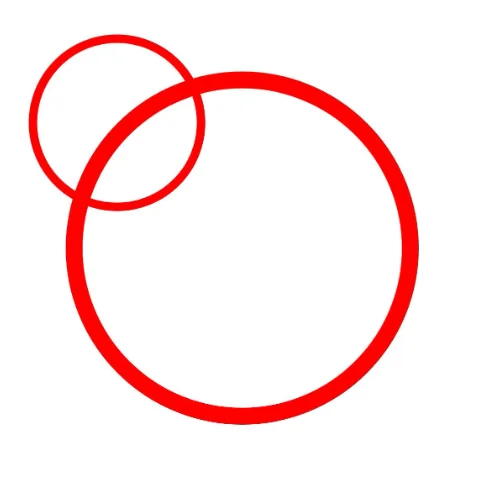
The saving operation is used to save the current canvas status to the top of the stack. The restoration operation is used to restore the canvas status saved at the top of the stack. Once the restoration operation is performed, a series of operations such as translation, scaling, and clipping between the saving and restoration operations are cleared.
Available APIs
The following table lists the APIs used for saving and restoring the canvas status. For details about the usage and parameters, see drawing_canvas.h.
| API | Description |
|---|---|
| void OH_Drawing_CanvasSave (OH_Drawing_Canvas *) | Saves the current canvas status (canvas matrix) to the top of the stack. |
| void OH_Drawing_CanvasRestore (OH_Drawing_Canvas *) | Restores the canvas status (canvas matrix) saved on the top of the stack. |
| void OH_Drawing_CanvasRestoreToCount (OH_Drawing_Canvas *, uint32_t saveCount) | Restores to a given number of canvas statuses (canvas matrices). |
How to Develop
// Create a pen object.
OH_Drawing_Pen* pen = OH_Drawing_PenCreate();
// Set the stroke color of the pen.
OH_Drawing_PenSetColor(pen, OH_Drawing_ColorSetArgb(RGBA_MAX, RGBA_MAX, RGBA_MIN, RGBA_MIN));
// Set the pen width to 20.
OH_Drawing_PenSetWidth(pen, 20);
// Set the pen for the canvas.
OH_Drawing_CanvasAttachPen(canvas, pen);
// Save the current canvas status. Currently, no scale-up operation is performed. The original status is saved.
OH_Drawing_CanvasSave(canvas);
OH_Drawing_Matrix *matrix = OH_Drawing_MatrixCreateScale(2, 2, 2, 2);
// Scale up the canvas.
OH_Drawing_CanvasConcatMatrix(canvas, matrix);
OH_Drawing_Point* point = OH_Drawing_PointCreate(value300_, value300_);
// Draw a circle. Because the scale-up operation has been performed, a large circle is drawn.
OH_Drawing_CanvasDrawCircle(canvas, point, value200_);
// Restore the canvas to the original status.
OH_Drawing_CanvasRestore(canvas);
// Draw a circle. Because the original state is restored, a small circle is drawn.
OH_Drawing_CanvasDrawCircle(canvas, point, value200_);
// Remove the pen from the canvas.
OH_Drawing_CanvasDetachPen(canvas);
// Destroy the pen object and reclaim the memory occupied by the object.
OH_Drawing_PenDestroy(pen);
OH_Drawing_PointDestroy(point);
OH_Drawing_MatrixDestroy(matrix);
Samples
The following samples are provided to help you better understand how to use the Drawing APIs (C/C++) for development:
你可能感兴趣的鸿蒙文章
openharmony 鸿蒙 geometric-shape-drawing-arkts
openharmony 鸿蒙 native-fence-guidelines
openharmony 鸿蒙 native-vsync-guidelines
openharmony 鸿蒙 displaysync-overview