FAQs About Dynamic Attribute Setting
This topic addresses common issues related to dynamic attribute setting.
JS Crash Occurs When AttributeModifier Is Used to Set Dynamic Attributes for a Component
Symptom
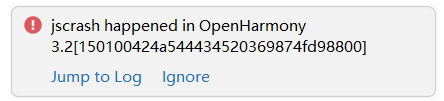
A JS crash occurs after AttributeModifier is used to set dynamic attributes for a component.
Solution
Go to the error log as prompted, view the error cause, and rectify the fault. For details, see the code example below.
Code Example

In this example, a button is bound to AttributeModifier to demonstrate the scenario where an exception is thrown when an unsupported attribute is set. After the code is executed, a JS crash error is reported. In this example, deleting the code related to reuseId will allow the application to run normally.
// xxx.ets
// Set the custom AttributeModifier for the Button component attributes.
class MyButtonModifier implements AttributeModifier<ButtonAttribute> {

  applyNormalAttribute(instance: ButtonAttribute): void {
    instance.reuseId('String') // Deleting this line will allow the application to run normally.
    instance.backgroundColor(Color.Red)
  }
}

@Entry
@Component
struct attributeDemo {
  @State modifier: MyButtonModifier = new MyButtonModifier();

  build() {
    Row() {
      Column() {
        Button('Button')
          .attributeModifier(this.modifier)
      }
      .width('100%')
    }
    .height('100%')
  }
}
你可能感兴趣的鸿蒙文章
openharmony 鸿蒙 arkts-common-components-text-input
openharmony 鸿蒙 arkts-select-component-faq
openharmony 鸿蒙 js-framework-syntax-css
openharmony 鸿蒙 arkts-popup-and-menu-components-popup
openharmony 鸿蒙 arkts-navigation-animation-faq
openharmony 鸿蒙 arkts-rotation-transition-animation
openharmony 鸿蒙 ndk-inspector-component-observer
openharmony 鸿蒙 arkts-popup-and-menu-components-uicontext-popup