Class (CursorController)
提供光标样式设置的能力。
说明:
本模块首批接口从API version 10开始支持。后续版本的新增接口,采用上角标单独标记接口的起始版本。
本Class首批接口从API version 12开始支持。
以下API需先使用UIContext中的getCursorController()方法获取CursorController实例,再通过此实例调用对应方法。
restoreDefault12+
restoreDefault(): void
恢复默认的光标样式。
原子化服务API: 从API version 12开始,该接口支持在原子化服务中使用。
系统能力: SystemCapability.ArkUI.ArkUI.Full
示例:

当光标移出绿框时,通过CursorController的restoreDefault方法恢复默认光标样式。
import { pointer } from '@kit.InputKit';
import { UIContext, CursorController } from '@kit.ArkUI';

@Entry
@Component
struct CursorControlExample {
  @State text: string = '';
  cursorCustom: CursorController = this.getUIContext().getCursorController();

  build() {
    Column() {
      Row().height(200).width(200).backgroundColor(Color.Green).position({x: 150 ,y:70})
        .onHover((flag) => {
          if (flag) {
            this.cursorCustom.setCursor(pointer.PointerStyle.EAST);
          } else {
            console.info("restoreDefault");
            this.cursorCustom.restoreDefault();
          }
        })
    }.width('100%')
  }
}
setCursor12+
setCursor(value: PointerStyle): void
更改当前的鼠标光标样式。
说明:
该接口调用后不会立即生效,而是在下一帧改变鼠标光标样式。
原子化服务API: 从API version 12开始,该接口支持在原子化服务中使用。
系统能力: SystemCapability.ArkUI.ArkUI.Full
参数:
| 参数名 | 类型 | 必填 | 说明 |
|---|---|---|---|
| value | PointerStyle | 是 | 光标样式。 |
示例:
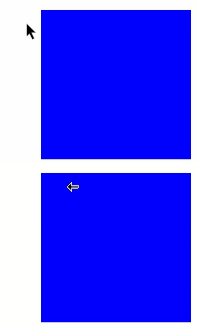
当光标进入蓝框时,通过CursorController的setCursor方法修改光标样式为PointerStyle.WEST。
import { pointer } from '@kit.InputKit';
import { UIContext, CursorController } from '@kit.ArkUI';

@Entry
@Component
struct CursorControlExample {
  @State text: string = '';
  cursorCustom: CursorController = this.getUIContext().getCursorController();

  build() {
    Column() {
      Row().height(200).width(200).backgroundColor(Color.Blue).position({x: 100 ,y:70})
        .onHover((flag) => {
          if (flag) {
            this.cursorCustom.setCursor(pointer.PointerStyle.WEST);
          } else {
            this.cursorCustom.restoreDefault();
          }
        })
    }.width('100%')
  }
}
setCustomCursor
setCustomCursor(value: image.PixelMap, focusX?: number, focusY?: number): void
设置自定义鼠标光标样式。
说明:
该接口调用后不会立即生效,而是在下一帧改变鼠标光标样式。
起始版本: 26.0.0
原子化服务API: 从API版本26.0.0开始,该接口支持在原子化服务中使用。
系统能力: SystemCapability.ArkUI.ArkUI.Full
模型约束: 此接口仅可在Stage模型下使用。
参数:
| 参数名 | 类型 | 必填 | 说明 |
|---|---|---|---|
| value | image.PixelMap | 是 | 自定义鼠标光标样式的像素图。 |
| focusX | number | 否 | 自定义光标的焦点X坐标。焦点指的是鼠标实际点击的位置。 默认值:0 单位:px 取值范围:[0, +∞) |
| focusY | number | 否 | 自定义光标的焦点Y坐标。 默认值:0 单位:px 取值范围:[0, +∞) |
示例:

该示例通过调用setCustomCursor接口,设置自定义鼠标光标样式。
从API版本26.0.0开始,新增setCustomCursor接口。
import { image } from '@kit.ImageKit';
import { CursorController } from '@kit.ArkUI';
import { BusinessError } from '@kit.BasicServicesKit';

@Entry
@Component
struct CustomCursorExample {
  cursorController: CursorController = this.getUIContext().getCursorController();
  @State pixelMap: image.PixelMap|undefined = undefined;

  async loadPixelMapFromRawFile(): Promise<void> {
    try {
      // 1.获取资源管理器,添加空值检查
      const uiContext = this.getUIContext();
      if (!uiContext) {
        console.error('UIContext is undefined');
        return;
      }
      const context = uiContext.getHostContext();
      if (!context) {
        console.error('HostContext is undefined');
        return;
      }
      const resourceMgr = context.resourceManager;
      if (!resourceMgr) {
        console.error('ResourceManager is undefined');
        return;
      }
      // 2.读取rawfile中的图片文件
      const fileData: Uint8Array = await resourceMgr.getRawFileContent('cursor.png');
      const buffer = fileData.buffer.slice(0);
      // 3.创建ImageSource
      const imageSource = image.createImageSource(buffer);
      // 4.创建PixelMap(可以指定期望的尺寸)
      const pixelMap = await imageSource.createPixelMap({
        desiredSize: { width: 32, height: 32 }
      });
      this.pixelMap = pixelMap;
      console.info('Custom cursor loaded successfully');
    } catch (error) {
      let err = error as BusinessError;
      console.error(`Failed to load cursor: ${err.code}, ${err.message}`);
    }
  }

  build() {
    Column() {
      Button('load image')
        .width("40%")
        .height('7%')
        .fontSize('30vp')
        .margin(70)
        .backgroundColor(Color.Blue)
        .onClick(() => {
          // 点击按钮加载PixelMap
          this.loadPixelMapFromRawFile();
        })
      Row()
        .height(200)
        .width(200)
        .backgroundColor(Color.Blue)
        .onHover((isHover: boolean) => {
          if (isHover && this.pixelMap != undefined) {
            // 设置自定义鼠标光标样式,焦点位置设为(16, 16),即光标中心
            this.cursorController.setCustomCursor(this.pixelMap, 16, 16);
          } else {
            this.cursorController.restoreDefault();
          }
        })
    }
    .justifyContent(FlexAlign.Center)
    .alignItems(HorizontalAlign.Center)
    .width('100%')
    .height('100%')
  }

  aboutToDisappear(): void {
    // 释放PixelMap资源
    if (this.pixelMap) {
      this.pixelMap.release();
      this.pixelMap = undefined;
    }
    this.cursorController.restoreDefault();
  }
}
你可能感兴趣的鸿蒙文章
openharmony 鸿蒙 arkts-apis-uicontext-contextmenucontroller
openharmony 鸿蒙 errorcode-canvas
openharmony 鸿蒙 capi-oh-nativexcomponent-native-xcomponent-oh-nativexcomponent
openharmony 鸿蒙 errorcode-bindSheet
openharmony 鸿蒙 js-apis-arkui-uiExtension-sys
openharmony 鸿蒙 capi-arkui-accessibility-arkui-accessibilityeventinfo
openharmony 鸿蒙 capi-arkui-rendernodeutils
openharmony 鸿蒙 capi-native-node-h-nodeattributetype-layoutcomponent