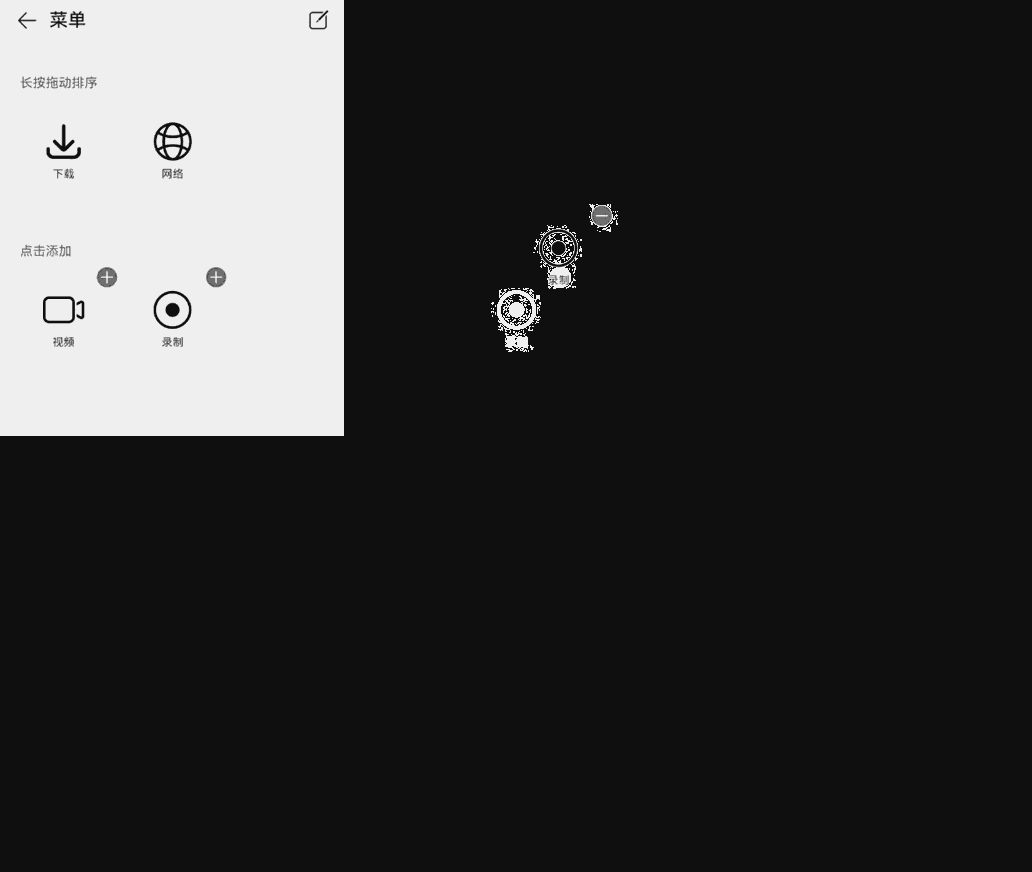
GridObjectSortComponent
网格对象的编辑排序是用于网格对象的编辑、拖动排序、新增和删除。
说明:
该组件从API version 11开始支持。后续版本如有新增内容,则采用上角标单独标记该内容的起始版本。
该组件不支持在Wearable设备上使用。
导入模块
import { GridObjectSortComponent, GridObjectSortComponentItem, GridObjectSortComponentOptions, GridObjectSortComponentType , SymbolGlyphModifier } from '@kit.ArkUI';
子组件
无
属性
不支持通用属性。
GridObjectSortComponent
GridObjectSortComponent({options: GridObjectSortComponentOptions, dataList: Array<GridObjectSortComponentItem>, onSave: (select: Array<GridObjectSortComponentItem>, unselect: Array<GridObjectSortComponentItem>) => void, onCancel: () => void })
网格对象排序组件。
装饰器类型:@Component
原子化服务API: 从API version 12开始,该接口支持在原子化服务中使用。
系统能力: SystemCapability.ArkUI.ArkUI.Full
| 名称 | 类型 | 必填 | 装饰器类型 | 说明 |
|---|---|---|---|---|
| options | GridObjectSortComponentOptions | 是 | @Prop | 组件配置信息。 |
| dataList | Array<GridObjectSortComponentItem> | 是 | - | 传入的数据,最大长度为50,数据长度超过50,只会取前50的数据。 |
| onSave | (select: Array<GridObjectSortComponentItem>, unselect: Array<GridObjectSortComponentItem>) => void | 是 | - | 保存编辑排序的回调函数,返回编辑后的数据。 |
| onCancel | () => void | 是 | - | 取消保存数据的回调。 |
GridObjectSortComponentOptions
网格对象排序组件的组件配置信息。
原子化服务API: 从API version 12开始,该接口支持在原子化服务中使用。
系统能力: SystemCapability.ArkUI.ArkUI.Full
| 名称 | 类型 | 必填 | 说明 |
|---|---|---|---|
| type | GridObjectSortComponentType | 否 | 组件展示形态:文字|图片+文字。 默认:GridObjectSortComponentType.text |
| imageSize | number |Resource | 否 | 图片的尺寸,单位vp。 取值范围:大于等于0。 默认值:56vp |
| normalTitle | ResourceStr | 否 | 未编辑状态下显示的标题。 默认值:频道。 |
| showAreaTitle | ResourceStr | 否 | 展示区域标题,第一个子标题。 默认值:长按拖动排序。 |
| addAreaTitle | ResourceStr | 否 | 添加区域标题,第二个子标题。 默认值:点击添加。 |
| editTitle | ResourceStr | 否 | 编辑状态下头部标题显示。 默认值:编辑。 |
GridObjectSortComponentType
配置网格对象排序组件节点的类型,配置名称 IMAGE_TEXT 为图片文字类型,TEXT 为文字类型。
原子化服务API: 从API version 12开始,该接口支持在原子化服务中使用。
系统能力: SystemCapability.ArkUI.ArkUI.Full
| 名称 | 值 | 说明 |
|---|---|---|
| IMAGE_TEXT | 'image_text' | 图片文字类型。 |
| TEXT | 'text' | 文字类型。 |
GridObjectSortComponentItem
网格对象排序组件的组件数据配置信息。
系统能力: SystemCapability.ArkUI.ArkUI.Full
| 名称 | 类型 | 必填 | 说明 |
|---|---|---|---|
| id | number | string | 是 | 数据id序号,不可重复。 默认值:空字符串。 原子化服务API: 从API version 12开始,该接口支持在原子化服务中使用。 |
| text | ResourceStr | 是 | 显示文本信息。 原子化服务API: 从API version 12开始,该接口支持在原子化服务中使用。 |
| selected | boolean | 是 | 是否已经被添加,添加:true,未添加:false。 原子化服务API: 从API version 12开始,该接口支持在原子化服务中使用。 |
| url | ResourceStr | 否 | GridObjectSortComponentType类型为IMAGE_TEXT时,需要传入图片地址。 原子化服务API: 从API version 12开始,该接口支持在原子化服务中使用。 |
| symbolStyle18+ | SymbolGlyphModifier | 否 | GridObjectSortComponentType类型为IMAGE_TEXT时,需要传入Symbol图标资源。配置优先级高于url。 原子化服务API: 从API version 18开始,该接口支持在原子化服务中使用。 |
| order | number | 是 | 顺序序号。 取值范围:大于等于0。 默认值:0 原子化服务API: 从API version 12开始,该接口支持在原子化服务中使用。 |
事件
不支持通用事件。
示例
网格对象的编辑排序组件基础用法,涉及对组件配置信息初始化,数据初始化,保存、取消方法的使用。
import { GridObjectSortComponent, GridObjectSortComponentItem, GridObjectSortComponentOptions, GridObjectSortComponentType, SymbolGlyphModifier } from '@kit.ArkUI';

@Entry
@Component
struct Index {
  // 组件数据初始化。
  @State dataList: GridObjectSortComponentItem[] = [
    {
      id: 0,
      url: $r('sys.media.ohos_save_button_filled'),
      text: '下载',
      selected: true,
      order: 3
    },
    {
      id: 1,
      url: $r('sys.media.ohos_ic_public_web'),
      text: '网络',
      selected: true,
      order: 9
    },
    {
      id: 2,
      url: $r('sys.media.ohos_ic_public_video'),
      text: '视频',
      selected: false,
      order: 1
    },
    {
      id: 3,
      symbolStyle: new SymbolGlyphModifier($r('sys.symbol.record_circle')),
      text: '录制',
      selected: false,
      order: 4
    }
  ]

  // 组件配置信息初始化。
  @State option: GridObjectSortComponentOptions = {
    type: GridObjectSortComponentType.IMAGE_TEXT,
    imageSize: 45,
    normalTitle: '菜单',
    editTitle: '编辑',
    showAreaTitle: '长按拖动排序',
    addAreaTitle: '点击添加'
  }

  build() {
    Column() {
      GridObjectSortComponent({
        options: this.option,
        dataList: this.dataList,
        // 保存编辑排序的回调函数,返回编辑后的数据。
        onSave: (
          select: Array<GridObjectSortComponentItem>,
          unselect: Array<GridObjectSortComponentItem>
        ) => {
          // save ToDo
        },
        // 取消保存数据的回调。
        onCancel: () =>{
          // cancel ToDo
        }
      })
    }
  }
}