Class (CursorController)
Provides the capability to set cursor styles.
NOTE
The initial APIs of this module are supported since API version 10. Newly added APIs will be marked with a superscript to indicate their earliest API version.
The initial APIs of this class are supported since API version 12.
In the following API examples, you must first use getCursorController() in UIContext to obtain a CursorController instance, and then call the APIs using the obtained instance.
restoreDefault12+
restoreDefault(): void
Restores the default cursor style.
Atomic service API: This API can be used in atomic services since API version 12.
System capability: SystemCapability.ArkUI.ArkUI.Full
Example

In this example, the restoreDefault API of CursorController is used to restore the cursor style when the cursor moves out of the green frame.
import { pointer } from '@kit.InputKit';
import { UIContext, CursorController } from '@kit.ArkUI';

@Entry
@Component
struct CursorControlExample {
  @State text: string = '';
  cursorCustom: CursorController = this.getUIContext().getCursorController();

  build() {
    Column() {
      Row().height(200).width(200).backgroundColor(Color.Green).position({x: 150 ,y:70})
        .onHover((flag) => {
          if (flag) {
            this.cursorCustom.setCursor(pointer.PointerStyle.EAST);
          } else {
            console.info("restoreDefault");
            this.cursorCustom.restoreDefault();
          }
        })
    }.width('100%')
  }
}
setCursor12+
setCursor(value: PointerStyle): void
Sets the cursor style.
NOTE
This API does not take effect immediately. The cursor style will be updated in the next rendering frame.
Atomic service API: This API can be used in atomic services since API version 12.
System capability: SystemCapability.ArkUI.ArkUI.Full
Parameters
| Name | Type | Mandatory | Description |
|---|---|---|---|
| value | PointerStyle | Yes | Pointer style. |
Example
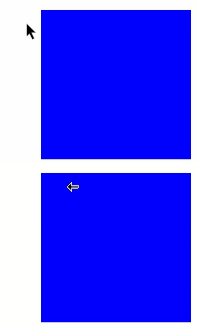
In this example, the setCursor API of CursorController is used to set the cursor style to PointerStyle.WEST when the cursor moves into the blue frame.
import { pointer } from '@kit.InputKit';
import { UIContext, CursorController } from '@kit.ArkUI';

@Entry
@Component
struct CursorControlExample {
  @State text: string = '';
  cursorCustom: CursorController = this.getUIContext().getCursorController();

  build() {
    Column() {
      Row().height(200).width(200).backgroundColor(Color.Blue).position({x: 100 ,y:70})
        .onHover((flag) => {
          if (flag) {
            this.cursorCustom.setCursor(pointer.PointerStyle.WEST);
          } else {
            this.cursorCustom.restoreDefault();
          }
        })
    }.width('100%')
  }
}
setCustomCursor
setCustomCursor(value: image.PixelMap, focusX?: number, focusY?: number): void
Sets the custom cursor style.
NOTE
This API does not take effect immediately. The cursor style will be updated in the next rendering frame.
Since: 26.0.0
Atomic service API: This API can be used in atomic services since API version 26.0.0.
System capability: SystemCapability.ArkUI.ArkUI.Full
Model restriction: This API can be used only in the stage model.
Parameters
| Name | Type | Mandatory | Description |
|---|---|---|---|
| value | image.PixelMap | Yes | Pixel map of the custom mouse cursor style. |
| focusX | number | No | X coordinate of the custom cursor's hotspot. The hotspot refers to the actual location where the click occurs. Default value: 0 Unit: px Value range: [0, +∞) |
| focusY | number | No | Y coordinate of the custom cursor's hotspot. Default value: 0 Unit: px Value range: [0, +∞) |
Example
In this example, the setCustomCursor API is called to set the custom cursor style.
The setCustomCursor API is supported since API version 26.0.0.
import { image } from '@kit.ImageKit';
import { CursorController } from '@kit.ArkUI';
import { BusinessError } from '@kit.BasicServicesKit';

@Entry
@Component
struct CustomCursorExample {
  cursorController: CursorController = this.getUIContext().getCursorController();
  @State pixelMap: image.PixelMap|undefined = undefined;

  async loadPixelMapFromRawFile(): Promise<void> {
    try {
      // 1. Obtain the resource manager and add null value check.
      const uiContext = this.getUIContext();
      if (!uiContext) {
        console.error('UIContext is undefined');
        return;
      }
      const context = uiContext.getHostContext();
      if (!context) {
        console.error('HostContext is undefined');
        return;
      }
      const resourceMgr = context.resourceManager;
      if (!resourceMgr) {
        console.error('ResourceManager is undefined');
        return;
      }
      // 2. Read the image file in rawfile.
      const fileData: Uint8Array = await resourceMgr.getRawFileContent('cursor.png');
      const buffer = fileData.buffer.slice(0);
      // 3. Create an ImageSource object.
      const imageSource = image.createImageSource(buffer);
      // 4. Create a PixelMap object (you can specify the expected dimensions).
      const pixelMap = await imageSource.createPixelMap({
        desiredSize: { width: 32, height: 32 }
      });
      this.pixelMap = pixelMap;
      console.info('Custom cursor loaded successfully');
    } catch (error) {
      let err = error as BusinessError;
      console.error(`Failed to load cursor: ${err.code}, ${err.message}`);
    }
  }

  build() {
    Column() {
      Button('load image')
        .width("40%")
        .height('7%')
        .fontSize('30vp')
        .margin(70)
        .backgroundColor(Color.Blue)
        .onClick(() => {
          // Tap the button to load the PixelMap.
          this.loadPixelMapFromRawFile();
        })
      Row()
        .height(200)
        .width(200)
        .backgroundColor(Color.Blue)
        .onHover((isHover: boolean) => {
          if (isHover && this.pixelMap != undefined) {
            // Set the custom cursor style and set the hotspot position to (16, 16), which is the center of the cursor.
            this.cursorController.setCustomCursor(this.pixelMap, 16, 16);
          } else {
            this.cursorController.restoreDefault();
          }
        })
    }
    .justifyContent(FlexAlign.Center)
    .alignItems(HorizontalAlign.Center)
    .width('100%')
    .height('100%')
  }

  aboutToDisappear(): void {
    // Release the PixelMap resource.
    if (this.pixelMap) {
      this.pixelMap.release();
      this.pixelMap = undefined;
    }
    this.cursorController.restoreDefault();
  }
}

你可能感兴趣的鸿蒙文章
openharmony 鸿蒙 arkts-apis-uicontext-contextmenucontroller
openharmony 鸿蒙 errorcode-canvas
openharmony 鸿蒙 capi-oh-nativexcomponent-native-xcomponent-oh-nativexcomponent
openharmony 鸿蒙 errorcode-bindSheet
openharmony 鸿蒙 js-apis-arkui-uiExtension-sys
openharmony 鸿蒙 capi-arkui-accessibility-arkui-accessibilityeventinfo
openharmony 鸿蒙 capi-arkui-rendernodeutils
openharmony 鸿蒙 js-apis-arkui-node
openharmony 鸿蒙 capi-native-node-h
openharmony 鸿蒙 capi-arkui-nativemodule-arkui-listitemswipeactionitem