Class (MeasureUtils)
Provides APIs for measuring text metrics, such as text height and width.
NOTE
The initial APIs of this module are supported since API version 10. Newly added APIs will be marked with a superscript to indicate their earliest API version.
The initial APIs of this class are supported since API version 12.
In the following API examples, you must first use getMeasureUtils() in UIContext to obtain a MeasureUtils instance, and then call the APIs using the obtained instance.
To perform more complex text measurements, use the Paragraph API.
Avoid using ApplicationContext.setFontSizeScale during text measurement API calls. To ensure timing correctness and the accuracy of measurement results, manually listen for font scale changes.
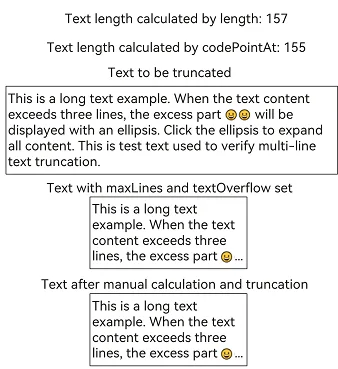
For measuring text after truncation, direct use of the string length for truncation may lead to inaccuracies. This is because certain Unicode characters (for example, emojis) have code points with a length greater than 1, and truncating by string length can split these multi-code-point characters, resulting in incorrect text display or measurement errors. As such, you are advised to perform iterative truncation processing based on Unicode code points. For details, see Example 2 in measureTextSize.
measureText12+
measureText(options: MeasureOptions): number
Measures the single-line display width of the specified text. For multi-line text (separated by newline characters \n), this API returns the width of the longest line.
NOTE
measureText always measures single-line text width. Layout constraints in options (constraintWidth, maxLines, and more) do not affect results. For layout-constrained width measurement, use measureTextSize.
Atomic service API: This API can be used in atomic services since API version 12.
System capability: SystemCapability.ArkUI.ArkUI.Full
Parameters
| Name | Type | Mandatory | Description |
|---|---|---|---|
| options | MeasureOptions | Yes | Options of the target text. |
Return value
| Type | Description |
|---|---|
| number | Text width. NOTE Floating-point results are rounded up. Unit: px. |
Example
This example uses the measureText API of MeasureUtils to obtain the width of the "Hello World" text.
import { MeasureUtils } from '@kit.ArkUI';

@Entry
@Component
struct Index {
  @State uiContext: UIContext = this.getUIContext();
  @State uiContextMeasure: MeasureUtils = this.uiContext.getMeasureUtils();
  @State textWidth: number = this.uiContextMeasure.measureText({
    textContent: "Hello World",
    fontSize: '50px'
  });

  build() {
    Row() {
      Column() {
        Text(`The width of 'Hello World': ${this.textWidth}`)
      }
      .width('100%')
    }
    .height('100%')
  }
}
measureTextSize12+
measureTextSize(options: MeasureOptions): SizeOptions
Measures the width and height of the given single-line text.
Atomic service API: This API can be used in atomic services since API version 12.
System capability: SystemCapability.ArkUI.ArkUI.Full
Parameters
| Name | Type | Mandatory | Description |
|---|---|---|---|
| options | MeasureOptions | Yes | Options of the target text. |
Return value
| Type | Description |
|---|---|
| SizeOptions | Width and height of the text. NOTE If constraintWidth is not specified, the floating-point value of the text width will be rounded up. The return values for text width and height are both in px. |
Example 1
This example uses the measureTextSize API of MeasureUtils to obtain the width and height of the "Hello World" text.
import { MeasureUtils } from '@kit.ArkUI';

@Entry
@Component
struct Index {
  @State uiContext: UIContext = this.getUIContext();
  @State uiContextMeasure: MeasureUtils = this.uiContext.getMeasureUtils();
  textSize: SizeOptions = this.uiContextMeasure.measureTextSize({
    textContent: "Hello World",
    fontSize: '50px'
  });
  build() {
    Row() {
      Column() {
        Text(`The width of 'Hello World': ${this.textSize.width}`)
        Text(`The height of 'Hello World': ${this.textSize.height}`)
      }
      .width('100%')
    }
    .height('100%')
  }
}
Example 2
This example implements custom text truncation using the measureTextSize method from MeasureUtils combined with Unicode code point calculation. This approach achieves the same effect as setting maxLines and textOverflow.
@Entry
@Component
struct TextDemo {
  @State isExpanded: boolean = false;
  @State displayedText: string = '';
  @State defaultFontSize: number = 16;
  @State textWidth: number = 150;
  @State numLenghth: number = 0;
  @State numUnocde: number = 0;
  private fullText: string =
    'This is a long text example. When the text content exceeds three lines, the excess part 😀😀 will be displayed with an ellipsis. Click the ellipsis to expand all content. This is test text used to verify multi-line text truncation.'
  private maxLines: number = 3;

  aboutToAppear() {
    const codePoints = this.getCodePoints(this.fullText);
    this.numLenghth = this.fullText.length;
    this.numUnocde = codePoints.length;
    this.calculateText(this.maxLines, this.fullText);
  }

  getCodePoints(text: string): number[] { // Split text using codePointAt.
    const codePoints: number[] = [];
    let index = 0;
    while (index < text.length) {
      const codePoint = text.codePointAt(index);
      if (codePoint === undefined) {
        break;
      }
      codePoints.push(codePoint);
      index += codePoint > 0xFFFF? 2 : 1; // Handle 4-byte characters.
    }
    return codePoints;
  }

  lastUnicodeLength(str:string) { // Obtain the Unicode length of the last character in the string.
    if (!str||str.length < 1) {
      return 0;
    }
    if (str.length < 2) {
      return 1;
    }
    let lastCodePoint = str.codePointAt(str.length - 2);
    if (lastCodePoint == undefined) {
      return 1;
    }
    let lastStr = String.fromCodePoint(lastCodePoint);
    return lastStr.length;
  }

  calculateText(maxLines: number, fullText: string) { // Calculate text truncation based on line constraints.
    const noMaxLinesSize = this.getUIContext().getMeasureUtils().measureTextSize({
      textContent: fullText,
      constraintWidth: this.textWidth
    });
    const hasMaxLinesSize = this.getUIContext().getMeasureUtils().measureTextSize({
      textContent: fullText,
      constraintWidth: this.textWidth,
      maxLines: this.maxLines
    });

    this.displayedText = this.displayedText = this.fullText;
    if (Number(noMaxLinesSize.height) > Number(hasMaxLinesSize.height)) { // Truncation exists.
      while (this.displayedText.length > 0) {
        this.displayedText =
          this.displayedText.slice(0,
            this.displayedText.length - this.lastUnicodeLength(this.displayedText)); // Remove characters.
        let textAfterCut = this.displayedText + "…"; // Add an ellipsis.
        let sizeAfteCut = this.getUIContext().getMeasureUtils().measureTextSize({
          textContent: textAfterCut,
          constraintWidth: this.textWidth
        });
        if (Number(sizeAfteCut.height) <= Number(hasMaxLinesSize.height)) {
          break;
        } else {
          console.info("displayedText: " + this.displayedText);
        }
      }
      this.displayedText = this.displayedText + "...";
    }
  }

  build() {
    Column({ space: 10 }) {
      Text(`Text length calculated by length: ${this.numLenghth}`)
      Text(`Text length calculated by codePointAt: ${this.numUnocde}`)
      Text('Text to be truncated')
      Text(this.fullText)
        .borderWidth(1)

      Text('Text with maxLines and textOverflow set')
      Text(this.fullText)
        .maxLines(this.maxLines)
        .textOverflow({ overflow: TextOverflow.Ellipsis })
        .width(this.textWidth)
        .borderWidth(1)

      Text('Text after manual calculation and truncation')
      Text(this.displayedText)
        .width(this.textWidth)
        .borderWidth(1)
    }
    .padding(20)
  }
}
getParagraphs20+
getParagraphs(styledString: StyledString, options?: TextLayoutOptions): Array<Paragraph>
Converts a styled string into an array of corresponding Paragraph objects based on text layout options.
System capability: SystemCapability.ArkUI.ArkUI.Full
Parameters
| Name | Type | Mandatory | Description |
|---|---|---|---|
| styledString | StyledString | Yes | Styled string to be converted. |
| options | TextLayoutOptions | No | Text layout options. |
Return value
| Type | Description |
|---|---|
| Array<Paragraph> | Array of Paragraph objects. |
Example
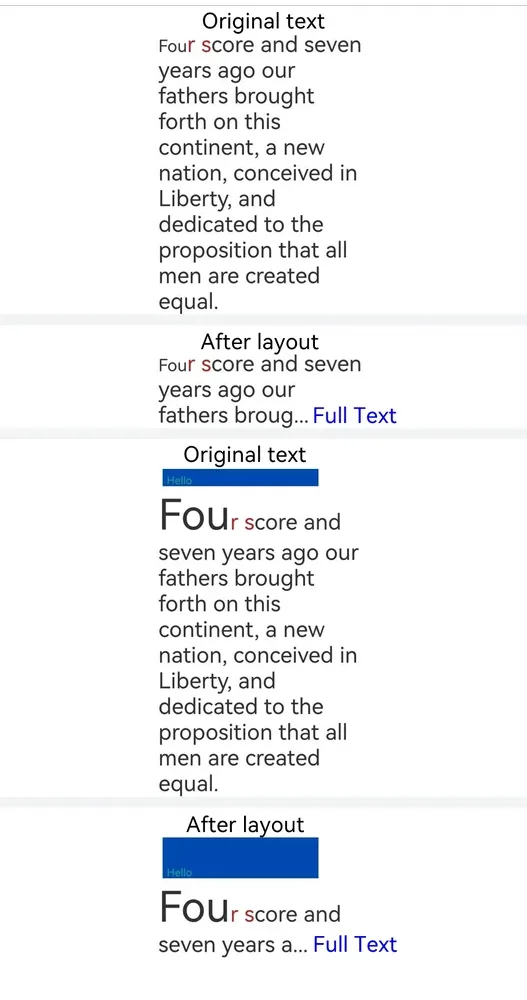
The following example demonstrates how to use the getParagraphs API from MeasureUtils to measure text. When the content exceeds the maximum number of display lines, the text is truncated and displays a "... Full Text" indicator.
import { LengthMetrics } from '@kit.ArkUI';
import { drawing } from '@kit.ArkGraphics2D';

class MyCustomSpan extends CustomSpan {
  constructor(word: string, width: number, height: number, context: UIContext) {
    super();
    this.word = word;
    this.width = width;
    this.height = height;
    this.context = context;
  }

  onMeasure(measureInfo: CustomSpanMeasureInfo): CustomSpanMetrics {
    return { width: this.width, height: this.height };
  }

  onDraw(context: DrawContext, options: CustomSpanDrawInfo) {
    let canvas = context.canvas;
    const brush = new drawing.Brush();
    brush.setColor({
      alpha: 255,
      red: 0,
      green: 74,
      blue: 175
    });
    const font = new drawing.Font();
    font.setSize(25);
    const textBlob = drawing.TextBlob.makeFromString(this.word, font, drawing.TextEncoding.TEXT_ENCODING_UTF8);
    canvas.attachBrush(brush);
    canvas.drawRect({
      left: options.x + 10,
      right: options.x + this.context.vp2px(this.width) - 10,
      top: options.lineTop + 10,
      bottom: options.lineBottom - 10
    });
    brush.setColor({
      alpha: 255,
      red: 23,
      green: 169,
      blue: 141
    });
    canvas.attachBrush(brush);
    canvas.drawTextBlob(textBlob, options.x + 20, options.lineBottom - 15);
    canvas.detachBrush();
  }

  setWord(word: string) {
    this.word = word;
  }

  width: number = 160;
  word: string = "drawing";
  height: number = 10;
  context: UIContext;
}

@Entry
@Component
struct Index {
  str: string =
    "Four score and seven years ago our fathers brought forth on this continent, a new nation, conceived in Liberty, and dedicated to the proposition that all men are created equal.";
  mutableStr2 = new MutableStyledString(this.str, [
    {
      start: 0,
      length: 3,
      styledKey: StyledStringKey.FONT,
      styledValue: new TextStyle({ fontSize: LengthMetrics.px(20) })
    },
    {
      start: 3,
      length: 3,
      styledKey: StyledStringKey.FONT,
      styledValue: new TextStyle({ fontColor: Color.Brown })
    }
  ]);

  // Measure the number of lines a styled string can display within a specified width.
  getLineNum(styledString: StyledString, width: LengthMetrics) {
    let paragraphArr = this.getUIContext().getMeasureUtils().getParagraphs(styledString, { constraintWidth: width });
    let res = 0;
    for (let i = 0; i < paragraphArr.length; ++i) {
      res += paragraphArr[i].getLineCount();
    }
    return res;
  }

  // Determine the maximum character count that can be displayed in maxLines for a styled string.
  getCorrectIndex(styledString: MutableStyledString, maxLines: number, width: LengthMetrics) {
    let low = 0;
    let high = styledString.length - 1;
    // Use binary search.
    while (low <= high) {
      let mid = (low + high) >> 1;
      console.info("demo: get " + low + " " + high + " " + mid);
      let moreStyledString = new MutableStyledString("... Full Text", [{
        start: 4,
        length: 2,
        styledKey: StyledStringKey.FONT,
        styledValue: new TextStyle({ fontColor: Color.Blue })
      }]);
      moreStyledString.insertStyledString(0, styledString.subStyledString(0, mid));
      let lineNum = this.getLineNum(moreStyledString, LengthMetrics.px(500));
      if (lineNum <= maxLines) {
        low = mid + 1;
      } else {
        high = mid - 1;
      }
    }
    return high;
  }

  mutableStrAllContent = new MutableStyledString(this.str, [
    {
      start: 0,
      length: 3,
      styledKey: StyledStringKey.FONT,
      styledValue: new TextStyle({ fontSize: LengthMetrics.px(40) })
    },
    {
      start: 3,
      length: 3,
      styledKey: StyledStringKey.FONT,
      styledValue: new TextStyle({ fontColor: Color.Brown })
    }
  ]);
  customSpan1: MyCustomSpan = new MyCustomSpan("Hello", 120, 10, this.getUIContext());
  mutableStrAllContent2 = new MutableStyledString(this.str, [
    {
      start: 0,
      length: 3,
      styledKey: StyledStringKey.FONT,
      styledValue: new TextStyle({ fontSize: LengthMetrics.px(100) })
    },
    {
      start: 3,
      length: 3,
      styledKey: StyledStringKey.FONT,
      styledValue: new TextStyle({ fontColor: Color.Brown })
    }
  ]);
  controller: TextController = new TextController();
  controller2: TextController = new TextController();
  textController: TextController = new TextController();
  textController2: TextController = new TextController();

  aboutToAppear() {
    this.mutableStrAllContent2.insertStyledString(0, new StyledString(this.customSpan1));
    this.mutableStr2.insertStyledString(0, new StyledString(this.customSpan1));
  }

  build() {
    Scroll() {
      Column() {
        Text('Original text')
        Text(undefined, { controller: this.controller }).width('500px').onAppear(() => {
          this.controller.setStyledString(this.mutableStrAllContent);
        })
        Divider().strokeWidth(8).color('#F1F3F5')
        Text('After layout')
        Text(undefined, { controller: this.textController }).onAppear(() => {
          let now = this.getCorrectIndex(this.mutableStrAllContent, 3, LengthMetrics.px(500));
          if (now != this.mutableStrAllContent.length - 1) {
            let moreStyledString = new MutableStyledString("... Full Text", [{
              start: 4,
              length: 2,
              styledKey: StyledStringKey.FONT,
              styledValue: new TextStyle({ fontColor: Color.Blue })
            }]);
            moreStyledString.insertStyledString(0, this.mutableStrAllContent.subStyledString(0, now));
            this.textController.setStyledString(moreStyledString);
          } else {
            this.textController.setStyledString(this.mutableStrAllContent);
          }
        })
          .width('500px')
        Divider().strokeWidth(8).color('#F1F3F5')
        Text('Original text')
        Text(undefined, { controller: this.controller2 }).width('500px').onAppear(() => {
          this.controller2.setStyledString(this.mutableStrAllContent2);
        })
        Divider().strokeWidth(8).color('#F1F3F5')
        Text('After layout')
        Text(undefined, { controller: this.textController2 }).onAppear(() => {
          let now = this.getCorrectIndex(this.mutableStrAllContent2, 3, LengthMetrics.px(500));
          let moreStyledString = new MutableStyledString("... Full Text", [{
            start: 4,
            length: 2,
            styledKey: StyledStringKey.FONT,
            styledValue: new TextStyle({ fontColor: Color.Blue })
          }]);
          moreStyledString.insertStyledString(0, this.mutableStrAllContent2.subStyledString(0, now));
          this.textController2.setStyledString(moreStyledString);
        })
          .width('500px')
      }.width('100%')
    }
  }
}
你可能感兴趣的鸿蒙文章
openharmony 鸿蒙 arkts-apis-uicontext-contextmenucontroller
openharmony 鸿蒙 errorcode-canvas
openharmony 鸿蒙 capi-oh-nativexcomponent-native-xcomponent-oh-nativexcomponent
openharmony 鸿蒙 errorcode-bindSheet
openharmony 鸿蒙 js-apis-arkui-uiExtension-sys
openharmony 鸿蒙 capi-arkui-accessibility-arkui-accessibilityeventinfo
openharmony 鸿蒙 capi-arkui-rendernodeutils
openharmony 鸿蒙 js-apis-arkui-node
openharmony 鸿蒙 capi-native-node-h
openharmony 鸿蒙 capi-arkui-nativemodule-arkui-listitemswipeactionitem