Listening for Game Controller Online/Offline Events (C/C++)
When to Use
Game Controller Kit allows you to monitor controller online/offline events and query information about online controllers. After registering a listener for these events, you can receive real-time callback notifications when controllers are plugged in or unplugged. It also supports querying specific information about all online devices.
Service Flow
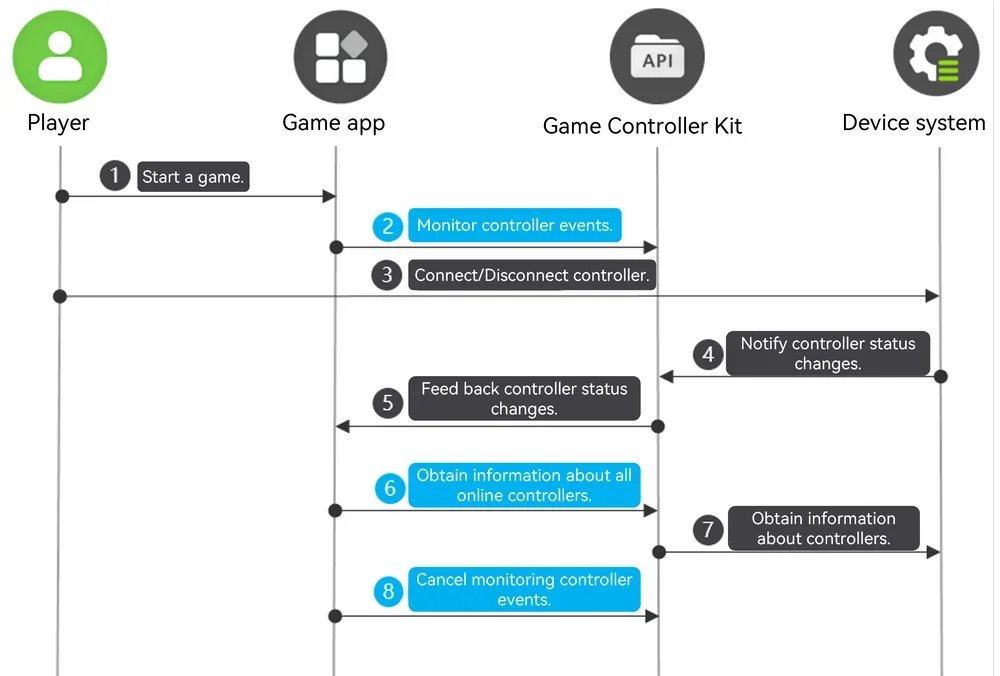
-
A player starts a game.
-
The game calls OH_GameDevice_RegisterDeviceMonitor to register a listener for controller status change events.
-
The player plugs in or unplugs a game controller.
-
The device system notifies Game Controller Kit of the controller status change.
-
Game Controller Kit feeds back the controller status change to the game.
-
The game calls OH_GameDevice_GetAllDeviceInfos to query information about all online game controllers from Game Controller Kit.
-
Game Controller Kit obtains information about all online game controllers from the device system.
-
Unregister via OH_GameDevice_UnregisterDeviceMonitor if monitoring is no longer needed.
Available APIs
For details about the APIs, please refer to the API reference.
| API | Description |
|---|---|
| GameController_ErrorCode OH_GameDevice_RegisterDeviceMonitor (GameDevice_DeviceMonitorCallback deviceMonitorCallback) | Registers the listening callback for controller status change events. |
| GameController_ErrorCode OH_GameDevice_UnregisterDeviceMonitor (void) | Unregisters the listening callback for controller status change events. |
| GameController_ErrorCode OH_GameDevice_GetAllDeviceInfos (GameDevice_AllDeviceInfos **allDeviceInfos) | Obtains information about all online controllers. |
How to Develop
Linking the Dynamic Library
target_link_libraries(entry PUBLIC libohgame_controller.z.so)
Importing the Module
#include <GameControllerKit/game_device.h>
Registering a Listener for Controller Status Changes
Call OH_GameDevice_RegisterDeviceMonitor to register a listener for controller status changes and receive callback notifications.
napi_value DeviceApi::RegisterDeviceMonitor(napi_env env, napi_callback_info info) {
    napi_value result;
    GameController_ErrorCode errorCode = OH_GameDevice_RegisterDeviceMonitor(DeviceApi::OnDeviceChanged);
    if (errorCode != GameController_ErrorCode::GAME_CONTROLLER_SUCCESS) {
        OH_LOG_ERROR(LOG_APP, "RegisterDeviceMonitor Failed, %{public}d", errorCode);
        napi_create_double(env, errorCode, &result);
        return result;
    }
    OH_LOG_INFO(LOG_APP, "RegisterDeviceMonitor Success");
    napi_create_double(env, 0, &result);
    return result;
}

void DeviceApi::OnDeviceChanged(const struct GameDevice_DeviceEvent *deviceEvent) {
    GameDevice_StatusChangedType type;
    OH_GameDevice_DeviceEvent_GetChangedType(deviceEvent, &type);
    GameDevice_DeviceInfo *deviceInfo;
    OH_GameDevice_DeviceEvent_GetDeviceInfo(deviceEvent, &deviceInfo);
    std::string temp = GetDeviceInfoStringForPrint(deviceInfo);
    Log::GetInstance()->PrintLog("OnDeviceChanged type[" + std::to_string(type) + "] DeviceInfo" + temp);
    OH_LOG_INFO(LOG_APP, "OnDeviceChanged type:%{public}d DeviceInfo:%{public}s", type, temp.c_str());
    OH_GameDevice_DestroyDeviceInfo(&deviceInfo);
}
Unregistering a Listener for Controller Status Changes
If subscription is no longer needed, call OH_GameDevice_UnregisterDeviceMonitor to unregister the listener for controller status change events.
napi_value DeviceApi::UnregisterDeviceMonitor(napi_env env, napi_callback_info info) {
    napi_value result;
    GameController_ErrorCode errorCode = OH_GameDevice_UnregisterDeviceMonitor();
    if (errorCode != GameController_ErrorCode::GAME_CONTROLLER_SUCCESS) {
        OH_LOG_ERROR(LOG_APP, "UnregisterDeviceMonitor Failed, %{public}d", errorCode);
        napi_create_double(env, errorCode, &result);
        return result;
    }
    OH_LOG_INFO(LOG_APP, "UnregisterDeviceMonitor Success");
    napi_create_double(env, 0, &result);
    return result;
}
Querying All Online Controllers
Call OH_GameDevice_GetAllDeviceInfos to query information about all online game controllers.
GameController_ErrorCode DeviceApi::DoQueryAllDeviceInfos() {
    GameDevice_AllDeviceInfos *gameDevice_AllDeviceInfos;
    //Query all online controllers.
    GameController_ErrorCode errorCode = OH_GameDevice_GetAllDeviceInfos(&gameDevice_AllDeviceInfos);
    if (errorCode != GameController_ErrorCode::GAME_CONTROLLER_SUCCESS) {
        OH_LOG_ERROR(LOG_APP, "GetAllDeviceInfos Failed, %{public}d", errorCode);
        return errorCode;
    }
    // Obtain controller information in sequence.
    int count;
    OH_GameDevice_AllDeviceInfos_GetCount(gameDevice_AllDeviceInfos, &count);
    Log::GetInstance()->PrintLog("GetAllDeviceInfos Success, the count is " + std::to_string(count));
    for (int idx = 0; idx < count; idx++) {
        GameDevice_DeviceInfo *deviceInfo;
        errorCode = OH_GameDevice_AllDeviceInfos_GetDeviceInfo(gameDevice_AllDeviceInfos, idx, &deviceInfo);
        if (errorCode != GameController_ErrorCode::GAME_CONTROLLER_SUCCESS) {
            OH_LOG_ERROR(LOG_APP, "OH_GameDevice_AllDeviceInfos_GetDeviceInfo Failed, %{public}d", errorCode);
            return errorCode;
        }
        std::string temp = GetDeviceInfoStringForPrint(deviceInfo);
        Log::GetInstance()->PrintLog("AllDeviceInfos[" + std::to_string(idx) + "]" + temp);
        OH_LOG_INFO(LOG_APP, "AllDeviceInfos[%{public}d] DeviceInfo: %{public}s", idx, temp.c_str());
        OH_GameDevice_DestroyDeviceInfo(&deviceInfo);
    }
    // Destroy the pointer to the controller query result.
    OH_GameDevice_DestroyAllDeviceInfos(&gameDevice_AllDeviceInfos);
    OH_LOG_INFO(LOG_APP, "GetAllDeviceInfos Success");
    return errorCode;
}

std::string DeviceApi::GetDeviceInfoStringForPrint(GameDevice_DeviceInfo *deviceInfo) {
    std::string log;
    char *deviceId = NULL;
    OH_GameDevice_DeviceInfo_GetDeviceId(deviceInfo, &deviceId);
    log.append("deviceId:").append(deviceId);
    free(deviceId);
    char *name = NULL;
    OH_GameDevice_DeviceInfo_GetName(deviceInfo, &name);
    log.append(",name:").append(name);
    free(name);
    int product;
    OH_GameDevice_DeviceInfo_GetProduct(deviceInfo, &product);
    log.append(",product:").append(std::to_string(product));
    int version;
    OH_GameDevice_DeviceInfo_GetVersion(deviceInfo, &version);
    log.append(",version:").append(std::to_string(version));
    char *physicalAddress = NULL;
    OH_GameDevice_DeviceInfo_GetPhysicalAddress(deviceInfo, &physicalAddress);
    log.append(",physicalAddress:").append(physicalAddress);
    free(physicalAddress);
    GameDevice_DeviceType type;
    OH_GameDevice_DeviceInfo_GetDeviceType(deviceInfo, &type);
    log.append(",type:").append(std::to_string(type));
    return log;
}