Text and Image Layout
Text and image layout combines images with text, allowing text to flow around images. This layout approach presents information intuitively, enhances visual impact, and creates diverse page display effects.
Using the Span and ImageSpan for Text and Image Layout
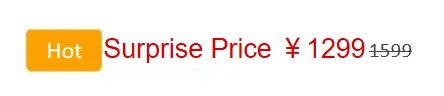
Configure the textVerticalAlign attribute of the Text component and set the verticalAlign attribute of the ImageSpan component to ImageSpanAlignment.FOLLOW_PARAGRAPH to display product price and discount.
Text() {
  // Replace $r('app.media.hot_sale') with the actual resource file.
  ImageSpan($r('app.media.hot_sale'))
    .width(50)
    .height(30)
    .borderRadius(5)
    .verticalAlign(ImageSpanAlignment.FOLLOW_PARAGRAPH)
  // Replace $r('app.string.surprise_price') with the actual resource file. In this example, the value in the resource file is "Surprise Price ¥1299."
  Span($r('app.string.surprise_price'))
    .fontSize(25)
    .fontColor(Color.Red)
  Span('1599')
    .decoration({
      type: TextDecorationType.LineThrough,
      color: Color.Grey,
      style: TextDecorationStyle.SOLID
    })
    .fontSize(16)
}.textVerticalAlign(TextVerticalAlign.CENTER)
Using Styled Strings for Text and Image Layout
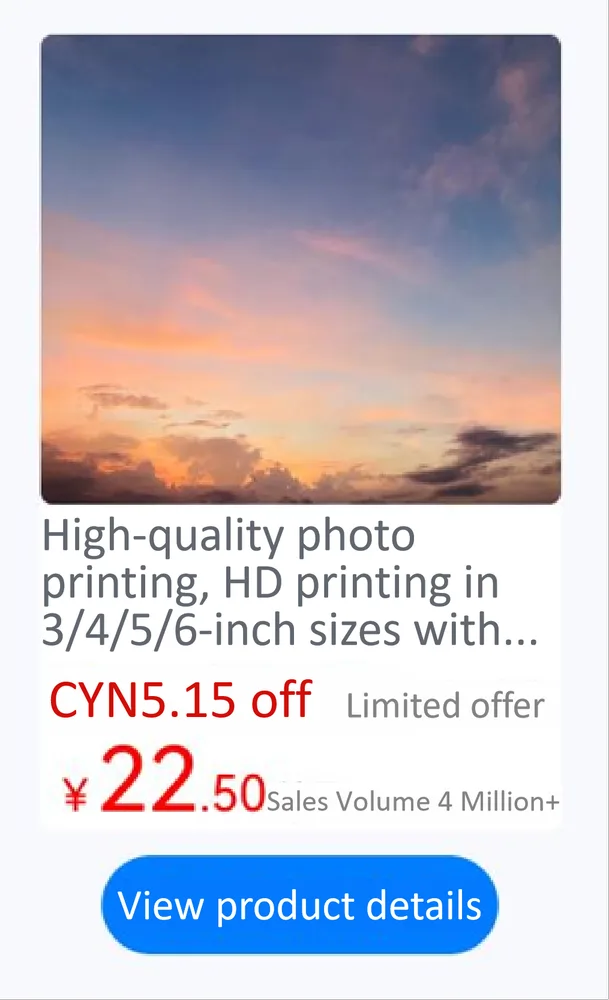
Embed images using ImageAttachment and apply text styles with TextStyle to display detailed product information.
// resourceGetString is a utility function for retrieving string resources from the application's resource directory.
import resourceGetString from '../../common/resource';
import { image } from '@kit.ImageKit';
import { LengthMetrics } from '@kit.ArkUI';
import { hilog } from '@kit.PerformanceAnalysisKit';

const TAG = '[Sample_Textcomponent]';
const DOMAIN = 0xF811;
const BUNDLE = 'Textcomponent_';

@Entry
@Component
struct styled_string_demo {
  @State message: string = 'Hello World';
  imagePixelMap: image.PixelMap|undefined = undefined;
  @State imagePixelMap3: image.PixelMap|undefined = undefined;
  mutableStr: MutableStyledString = new MutableStyledString('123');
  controller: TextController = new TextController();
  mutableStr2: MutableStyledString = new MutableStyledString('This is set decoration line style to the mutableStr2', [{
    start: 0,
    length: 15,
    styledKey: StyledStringKey.DECORATION,
    styledValue: new DecorationStyle({
      type: TextDecorationType.Overline,
      color: Color.Orange,
      style: TextDecorationStyle.DOUBLE
    })
  }]);

  async aboutToAppear() {
    hilog.info(DOMAIN, TAG, BUNDLE + 'aboutToAppear initial imagePixelMap');
    // Replace $r('app.media.sky') with the resource file you use.
    this.imagePixelMap = await this.getPixmapFromMedia($r('app.media.sky'));
  }

  private async getPixmapFromMedia(resource: Resource) {
    let unit8Array = await this.getUIContext().getHostContext()?.resourceManager?.getMediaContent(resource.id);
    let imageSource = image.createImageSource(unit8Array?.buffer?.slice(0, unit8Array?.buffer?.byteLength));
    let createPixelMap: image.PixelMap = await imageSource.createPixelMap({
      desiredPixelFormat: image.PixelMapFormat.RGBA_8888
    });
    await imageSource.release();
    return createPixelMap;
  }

  leadingMarginValue: ParagraphStyle = new ParagraphStyle({
    leadingMargin: LengthMetrics.vp(5),
    maxLines: 2,
    overflow: TextOverflow.Ellipsis,
    textVerticalAlign: TextVerticalAlign.BASELINE
  });
  // Line height style object
  lineHeightStyle1: LineHeightStyle = new LineHeightStyle(new LengthMetrics(24));
  // Bold style
  boldTextStyle: TextStyle = new TextStyle({ fontWeight: FontWeight.Bold });
  // Create a paragraph style object paragraphStyledString1.
  paragraphStyledString1: MutableStyledString =
    // Replace $r('app.string.print_photo') with the actual resource file. In this example, the value in the resource file is "\nHigh-quality photo printing, HD printing in 3/4/5/6-inch sizes with free shipping and lamination, quality guaranteed,".
    new MutableStyledString(resourceGetString.resourceToString($r('app.string.print_photo')), [
      {
        start: 0,
        length: 28,
        styledKey: StyledStringKey.PARAGRAPH_STYLE,
        styledValue: this.leadingMarginValue
      },
      {
        start: 11,
        length: 4,
        styledKey: StyledStringKey.LINE_HEIGHT,
        styledValue: this.lineHeightStyle1
      }
    ]);
  // Replace $r('app.string.limited_time_discount') with the actual resource file. In this example, the value in the resource file is "\nCYN5.15 off Limited offer."
  paragraphStyledString2: MutableStyledString = new MutableStyledString(resourceGetString.resourceToString($r('app.string.limited_time_discount')), [
    {
      start: 0,
      length: 5,
      styledKey: StyledStringKey.PARAGRAPH_STYLE,
      styledValue: this.leadingMarginValue
    },
    {
      start: 0,
      length: 4,
      styledKey: StyledStringKey.LINE_HEIGHT,
      styledValue: new LineHeightStyle(new LengthMetrics(40))
    },
    {
      start: 0,
      length: 9,
      styledKey: StyledStringKey.FONT,
      styledValue: this.boldTextStyle
    },
    {
      start: 1,
      length: 9,
      styledKey: StyledStringKey.FONT,
      styledValue: new TextStyle({ fontSize: LengthMetrics.vp(20), fontColor: Color.Red })
    },
    {
      start: 11,
      length: 4,
      styledKey: StyledStringKey.FONT,
      styledValue: new TextStyle({ fontColor: Color.Grey, fontSize: LengthMetrics.vp(14) })
    }
  ]);
  // Replace $r('app.string.sales_volume') with the actual resource file. In this example, the value in the resource file is "\n¥22.50, Sales Volume 4 Million+."
  paragraphStyledString3: MutableStyledString = new MutableStyledString(resourceGetString.resourceToString($r('app.string.sales_volume')), [
    {
      start: 0,
      length: 15,
      styledKey: StyledStringKey.PARAGRAPH_STYLE,
      styledValue: this.leadingMarginValue
    },
    {
      start: 0,
      length: 7,
      styledKey: StyledStringKey.LINE_HEIGHT,
      styledValue: new LineHeightStyle(new LengthMetrics(40))
    },
    {
      start: 0,
      length: 7,
      styledKey: StyledStringKey.FONT,
      styledValue: this.boldTextStyle
    },
    {
      start: 1,
      length: 1,
      styledKey: StyledStringKey.FONT,
      styledValue: new TextStyle({ fontSize: LengthMetrics.vp(18), fontColor: Color.Red })
    },
    {
      start: 2,
      length: 2,
      styledKey: StyledStringKey.FONT,
      styledValue: new TextStyle({ fontSize: LengthMetrics.vp(36), fontColor: Color.Red })
    },
    {
      start: 4,
      length: 3,
      styledKey: StyledStringKey.FONT,
      styledValue: new TextStyle({ fontSize: LengthMetrics.vp(20), fontColor: Color.Red })
    },
    {
      start: 7,
      length: 9,
      styledKey: StyledStringKey.FONT,
      styledValue: new TextStyle({ fontColor: Color.Grey, fontSize: LengthMetrics.vp(14) })
    }
  ]);

  build() {
    Row() {
      Column({ space: 10 }) {
        Text(undefined, { controller: this.controller })
          .copyOption(CopyOptions.InApp)
          .draggable(true)
          .backgroundColor('#FFFFFF')
          .borderRadius(5)
          .width(210)
        // Replace $r('app.string.textImageMixedLayout_content') with the actual resource file. In this example, the value in the resource file is "View product details."
        Button($r('app.string.textImageMixedLayout_content'))
          .onClick(() => {
            if (this.imagePixelMap !== undefined) {
              this.mutableStr = new MutableStyledString(new ImageAttachment({
                value: this.imagePixelMap,
                size: { width: 210, height: 190 },
                verticalAlign: ImageSpanAlignment.BASELINE,
                objectFit: ImageFit.Fill,
                layoutStyle: {
                  borderRadius: LengthMetrics.vp(5)
                }
              }));
              this.paragraphStyledString1.appendStyledString(this.paragraphStyledString2);
              this.paragraphStyledString1.appendStyledString(this.paragraphStyledString3);
              this.mutableStr.appendStyledString(this.paragraphStyledString1);
              this.controller.setStyledString(this.mutableStr);
            }
          })
      }
      .width('100%')
    }
    .height('100%')
    .backgroundColor('#F8F8FF')
  }
}
你可能感兴趣的鸿蒙文章
openharmony 鸿蒙 arkts-common-components-text-input
openharmony 鸿蒙 arkts-select-component-faq
openharmony 鸿蒙 js-framework-syntax-css
openharmony 鸿蒙 arkts-popup-and-menu-components-popup
openharmony 鸿蒙 arkts-navigation-animation-faq
openharmony 鸿蒙 arkts-rotation-transition-animation
openharmony 鸿蒙 ndk-inspector-component-observer
openharmony 鸿蒙 arkts-popup-and-menu-components-uicontext-popup